Revision C – January 2023
CDS2000 Page | 21
temperature if a temperature alarm exists. When a temperature alarm exists, ”@ Default
Temp” will be displayed above the delivery totalizer and printed on the delivery ticket if the
“PRINT” softkey is depressed.
Count During Temp Out of Range allows the programmer to select whether the system will
count when the product’s temperature is out of range. Selecting “NO” disables the totalizer
during a temperature alarm and prevents registration of vapor. No counting or totalization
will occur during a product temp sensor failure when “NO” is programmed for Count During
Temp Out of Range. Selecting “YES” permits the totalizer to count at the product’s default
warmest temperature if a temperature alarm exists. When a temperature alarm exists, ”@
Default Temp” will be displayed above the delivery totalizer and printed on the delivery ticket
if the “PRINT” softkey is depressed.
Count During High Flow allows the programmer to select whether the system will count
during a High Flow Rate alarm. Selecting “NO” disables the totalizer during a high flow rate
alarm. No counting or totalization will occur during a high flow rate alarm when “NO” is
programmed for Count During High Flow. Selecting “YES” permits the totalizer to count at if
a high flow rate alarm exists.
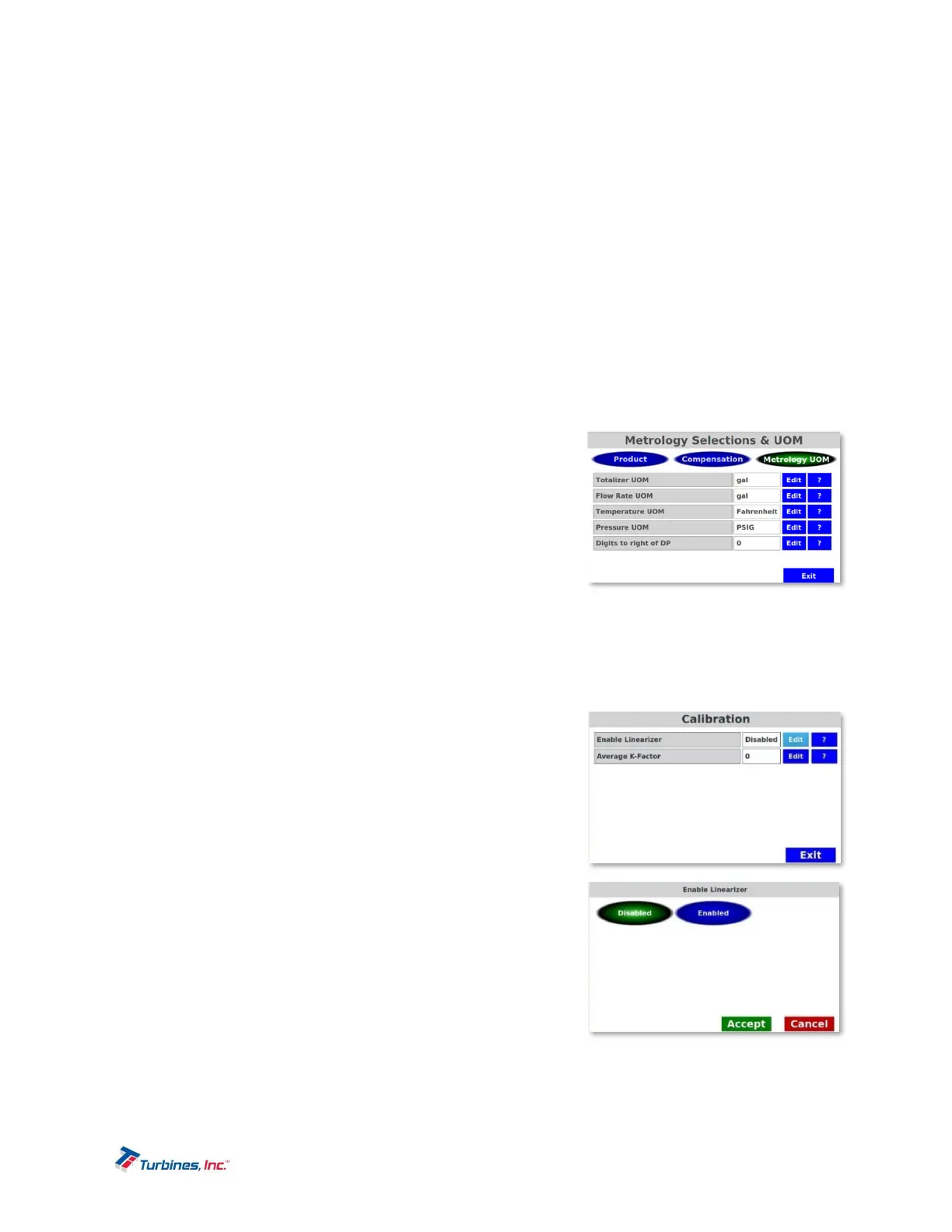
Configuration–MetrologyUOM
o Totalizer and Flow Rate UOM (Unit of Measure) allow
setting the Totalizer and Flow Rate units of measure.
The choices are as follows: gallons, liters, pounds,
pounds x 10, kilograms, standard cubic feet (ft
3
),
standard cubic feet x 100 (ft
3
x 100), cubic meter (m
3
)
gas and cubic meter (m
3
) liquid.
o Temperature UOM (Unit of Measure) sets the unit of
measure for temperature. Choices are: Kelvin, Celsius and Fahrenheit.
o Pressure UOM (Unit of Measure) sets the unit of measure for pressure. The choices are: PSIG,
kPa, and Atmospheres.
o Digits to right of DP (decimal point) allows the delivery total display to be adjusted between zero
to two digits to the right of the decimal point.
MetrologyConfiguration–Calibration
o Enable Linearizer: When the Linearizer is disabled, an
average K-Factor can be entered. When the Linearizer
is enabled, a linearizer table can be entered. Enable
Linearizer allows the CDS2000 to take advantage of
point-to-point programming using the turbine flowmeter
calibration sheet to enter frequency and corresponding
KF. Linearity is the deviation or spread of calibration
points from an acceptable straight line over the defined
flow range. The number of linearizer points can range
from 2 – 10. As a convenience, the CDS2000 offers a
“sort” feature which will place the data in the required
order once the frequency and corresponding KF have
been entered into the linearizer table.
Linearizer table editing:
Index is a reference number.


 To Next Page