Revision C – January 2023
CDS2000 Page | 27
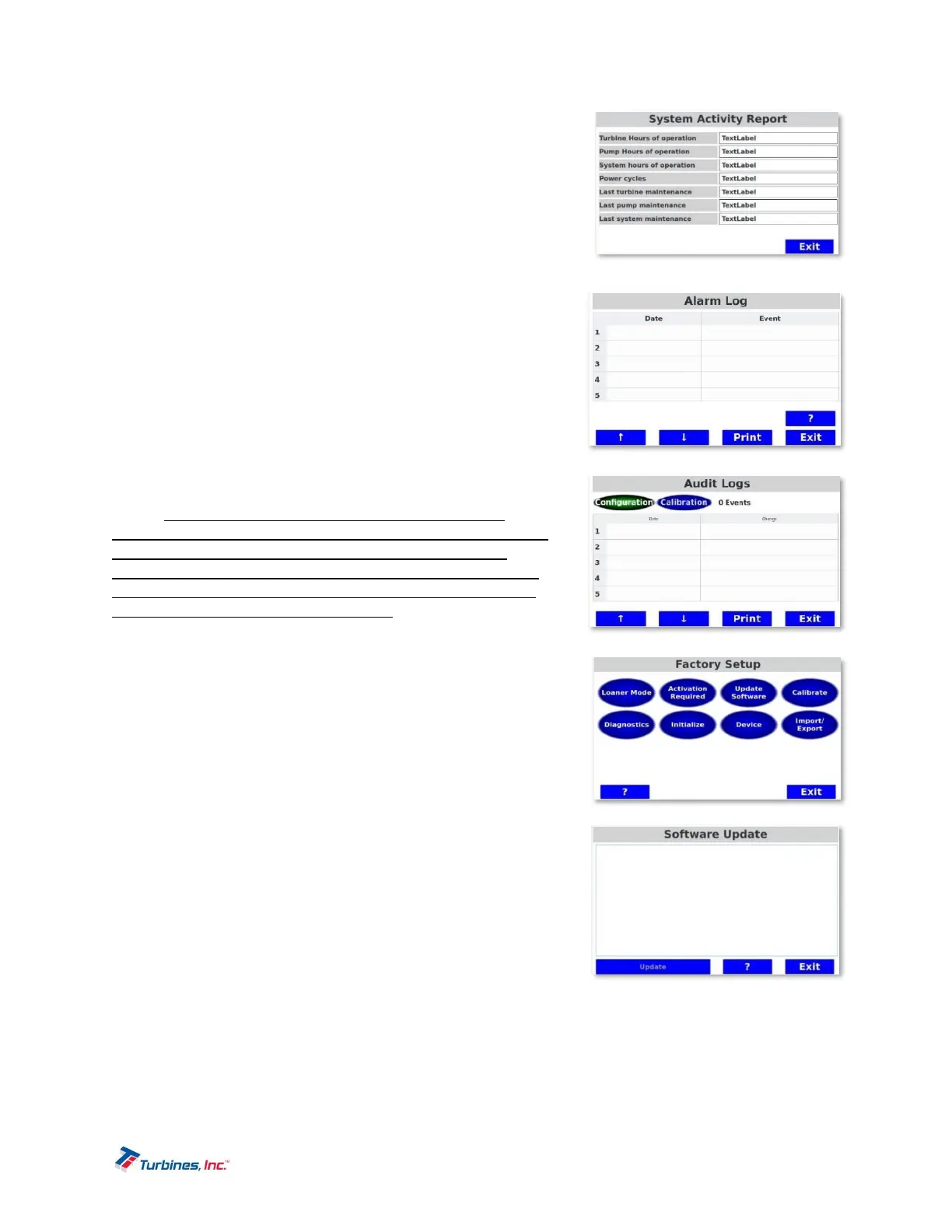
SystemActivity
These values are continuously updated by the system and can be
viewed in this menu.
Turbine Hours of Operation
Pump Hours of Operation
System Hours of Operation
Power cycles
Last turbine maintenance
Last system maintenance
ViewAlarmLog
Records all alarms that occur within the system. Alarms are
recorded in the order of occurrence beginning with the most
recent.
ViewAuditLogs
The Audit Trail contains a log of both the configuration and
calibration events that have occurred within the system. Events
are recorded in the order of occurrence beginning with the most
recent. Please note: the audit trail can be accessed while
powering on the unit via the following process: While the unit is
powering ON, a red screen is visible followed by a screen
displaying the Turbines Inc. logo. With either screen showing,
depress and hold BOTH middle softkeys for approximately 15
seconds until the Audit Trail logs appear.
Factory(PrivilegedPasswordProtected)
The Factory settings are only available to factory personnel. The
function capabilities under Factory Setup include the following:
LoanerMode
Configurations are used to determine if the CDS2000 is to disable
itself after a certain period of time. A password entered in the field
is available to extend the loaner period.
ActivationRequired
Activation required is used to determine if the CDS2000 must be
activated before being used. This allows stocking the unit by the
customer without consuming the warranty period. Activating the
unit automatically inserts the date of activation into the date of
manufacture for warranty purposes. If activation is required, an
activation code must be acquired from the factory.
SoftwareUpdates
Software updates require a Privileged Password and should be conducted by authorized personnel.
CalibrationSettings
Temperature Calibration leads the technician though a calibration procedure that sets the zero
and gain of the temp circuits. 100,1K and 10K RTD inputs, silicon diode and 4-20mA temperature
sensors inputs can be calibrated. Each sensor being used needs to be calibrated.


 To Next Page