Revision C – January 2023
CDS2000 Page | 9
Softkeys
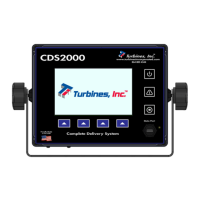
The CDS2000 unit utilizes both soft keys and touchscreen capabilities. Softkeys are intended for daily
use while the touchscreen is only necessary during configuration and setup. Please Note: touchscreen
capabilities are NOT enabled during the operating mode.
There are four softkeys located immediately below the display whose function is defined by an on-display
label directly above the key. During normal operation the DETAILS, RESET, PRINT, and ALARMS
softkeys are depicted on the Display.
DETAILS softkey: Pressing this softkey will display the Details Menu. Once the Details Menu is
displayed the softkey converts to a HOLD softkey and retains the Details Menu until this softkey
is released. Releasing the HOLD softkey permits the display to return to the Operating Menu.
While in the Details Menu, the following menu items can be viewed: DELIVERY, SENSORS,
PRODUCTS, PRINTER, and ABOUT. More information on Details can be found on page 12.
o Three additional softkeys are displayed while in the Details Menu: PREVIOUS, NEXT,
and EXIT softkeys.
o PREVIOUS softkey: Navigates to the previous menu item.
o NEXT softkey: Navigates to the next menu item.
o EXIT softkey: Exits user from either the menu item or menu altogether.
o RESET softkey: Depressing this softkey resets the Delivery Totalizer. This softkey is
disabled during delivery unless the unit is in the Prove Mode.
o PRINT softkey: Depressing this softkey downloads delivery data selected in CDS2000
Settings Menu page 24. Please Note: the PRINT softkey will not be displayed if the
printer output has been disabled in the CDS2000 Settings Menu page 24.
ALARMS softkey: Pressing this softkey displays a description of all Current and Delivery alarm
conditions. Once the Alarms Screen is displayed this softkey converts to an EXIT softkey. The
HOLD, RESET LPA and NEXT softkeys also appear. The Alarm Matrix can be found on page 41.
o HOLD retains the display until released plus 30 seconds.
o RESET LPA resets the Low-Pressure Alarm (Pump Discharge Pressure).
o NEXT toggles between the Current Alarms and Delivery Alarms menus.
o EXIT returns to the Operating screen immediately.
o Otherwise, the Alarm Display is retained for 30 seconds.


 To Next Page