EasyManua.ls Logo

United Communications ADB 3721 - Page 77

Default Icon
108 pages
Print Icon
To Next Page IconTo Next Page
To Previous Page IconTo Previous Page
Loading...
69
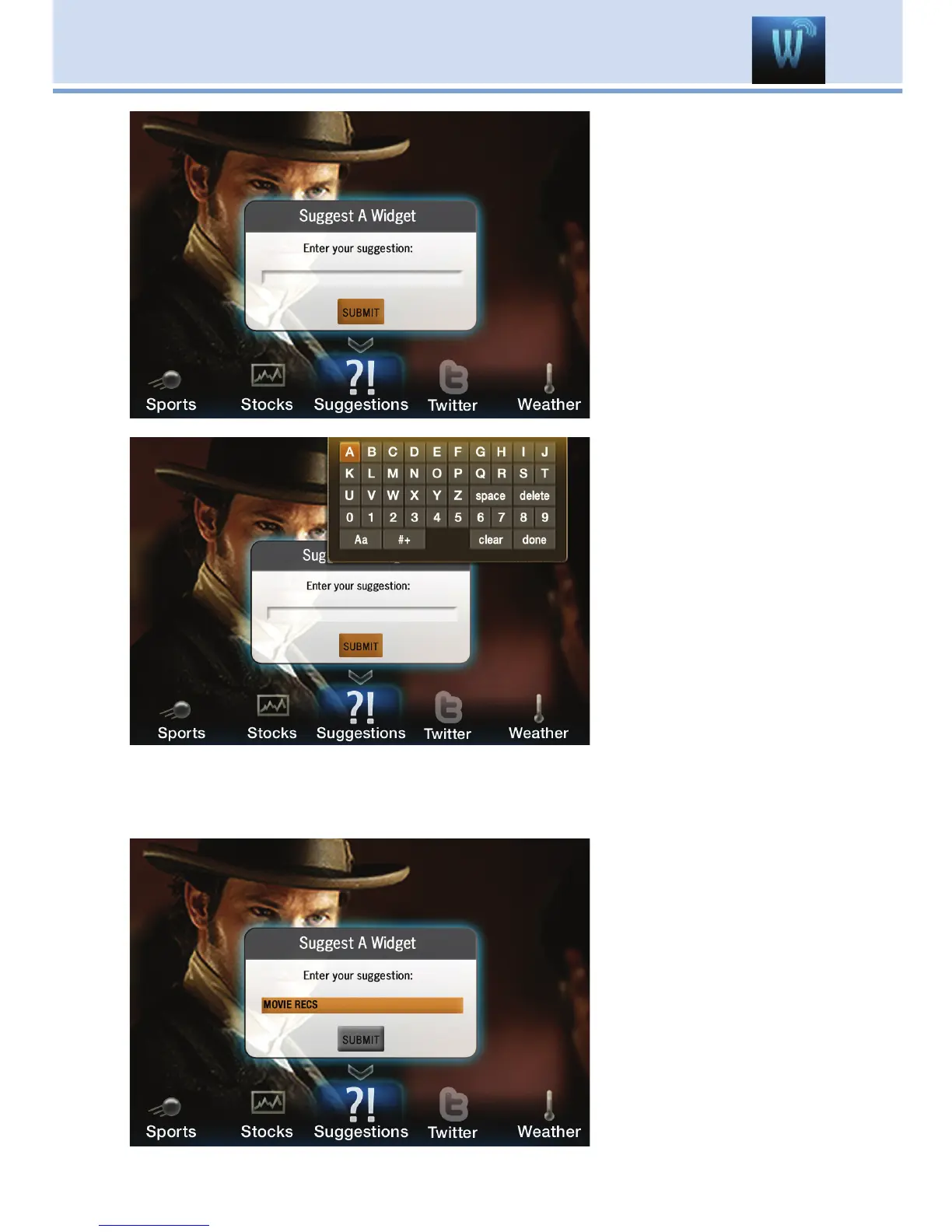
Step 1: Bring up the
Suggestions Widget
Select the
Suggestions Widget
from the Widget Menu
Bar. The Suggest A
Widget window will
appear, showing a
text box to enter your
suggestion.
Step 2: Bring up the
Keypad
Make sure the text
box is selected, and
press OK on your
remote to bring up the
Keypad.
Step 3: Using the
Keypad
Using the Arrow
Keys, select a letter
or number, then press
OK. Repeat this until you’re done entering the suggestion, then select
Done and press OK. The Keypad will disappear.
Step 4: Submit your
Suggestion
Once the suggestion
is successfully
entered, arrow down
to SUBMIT and press
OK on your remote.
17 Widgets (Coming Soon)

Table of Contents