B1 User Manual
© 2022 All rights reserved, Unitree Robotics 10
[1] Coprocessor Interface (Type-C)
[2] Main Processor Interface (Type-C)
The back cover of B1 also provides two interfaces, namely the main processor Type-C interface and the coprocessor
Type-C interface. The PC can be directly connected to the B1 core controller through these two interfaces. The main
processor interface and coprocessor interface are used for:
Firmware upgrade.
Real-time broadcast of hardware status information.
Troubleshooting. When B1 fails, users can check the status of B1 through these two interfaces and conduct
preliminary fault analysis and diagnosis.
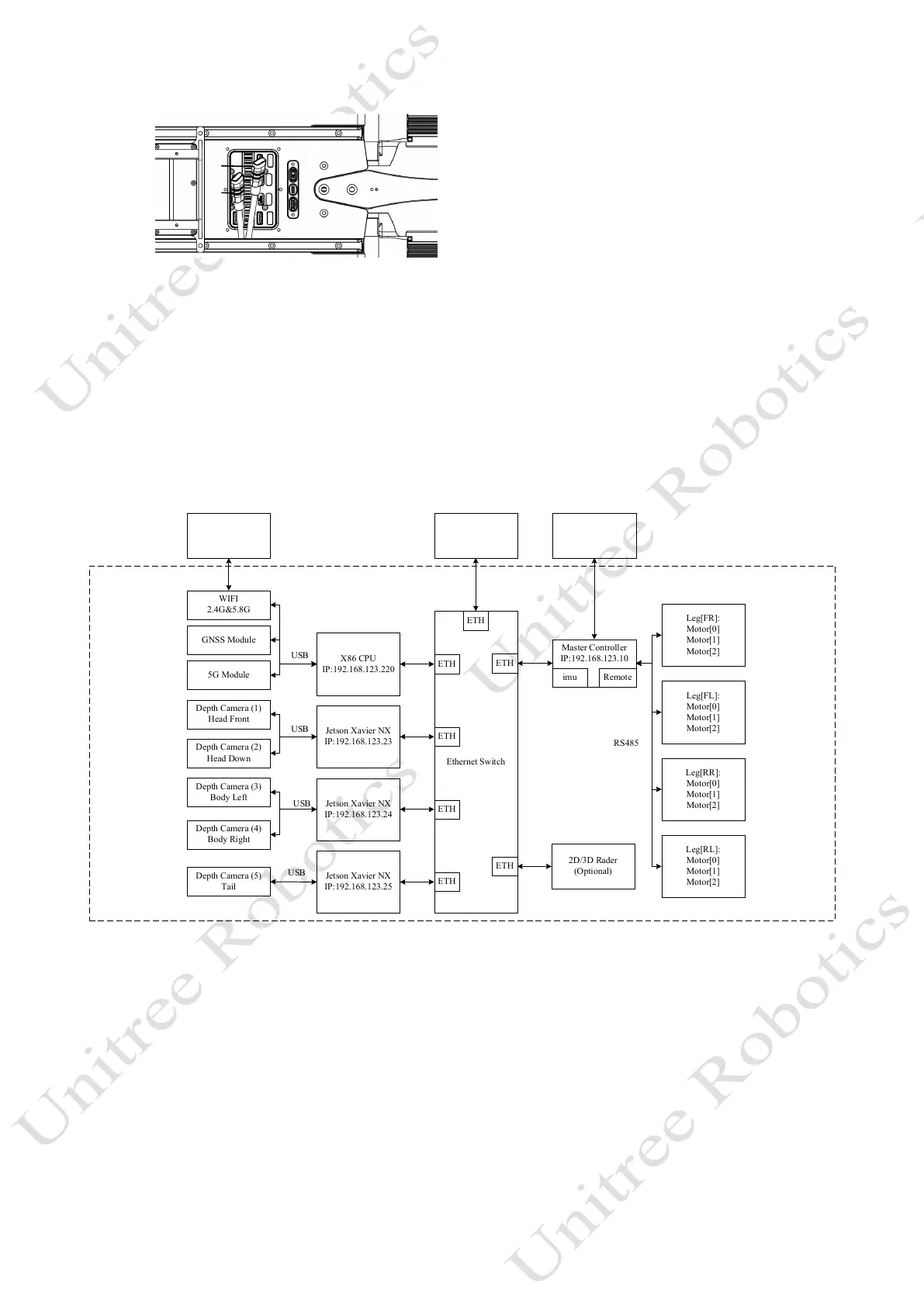
Network architecture: The operating system of Mini PC is a real-time Linux (Ubuntu) operating system. The
system architecture diagram is shown in the figure:
X86 CPU
IP:192.168.123.220
Ethernet Switch
Jetson Xavier NX
IP:192.168.123.23
Jetson Xavier NX
IP:192.168.123.24
Jetson Xavier NX
IP:192.168.123.25
Master Controller
IP:192.168.123.10
Leg[FR]:
Motor[0]
Motor[1]
Motor[2]
Leg[FL]:
Motor[0]
Motor[1]
Motor[2]
Leg[RR]:
Motor[0]
Motor[1]
Motor[2]
Leg[RL]:
Motor[0]
Motor[1]
Motor[2]
Depth Camera (1)
Head Front
Depth Camera (2)
Head Down
Depth Camera (3)
Body Left
Depth Camera (4)
Body Right
Depth Camera (5)
Tail
imu Remote
WIFI
2.4G&5.8G
GNSS Module
5G Module
ETH
ETH
ETH
ETH
ETH
2D/3D Rader
(Optional)
ETH
USB
USB
USB
USB
RS485
Users' PC
IP:192.168.123.XX
X
ETH
Users' phone APP
IP:192.168.12.XXX
Remote
1) The user's PC can directly connect the robot's built-in movement controller, perception controller and underlying
controller with Ethernet.
2) The users’ PC can communicate with the underlying controller of the robot and the robot self-loading controller
freely, which facilitate real-time transmission of visual perception data to each other.
3) The self-loading sensors of the robot are fully open and available for secondary development.
4) Develop low-level control: All motors and sensors of the robot can be read and controlled in real time, which is
convenient for directly using open-source robot algorithms
5) Develop high-level control: Users can directly send high-level movement commands to the robots, such as front,
back, left and right.



 To Next Page