36 l Smatrix Pulse | Installation and Operation Manual
Alarms
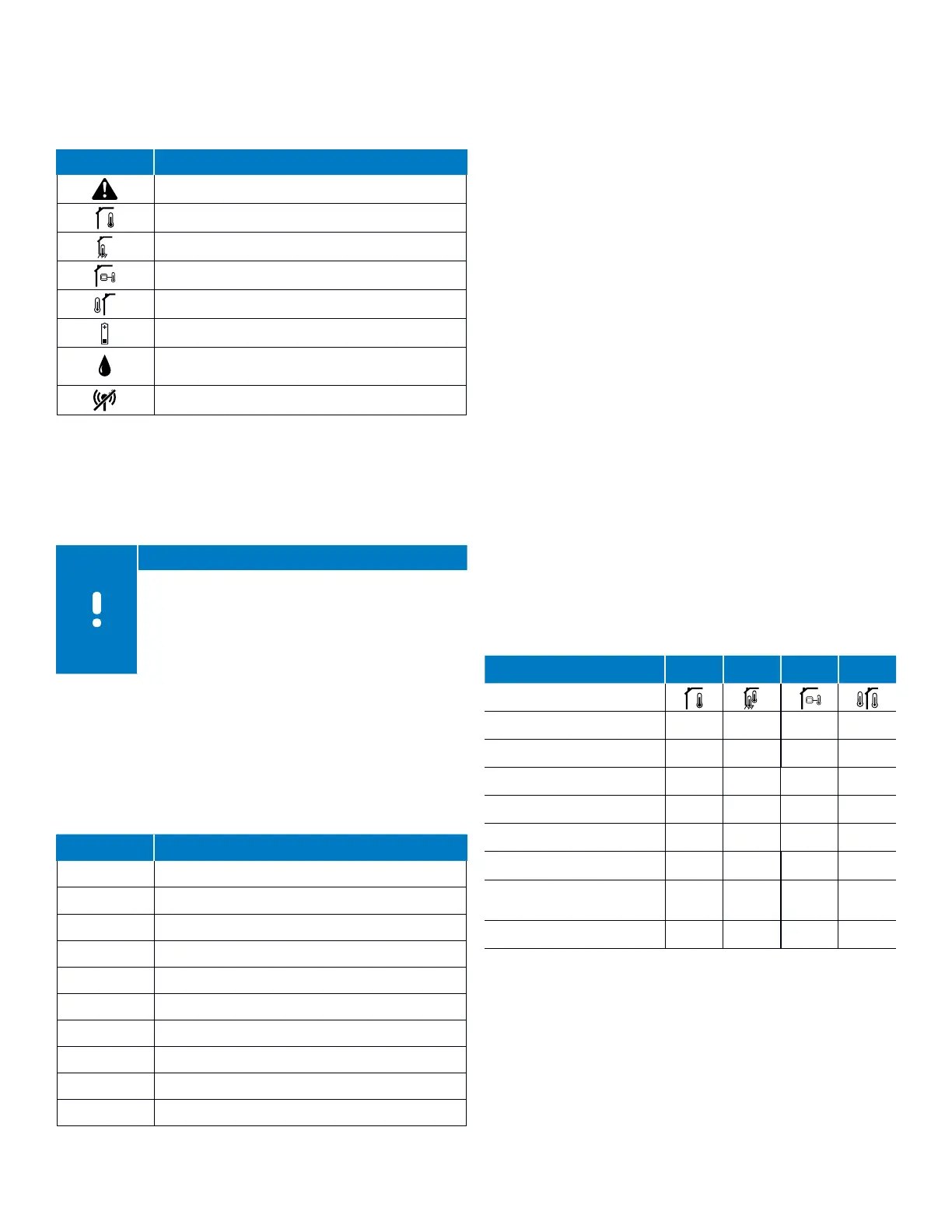
This figure shows all the possible symbols and characters
that can be shown for an alarm on the display along with
the cause/meaning.
Icons Description
Alarm mode (shown with the following:)
Faulty indoor sensor
Faulty floor sensor
Faulty remote sensor
Faulty outdoor sensor
Low battery indicator
Relative humidity high limit (only shown in
cooling mode and if RH control is setup)
Communication failure
Table 9-7: Alarms
Menus for Digital Thermostat (T-169)
This section shows all the setting options for operating the
Digital Thermostat (T-169).
Note
If no button on the thermostat is pressed for about
eight (8) seconds, while in a sub menu, the current
values will be saved, and the software exits to the
Settings menu. About 60 seconds later, it exits to
run mode where the current room temperature is
displayed.
To enter the Settings menu, use the following steps:
• Press and hold the OK button for about three (3) seconds.
• The settings icon and menu number are displayed in the
top-right corner of the display.
• Use the < or > button to change the numbers to locate a
sub menu (see list below).
Menu # Description
02 Heating/cooling changeover
03 ECO mode setback value
04 Control mode
05 High temperature floor limit
06 Low temperature floor limit
07 Cooling allowed
08 Display units
09 Relay Module integration
11 Room temperature calibration
12 Invert screen
Table 9-8: Digital Thermostat (T-169) menu descriptions
Menu 02: Heating/Cooling Changeover
This menu is not visible if the thermostat is registered to a
Controller. Heating/cooling changeover will be controlled
by a physical heating/cooling switch or in the Smatrix
Pulse App (requires Communication Module).
Menu 03: ECO Mode Setback Value
Default value: 39°F (4°C)
Setting range: 32 – 52°F (0 – 11°C), 1°F (0.5°C) increments
This is the setback temperature for whenever the system
is in ECO. The setting adjusts the current setpoint with the
set value. In Heating mode, the setpoint is reduced, and in
cooling mode it is increased. If the setback temperature
is set to 0, the thermostat will remain unaffected if a
program sets the system in ECO mode.
This menu is not visible if a Communication Module is
connected to the system. The setting is then available in
the Smatrix Pulse App.
Menu 04: Control Mode
This menu set the way an external sensor (if attached)
is used (remote, outdoor, etc.). If an external sensor
is connected to the thermostat, a control mode must
be chosen to accommodate the extra functionality of
the sensor. Current control mode options are Room
Temperature RT (default), Room and Floor Temperature
RFT, Remote Sensor RS or Room and Outdoor Sensor RO.
Refer to the table below for available information based
on the control mode selected.
RT RFT RS RO
Room temperature
P P P P
Alarm (if active)
P P P P
Floor temperature
P
Remote temperature
P
Outdoor temperature
P
ECO/Comfort mode status
P P P P
Active demand
(heating or cooling)
P P P P
Relative humidity
P P P P
Table 9-9: Control Mode menu



 To Next Page