2GM
1-6-8
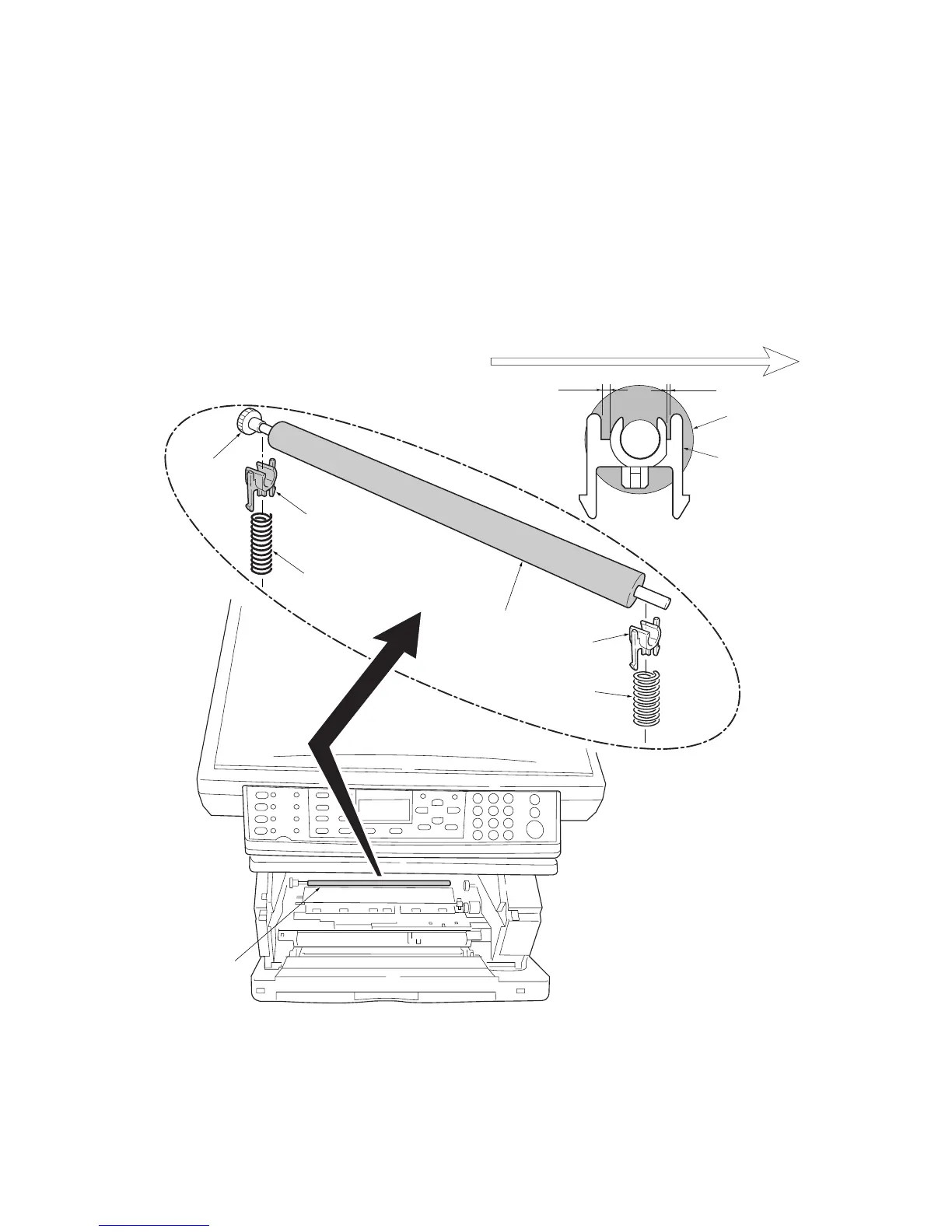
1-6-6 Removing the transfer roller
CAUTION
Do not touch the transfer roller (sponge) surface. Oil and dust (particles of paper, etc.) on the transfer roller can
significantly deteriorate the print quality (white spots, etc.).
When refitting the bushes and springs, make sure to refit the black colored bush and spring on the left side. Also, observe
the correct direction to which the bush is fit in reference to the paper passing direction.
1. Remove the process unit (see page 1-6-2).
2. Remove the transfer roller from the both bushes.
Figure 1-6-10 Removing the transfer roller
Long
Short
Paper passing direction
Transfer roller
Bush
Bush
(Black colored)
Spring
(Black colored)
Bush
Gear
Spring
Transfer roller
Transfer roller



 To Next Page