49
GAS SUPPLY ADJUSTMENTS
(COMMISSIONING PART II)
Adjusting to the maxi-
mum heat load (nominal
load)
● TURBOmax only: Set the DHW tem-
perature control to maximum and
fire the boiler at full rate by fully
opening a hot water tap.
● THERMOcompact only:
- Turn off the boiler at the main
ON/OFF control.
- Press and hold the „+” button,
while pressing the button turn the
main ON/OFF control to the „1”
ON position.
- Continue holding „+” button until
display alternates between „P1”
and „P2”. Release „+” button.
- Press „+” button until „P1” (full
gas rate) is shown in display.
- Press „i” button to operate boiler
at full gas rate.
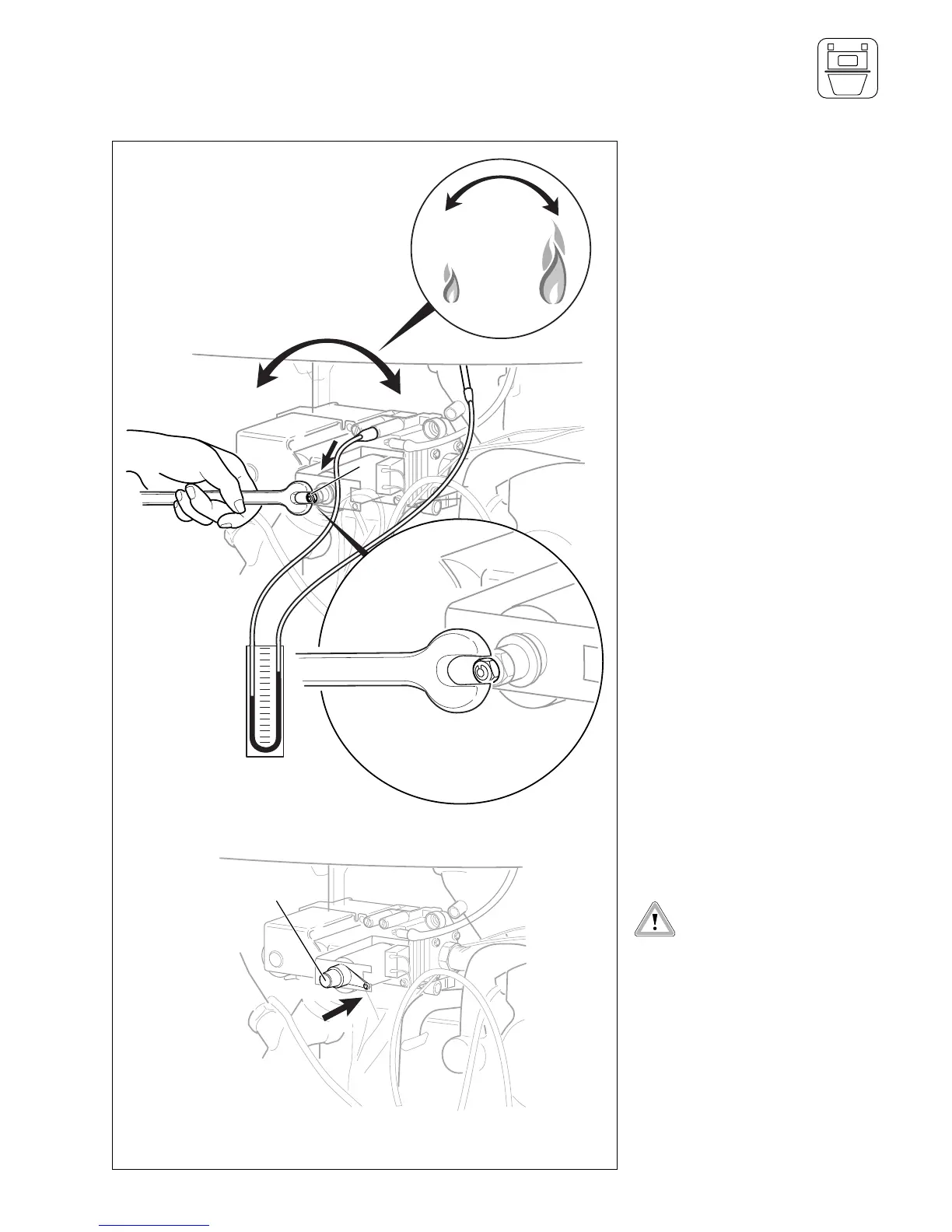
● Using a 7 mm spanner turn the
inner hexagonal nut (1) to adjust
the burner operating pressure.
- Turn the nut (1) clockwise to
increase the nominal load
- Turn the nut (1) anticlockwise to
decrease the nominal load
● Adjust the burner pressure until it
matsches the maximum output as
detailed on page 22.
● Now turn the 7 mm hexagonal nut
(1) anticlockwise until the burner
pressure drops by approx. 0.3 -
0.4 mbar.
Nominal load is now correctly adju-
sted.
● Refit the plastic cap (2).
The plastic cap (2) must be fit-
ted for the gas valve assembly
to function correctly.
● TURBOmax only: Turn off the hot
water tap.
● THERMOcompact only: To cancel
selected „P1“ or „P2“ mode press
the „i“ and „+“ buttons sumulta-
neously.


 To Next Page
 Loading...