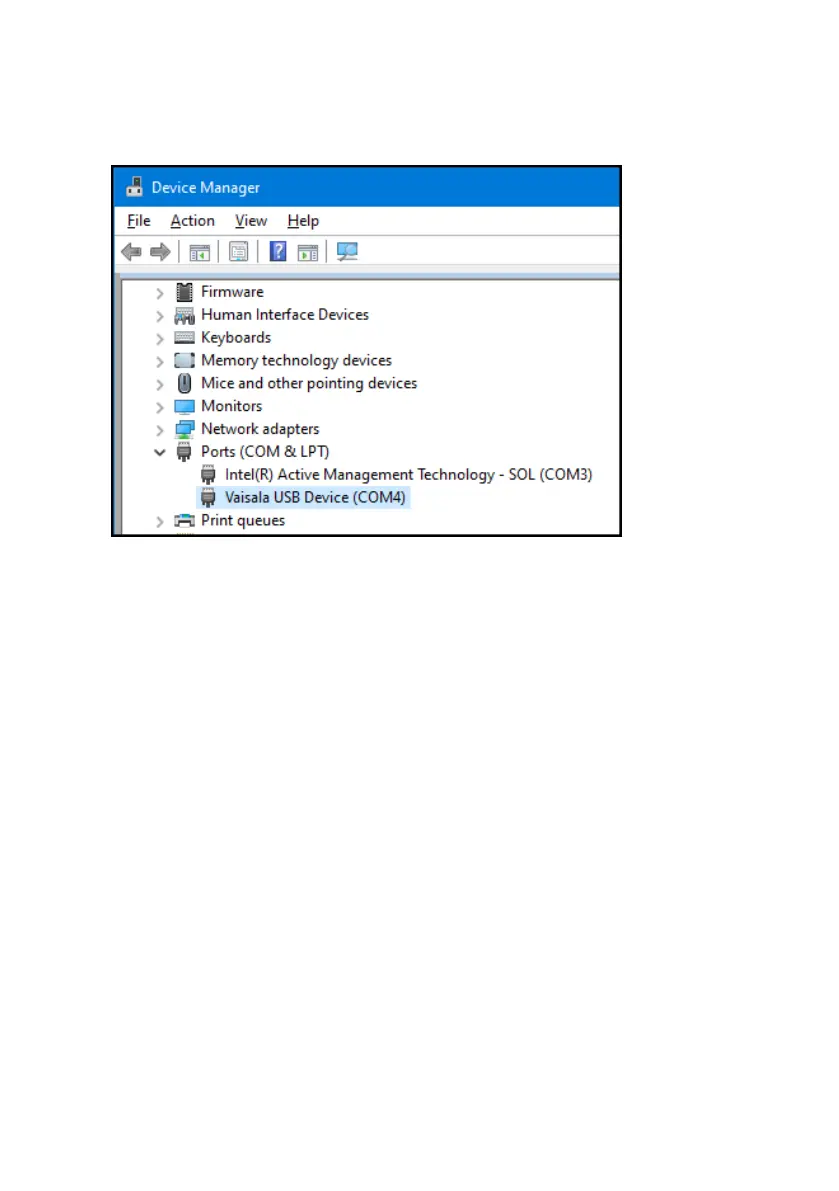
2. Open Device Manager from the Windowsâ Start menu. Use search to find it if necessary
(search for "device").
3. Locate the Vaisala USB device in the Device Manager list of devices :
• If the device is listed as Vaisala USB Device with a COM port number in brackets, the
driver is ready for use.
• If the device is listed as Vaisala USB Instrument Cable without a COM port number
listed, you must install the driver manually.
4. To install the driver manually:
a. Disconnect the USB cable from the computer.
b. Download the Vaisala USB device driver at http://www.vaisala.com/software (look for
USB Instrument Driver Setup for cables).
c. Extract the driver zip file and run the USB driver installation program Vaisala USB
Device Driver Setup.exe. Accept the installation defaults.
d. Go back to step 1 and verify that the driver installation works as expected.
Indigo201 User Guide M212842EN-B
22









 To Next Page