EasyManua.ls Logo

Vaisala Indigo 520 - User Manual

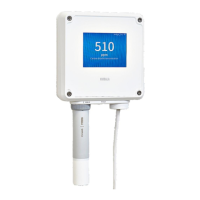
Vaisala Indigo 520
82 pages
Print Icon
To Next Page IconTo Next Page
Loading...
M212287EN-A
User Guide
Indigo 500 Series Transmitters
Indigo 520

Table of Contents

Other manuals for Vaisala Indigo 520

Questions and Answers

  • M
    Micheal RussellAug 14, 2025
    Why is login failing on Vaisala Indigo 520 Transmitter web interface?
    • C
      Catherine MunozAug 15, 2025
      If you are failing to log in to the web interface of your Vaisala Transmitter, it might be due to the transmitter's time not being set correctly. Some browsers may not accept valid browser sessions if the transmitter's time differs significantly from the browser's time. To resolve this, set the transmitter's time on the touchscreen via Menu > Transmitter > Date and time. Alternatively, you can restore the factory default settings and reconnect to the web interface. Upon reconnection, you will be prompted to provide the activation code and create new users and passwords.
  • M
    Michael BrandtAug 21, 2025
    What to do after a power outage on Vaisala Transmitter?
    • R
      Ryan HaynesAug 21, 2025
      If your Vaisala Transmitter experienced a power outage, simply wait for the transmitter to power up again, which should take a few minutes. Once it powers up, it will resume displaying measurements as before. To regain access to the web interface: first, check the current IP address of the transmitter on the touchscreen at the bottom left corner of the configuration menu. Then, reconnect to the web interface using this IP address.
  • T
    Timothy MezaAug 27, 2025
    How to sync Vaisala Transmitter touchscreen and web interface?
    • M
      Maria MillerAug 27, 2025
      If the web interface of your Vaisala Transmitter isn't displaying the same content as the touchscreen, and you've recently made changes on the touchscreen, the web page might need a refresh. Simply refresh the web page to see the updated content.
  • D
    Daniel HollandSep 2, 2025
    Why Vaisala Transmitter showing no measurement data from probe?
    • J
      Jennifer HaleSep 2, 2025
      If you are not receiving measurement data from the connected probe on your Vaisala Transmitter: * Check the status indicator on the connected probe. If it's off, ensure the probe is securely connected to the probe cable connector. * If the indicator is red, the probe sensor might be faulty and need replacement. * If the indicator is blinking green, try restarting the transmitter.
  • F
    Frank WilsonNov 8, 2025
    How to troubleshoot Vaisala Indigo 520 Transmitter web interface login issues?
    • J
      Jennifer FerrellNov 8, 2025
      If you cannot access the web interface login page for your Vaisala Transmitter, here are a few things to check: * Ensure that the 'Network off/on' setting on the touchscreen is enabled. You can find this setting under Menu > Transmitter > Network. * If your transmitter's IP address is assigned via DHCP, the IP address may have changed, possibly due to a restart. Check the current IP address of the transmitter on the touchscreen, located at the bottom left corner of the configuration menu, and reconnect using the current IP address. * If you are using a static IP address, verify the static network settings on the touchscreen under Menu > Transmitter > Network. * Also, make sure the Ethernet cable is properly connected to the transmitter. Open the transmitter cover and check if the ...

Summary

Product Overview

Indigo 520 Basic Features and Options

Highlights the key features, functionalities, and available options for the Indigo 520.

Analog Outputs

Explains the 4 analog output channels, their modes, and scaling.

Safety

Covers essential safety warnings and precautions for installation and operation.

ESD Protection

Explains measures to prevent damage from electrostatic discharge.

Installation

Mounting

Details the various mounting options and considerations for the transmitter.

Wiring

General wiring guidelines and terminal connections for power and signals.

Power Supply Terminals and Lead-through - PELV Option

Wiring details for transmitters powered by PELV (Protective Extra Low Voltage).

Power Supply Terminals and Lead-through - AC (Mains) Power Option

Wiring details for transmitters powered by AC mains voltage.

Attaching Probes

Procedure for connecting measurement probes to the transmitter.

User Interfaces

Start-up

Starting up Transmitter using Touchscreen Display

Steps to power on the transmitter and begin using the touchscreen interface.

Configuring Network Connection on Touchscreen

Guide to setting up network parameters via the touchscreen interface.

Starting up Transmitter using Web Interface

Steps to power on the transmitter and access its web interface.

Configuring Network Connection in Web Interface

Guide to setting up network parameters via the web interface.

Configuring Transmitter using Touchscreen Display

Configuring Analog Outputs on Touchscreen

Setting up the transmitter's analog output channels using the touchscreen.

Configuring Relays on Touchscreen

Setting up the transmitter's relay outputs using the touchscreen interface.

Configuring Transmitter using Web Interface

Configuring Analog Outputs in Web Interface

Setting up the transmitter's analog output channels using the web interface.

Configuring Relays in Web Interface

Setting up the transmitter's relay outputs using the web interface.

Modbus

Maintenance and Troubleshooting

Replacing Probes

Procedure for safely removing and installing new measurement probes.

Restoring Factory Default Settings

Procedure to reset all device settings back to their factory defaults.

Troubleshooting

Common problems encountered and their solutions for the transmitter.

Maintenance and Calibration

Technical Support

Vaisala Indigo 520 Specifications

General IconGeneral
DisplayLCD
Humidity Range0 to 100 %RH
Protection ClassIP65
Measurement ParametersTemperature, Humidity
ConnectivityRS485
Storage Temperature-40 to +80°C
Operating Humidity0 to 100 %RH
OutputRS485 (Modbus RTU)
Housing materialPlastic
CompatibilityCompatible with Vaisala Indigo series probes

Related product manuals