EasyManua.ls Logo

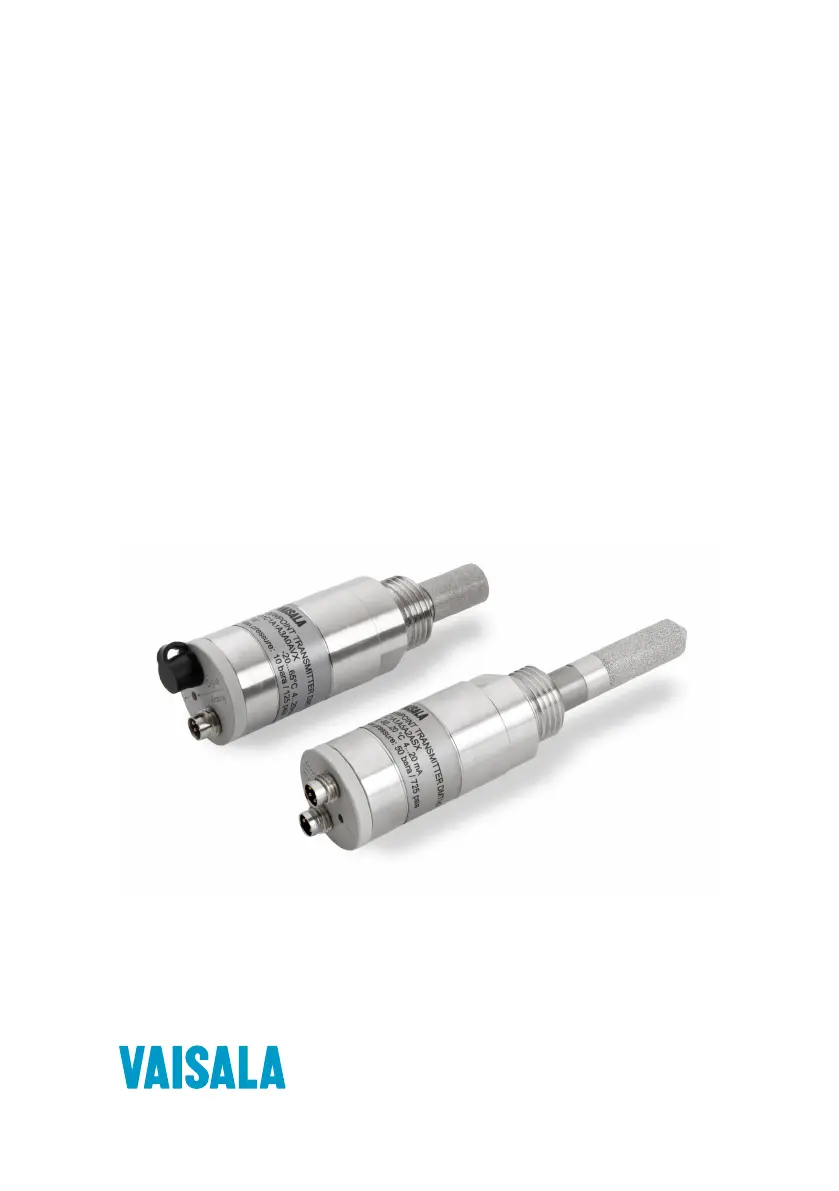
Vaisala DRYCAP DMT143 - User Manual

Vaisala DRYCAP DMT143
90 pages
Print Icon
To Next Page IconTo Next Page
Loading...
M211435EN-J
User Guide
Vaisala DRYCAP
â
Dew Point Transmitter
DMT143

Table of Contents

Questions and Answers

  • P
    Patrick BruceAug 13, 2025
    What to do if Vaisala DRYCAP DMT143 Transmitter outputs stars or has unavailable value?
    • D
      Debbie JohnsonAug 13, 2025
      If your Vaisala Transmitter outputs stars instead of measurement data on the serial line, shows an unavailable value in Modbus mode, or the analog signal is at an error level, it could be due to a damaged sensor, incorrect supply voltage, or an unsuitable measurement environment. First, try power cycling or resetting the transmitter. If the problem persists, check for active errors using Vaisala Insight PC software or the ERRS command. Also, verify the power supply.
  • T
    Tyler PotterAug 17, 2025
    Why is the dew point alarm LED red on my Vaisala DRYCAP DMT143?
    • K
      Kelsey NealAug 17, 2025
      If the dew point alarm LED is red on your Vaisala Transmitter even though the measured dew point is not high, the alarm limit may be set incorrectly for your application. Use Vaisala Insight PC software, the serial line, or an MI70 indicator to check and correct the alarm limit settings.
  • D
    Denise RobersonAug 20, 2025
    What to do if my Vaisala DRYCAP DMT143 Transmitter analog output is stuck?
    • L
      Lydia HartAug 21, 2025
      If the analog output of your Vaisala Transmitter seems stuck and the measurement is not changing, it may be due to sensor diagnostics in progress (autocal or purge) or an active malfunction error. Check the active errors using Vaisala Insight PC software or the ERRS command. Wait for the diagnostics to complete.
  • J
    James MillerAug 25, 2025
    How to troubleshoot temperature measurement error in Vaisala DRYCAP DMT143 Transmitter?
    • D
      Dr. Anthony DonaldsonAug 26, 2025
      A temperature measurement error in your Vaisala Transmitter may indicate that the temperature sensor is short-circuited, damaged, or missing. Check that the legs of the temperature sensor are not short-circuited.
  • R
    Robert MartinezAug 28, 2025
    How to troubleshoot humidity measurement error in Vaisala DRYCAP DMT143 Transmitter?
    • S
      Sheila BellAug 28, 2025
      A humidity measurement error in your Vaisala Transmitter may be because the humidity sensor is wet, damaged, or missing. Wait for the humidity sensor to dry, or remove the filter and gently dry the sensor and the filter with clean instrument air.
  • S
    stephen08Sep 1, 2025
    What to do if I cannot access my Vaisala Transmitter on the RS-485 line?
    • J
      Jeremy BerrySep 1, 2025
      If you are unable to access your Vaisala Transmitter on the RS-485 line, possible causes include incorrect wiring, unknown serial settings, or the transmitter being in POLL or MODBUS mode with an unknown address. Check the wiring and communication settings using Vaisala Insight PC software.
  • J
    Jennifer AcevedoSep 5, 2025
    Why is my Vaisala DRYCAP DMT143 Transmitter showing a supply voltage out of range error?
    • M
      madisonclarkSep 5, 2025
      If your Vaisala Transmitter indicates a supply voltage out of range error, it means the supply voltage is too low. Check and correct the power supply and wiring.
  • S
    Sara EspinozaSep 8, 2025
    What does firmware checksum mismatch mean on my Vaisala Transmitter?
    • E
      Emily PinedaSep 8, 2025
      A firmware checksum mismatch on your Vaisala Transmitter indicates an internal transmitter failure. Power-cycle the device and, if necessary, restore the factory settings.

Summary

About This Document

Version Information

Details document revisions, dates, and descriptions of changes.

Related Manuals

Lists other relevant Vaisala manuals for complementary information.

Documentation Conventions

Explains warning, caution, and note symbols used throughout the manual.

Trademarks

Lists registered trademarks of Vaisala and other companies.

Product Overview

Introduction to DMT143

Describes the DMT143 as a small, lightweight dew point transmitter for OEM applications.

Basic Features and Options

Lists key features including measurement range, accuracy, output options, and sensor technology.

Connectivity to Vaisala Insight Software

Explains connecting the transmitter to Vaisala Insight PC software for configuration.

Transmitter Parts

Details the physical components of the DMT143 and DMT143L transmitters.

Loop-powered Display

Describes connecting an external LED display powered by the 4...20 mA signal.

Connection Cables

Lists available Vaisala shielded and heavy-duty connection cables.

Sampling Accessories

Mentions compatibility with various sampling accessories for process connection.

Safety Precautions

Provides general safety warnings and specific ESD protection guidelines.

Regulatory Compliances

Lists EU directives and standards the product conforms to.

Functional Description

DRYCAP Technology

Explains the DRYCAP sensor technology for accurate, stable dew point measurement.

Autocalibration

Describes the automatic procedure that minimizes dry-end drift.

Sensor Purge

Explains the automatic procedure to minimize wet-end drift.

Sensor Warming

Details the sensor warming feature for high humidity and freezing conditions.

Startup Sequence

Illustrates the sequence of operations when the transmitter is powered on.

Alarm LED

Explains the function and states of the transmitter's alarm LED indicator.

Installation

Configuring Transmitter Before Installation

Guidance on configuring settings using Vaisala Insight software or serial interface.

Selecting the Location

Advice on choosing an appropriate installation point for accurate measurement.

Installing the Transmitter

Step-by-step instructions for the physical installation of the transmitter.

Wiring and Power Supply

Details connector pinouts and power supply requirements for operation.

Sampling Accessories and Procedures

Describes sampling cells (DMT242SC, DSC74) and installation flanges (DM240FA).

Operation

Transmitter Start-up

Explains the startup sequence and output behavior based on serial mode.

Vaisala Insight Software

Instructions for using Insight software for configuration and monitoring.

Operation with DM70 Handheld Meter

Guidance on connecting and using the transmitter with the DM70 handheld meter.

Modbus Communication

Default Modbus Serial Communication Settings

Lists the default serial communication settings for Modbus RTU over RS-485.

Serial Communication

Connecting to the Serial Interface

How to connect the transmitter to a PC using the RS-485 serial interface.

Terminal Application Settings

Configuring terminal software (e.g., PuTTY) for serial communication.

Accessing Serial Interface with Modbus Output

Connecting to devices with Modbus output and retrieving communication settings.

Serial Commands

Lists and describes available commands for serial communication.

Device Information Commands

Commands to retrieve device details like firmware, errors, and serial number.

Configuring Analog Output

Commands for setting analog output parameters, scaling, and error notification.

Serial Line Output Commands

Commands to control measurement output, interval, and single readings.

Configuring Measurement Parameters

Commands for setting output format, filtering, and pressure compensation.

Configuring Serial Line Operation

Commands to set operating mode, serial settings, and transmitter address.

Other Serial Commands

Commands for alarm LED configuration, resetting, and restoring factory settings.

Maintenance

Periodic Maintenance

Covers cleaning, calibration interval, and filter replacement procedures.

Field Check Using DM70 Meter

Procedure for field checking measurement accuracy with the DM70 handheld meter.

Repair Maintenance

Information on handling product issues and contacting service centers.

Troubleshooting

Solving Typical Problems

Addresses common issues like incorrect output or communication errors.

Error Messages in Insight Software

Lists and explains error messages displayed in Vaisala Insight software.

Error Codes in M170 Handheld Meter

Lists error codes displayed on the M170 handheld meter.

Unknown Serial Settings

Guidance on checking transmitter serial settings when unknown.

Technical Data

DMT143 Specifications

Detailed specifications including measurement performance and output scalings.

Dimensions

Drawings and dimensions for DMT143 and DMT143L models.

Spare Parts and Accessories

Lists available spare parts, accessories, and sampling cells with order codes.

Modbus Reference

Default Communication Settings

Lists the default serial settings for Modbus communication.

Function Codes

Explains Modbus function codes used for communication.

Data Encoding

Details 32-bit floating point and 16-bit integer data formats.

Modbus Registers

Categorizes Modbus registers for measurement data, status, configuration, and testing.

Modbus Communication Examples

Provides examples of Modbus requests and responses for reading and writing data.

Vaisala DRYCAP DMT143 Specifications

General IconGeneral
Protection ClassIP65
Measurement Range (Humidity)0 … 100 %RH
Measurement Range (Temperature)-40 to +60 °C
Accuracy (Temperature)±0.2 °C
Output Signals4...20 mA, 0...1 V, 0...5 V, 0...10 V
Power Supply10 to 30 VDC
Sensor TypeVaisala DRYCAP sensor
Response Time15 s

Related product manuals