7. Calibration and adjustment
7.1 Calibration overview
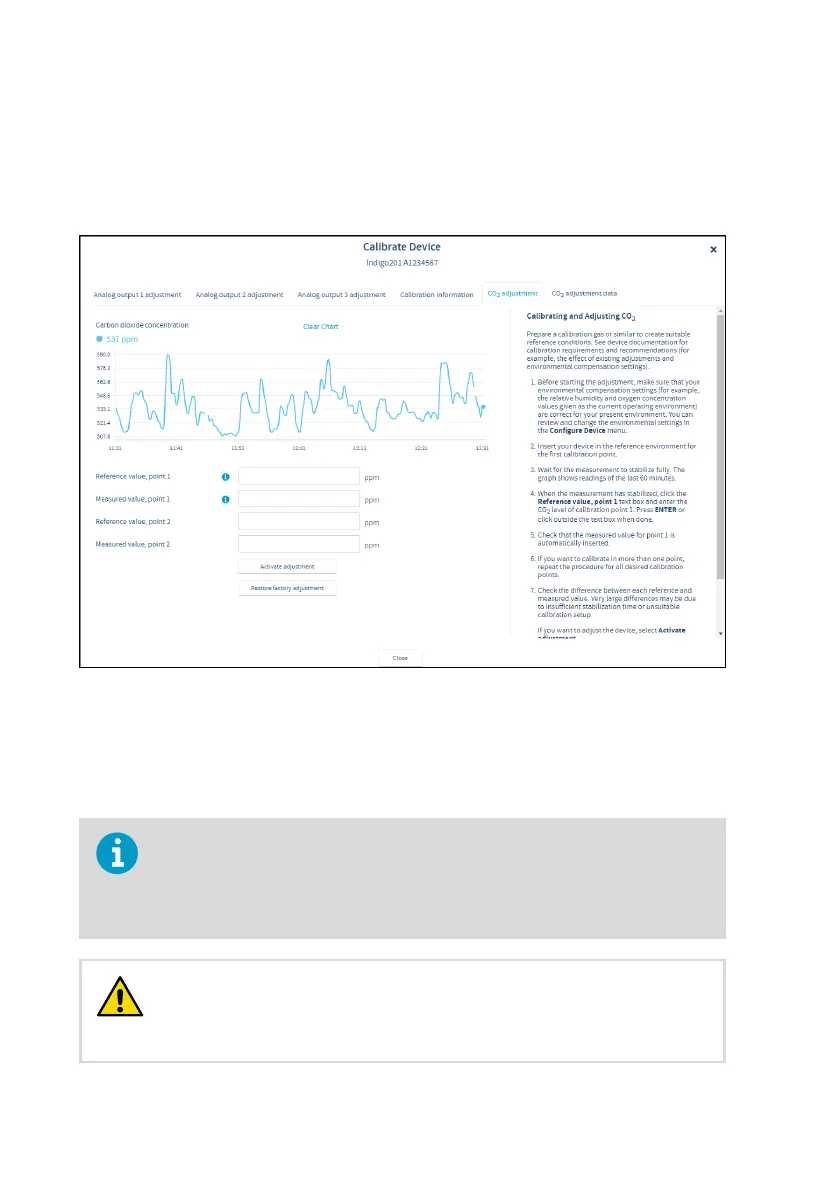
Figure 23 Calibration menu main view example (CO
2
probe)
The Calibrate menu in Insight PC software contains options for calibrating and adjusting the
measurement of the probe you have connected to the transmitter, and testing and adjusting
the analog output channels of the transmitter. You can also view the current adjustment and
restore the probe's factory adjustments.
The range of available options (for example, environmental compensations and
the number of adjustment points) varies depending on the features of the
connected probe.
The menu examples presented here are examples of calibration options that are
available when a CO
2
probe is connected to the transmitter.
Before adjusting a probe's measurement, make sure that you have
familiarized yourself with the probe-specific calibration requirements such as
possible adjustment limits and environmental compensation interdependencies.
See the user documentation of the probe for probe-specific information.
CAUTION!
Indigo201 User Guide M212842EN-B
40









 To Next Page