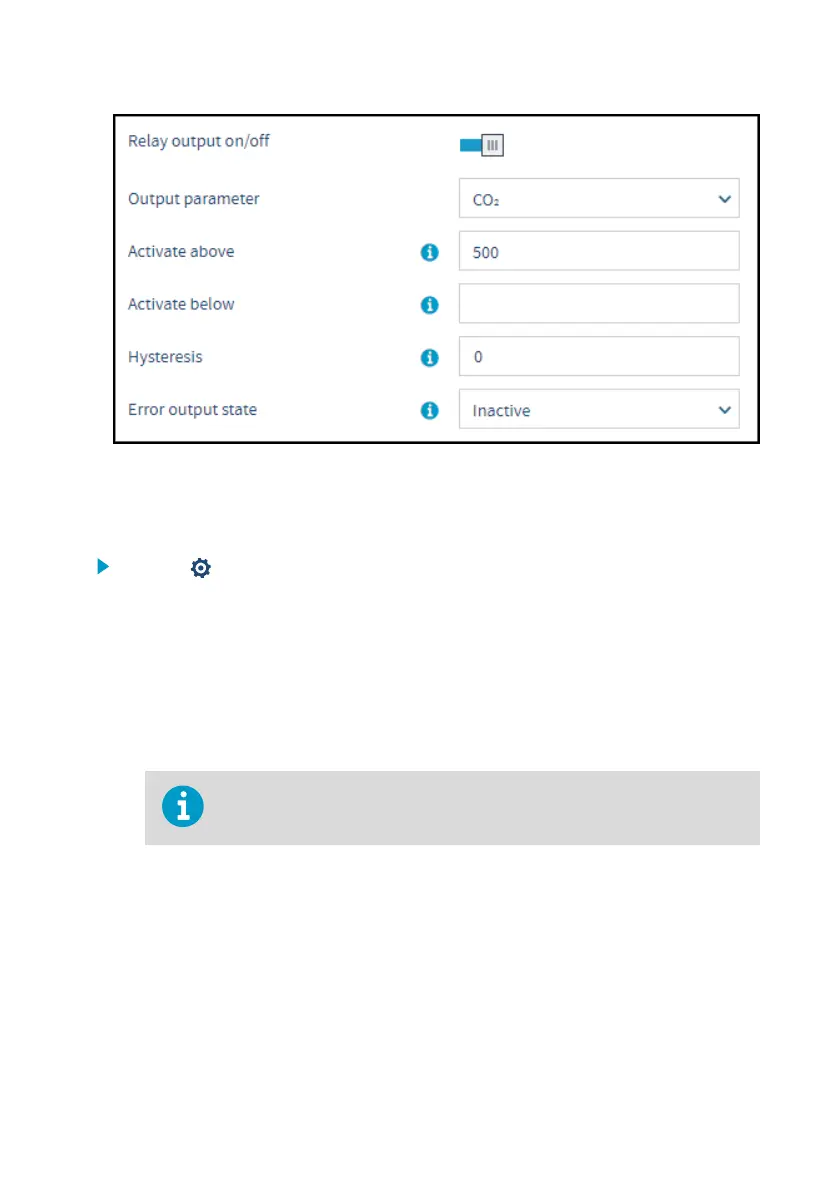
Figure 21 Relay settings example: one setpoint without hysteresis
To define a single setpoint for relay activation when the measurement exceeds the defined
activation limit (Activate above) without using hysteresis:
1. Select to access Insight main menu.
2. In the Configure Device menu, select either relay A or relay B.
3. Enable the relay output by setting Relay output on/o to ON.
4. Select the measurement parameter that is used to control the relay with the Output
parameter dropdown.
The parameter options depend on the connected probe. Note that the parameter units are
defined in the Settings menu: see Unit settings (page 26).
5. Enter the activation limit value in the Activate above field.
With this configuration, there is no hysteresis buer. The relay activates or
switches o immediately after passing this point.
6. Leave the Activate below field empty and set the Hysteresis field value as 0 (no
hysteresis).
7. Select the Error output state for the relay.
8. Select Save to store the configuration.
Chapter 6 – Configuring relays
37









 To Next Page