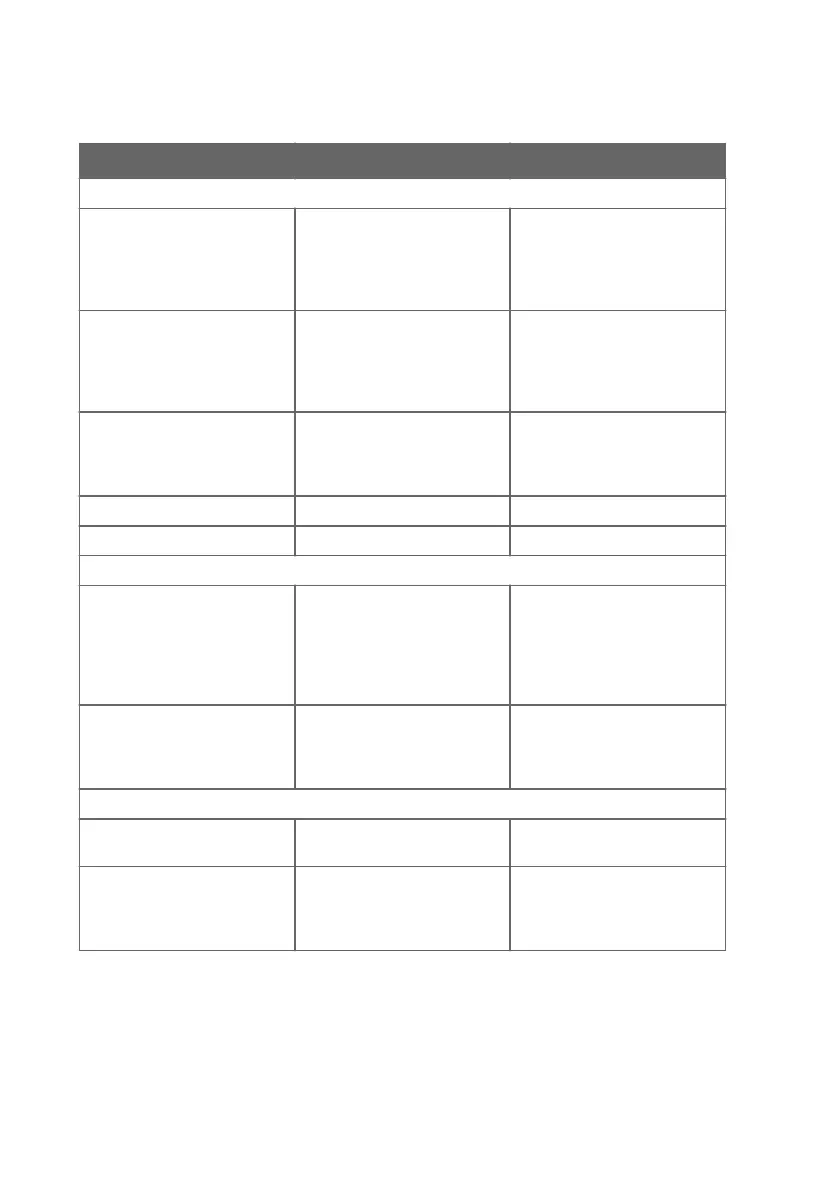
Table 5 Indigo transmitter messages shown on display
Display message Description Recommended action
Errors
Low supply voltage The supply voltage is below the
minimum (range: 15 ... 30 VDC
or 24 VAC ±10 % 50/60 Hz).
The error clears when the
supply voltage returns to the
specified range. Check your
power supply and restart
Indigo if needed.
No legal measurement probe The connected probe is not
compatible with Indigo or a
restriction (probe name or
serial number) on allowed
probes is in place.
Check your probe's Indigo
compatibility and possible
restrictions on allowed probes.
Analog output 1 out of range The output of analog output 1
has gone out of range.
The error clears when the
output returns to range. Check
the analog output
configuration.
Analog output 2 out of range See above See above
Analog output 3 out of range See above See above
Warnings
Outputs configured for
dierent probe
An analog output configuration
already exists in Indigo, and the
settings cannot be received
automatically from the probe
you are connecting.
Configure the analog output
settings for the new probe
manually, or reset the analog
output settings in Indigo to
enable automatic receiving of
analog output settings.
No measurement probe The measurement probe is not
connected, or the probe is
connected poorly and cannot
be recognized by Indigo.
Check that you have fastened
the probe correctly with the
locking wheel.
Notifications
Probe connected: Indigo displays the name of the
connected probe.
Waiting for measurements The connected probe is
preparing measurements (for
example, at start-up or after a
probe restart).
Indigo201 User Guide M212842EN-B
48









 To Next Page