Calibration
Calibration sequence
Progress
Figure A, information on the state of progress.
The possible statuses are:
●Stopped
Calibration stopped
●Started Calibration in progress
●In progress Calibration in progress
●Cancelled Calibration cancelled by user
●Completed Calibration completed successfully
●Error-xx See next page for the description
of possible errors and their diagnosis.
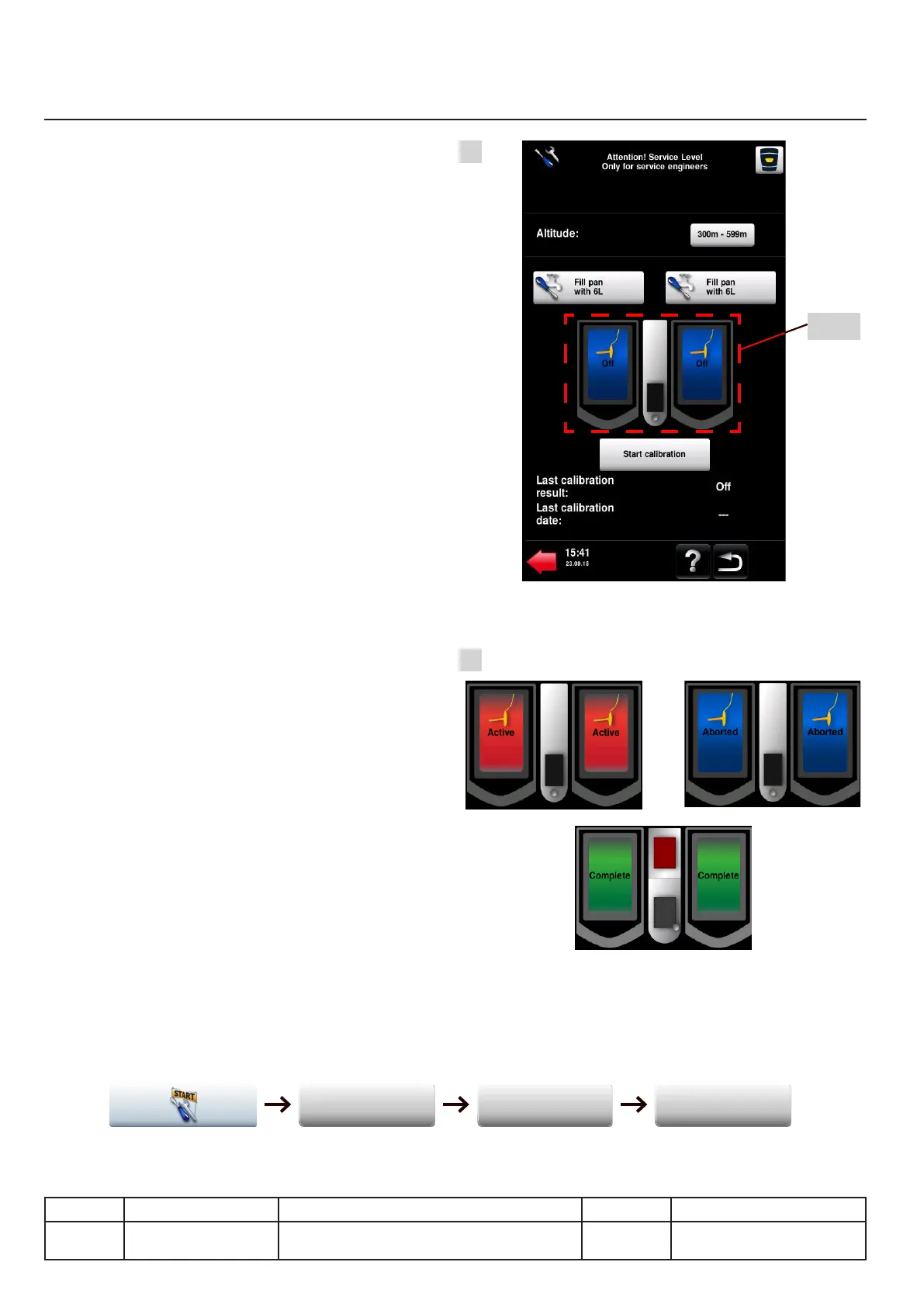
Figure B
Details on the progress of the automated process.
●Active = Red colour alternating with blue.
●Aborted = Calibration cancelled
●Completed = Calibration successfully completed
NB:
For more information about the service mode
and the calibration module see the Service Mode
chapter.
For 112L Dynamic units, each pan is calibrated
separately.
Results
The results of the calibration are visible after
rebooting the unit in the section "Measurements
in real time" in service mode.
Enable the service mode as described on
page 15. The results are available in the
table of real time probe measurements.
The "Offset/Calib" column displays these results
per thermocouple.
Access to the results:
v03 • July-2016 • Hen
IX.16
Heating system module
Line Units Serial number (starting from) Sw Revision
VCCM
VCCWE
All ExxXH1009xxxxxxx
A
B
Fig. B
Diagnosis
Real-time measures Probes



 To Next Page