Calibration
Calibration sequence
In case of an error
Since software version 01-01-02 or 01-02-02 unit
willwriteacalibrationlogle.
To read them, you’ll need a USB stick and a com-
puter. On next page there is a detailed explana-
tionofthelecontent.
File download:
Downloading several days’ data can gen-
eratelesofalargesize,also:
●Make sure you have enough space on the USB
stick. (1 Gb minimum)
●Limit the download to the period you are inter-
ested in! Only take several days if you need to.
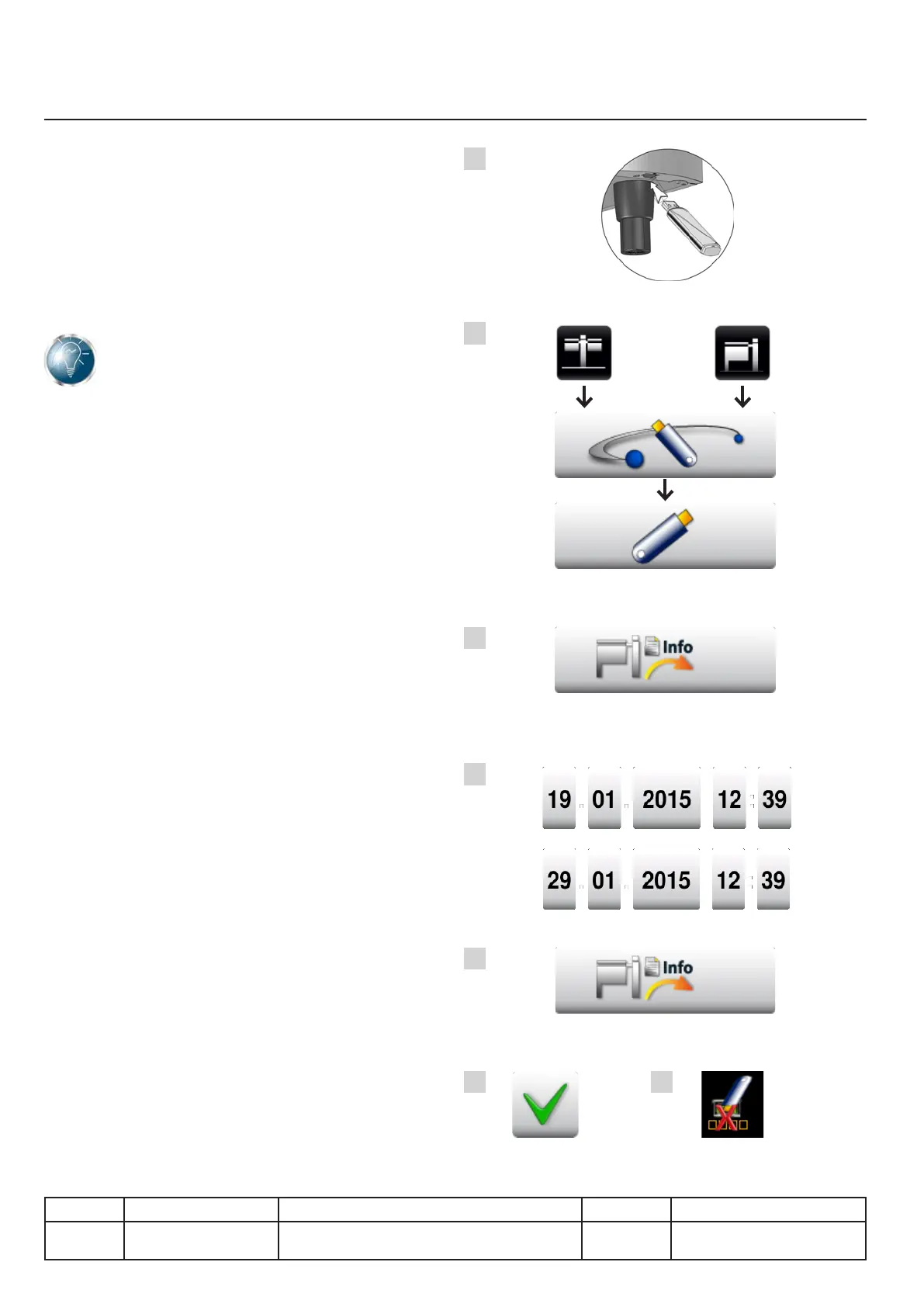
A. Connect the USB stick to the unit.
B. Go to the communication menu then USB.
C. Start the download by pressing the INFO
button.
D. Select the beginning and end dates of the
data to be downloaded. You can take up to
10 days’ data guaranteed. Depending how the
unit is used you can take even more, but the
download will take even longer and be even
larger.
E. Launch the download by selecting the INFO
button.
F. Thedownloadhassuccessfullynishedwhen
the green tick is displayed.
G. If download is not successful the USB stick
appears crossed out in red.
IX.18
v03 • July-2016 • Hen
Heating system module
A
B
C
D
E
F G
Line Units Serial number (starting from) Sw Revision
VCCM
VCCWE
All ExxXH1009xxxxxxx 01-01-02
01-02-02



 To Next Page