46
6 Set up with the display and adjustment module
VEGAPULS 64 • Two-wire 4 … 20 mA/HART
51141-EN-210219
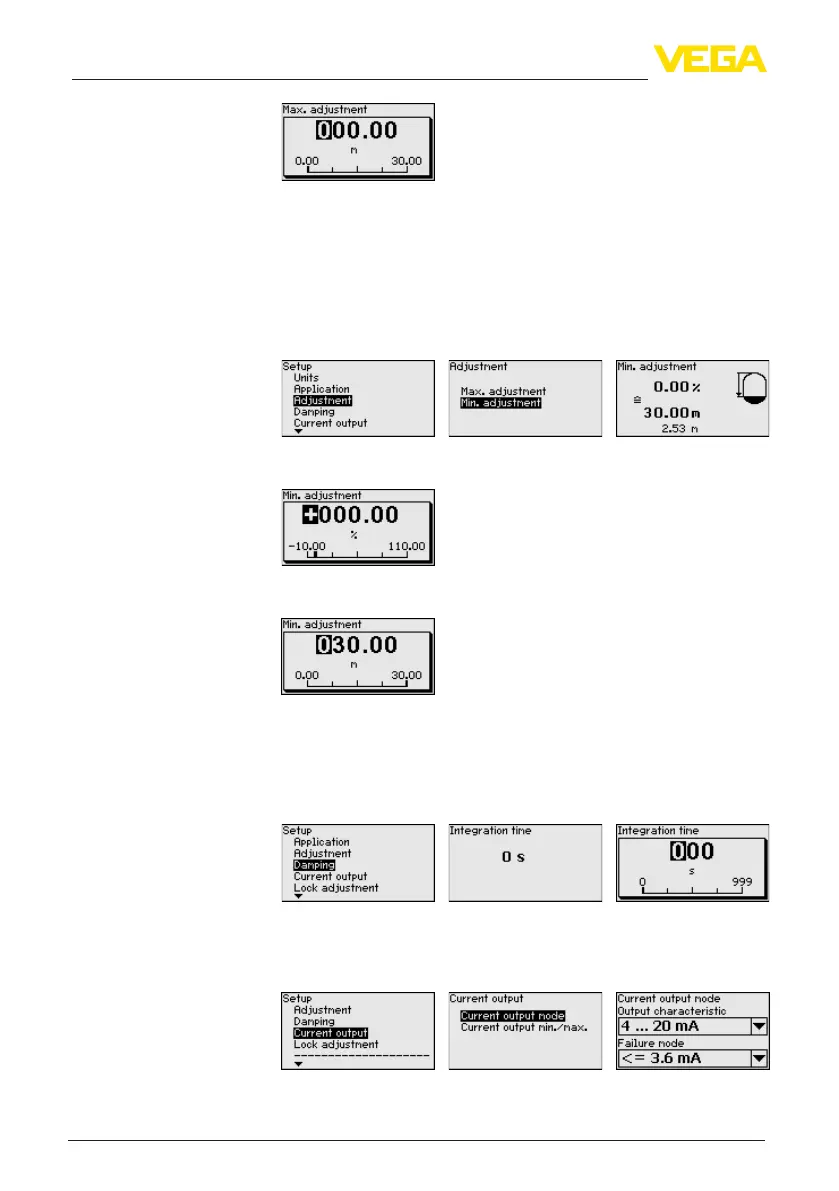
4. Enter the corresponding distance value in meters for the full ves-
sel.
5. Save settings with [OK] and move with [ESC] and [->] to Min.
adjustment.
Proceed as follows:
1. Select with [->] the menu item " Min. adjustment"andconrmwith
[OK].
2. Edit the percentage value with [OK] and set the cursor to the
requested position with [->].
3. Set the requested percentage value with [+] and save with [OK].
The cursor jumps now to the distance value.
4. Enter the suitable distance value in m for empty vessel (e.g. dis-
tance from the sensor to the vessel bottom) corresponding to the
percentage value.
Todampprocess-dependentmeasuredvalueuctuations,setan
integration time of 0 … 999 s in this menu item.
The default setting is a damping of 0 s.
In the menu item " Current output mode" you determine the output
characteristics and reaction of the current output in case of fault.
The default setting is output characteristics 4 … 20 mA, fault mode
< 3.6 mA.
Setup - Min. adjustment
Setup - Damping
Setup - Current output,
mode



 To Next Page