77
9 Set up with the display and adjustment module
VEGAPULS 6X • Two-wire 4 … 20 mA/HART
66190-EN-221107
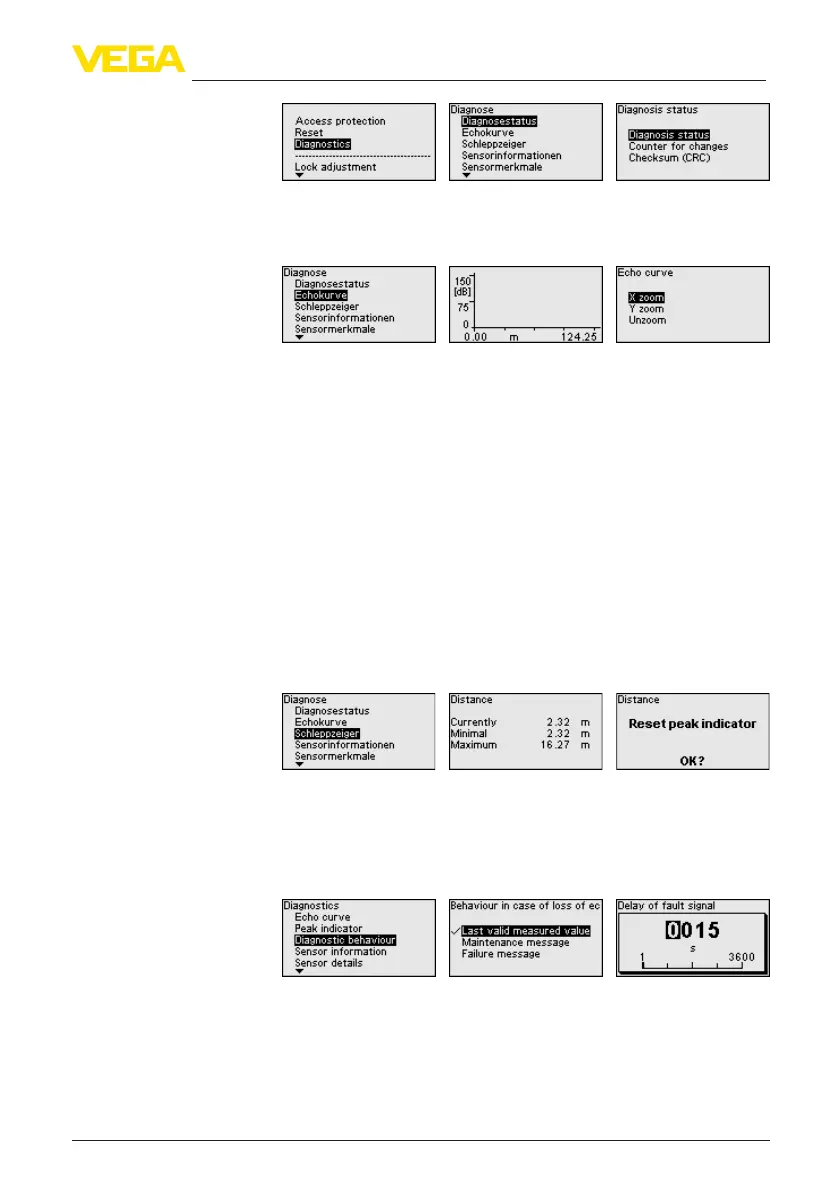
The " Echo curve" shows the signal strength of the echoes over the
measuring range in dB. This enables an evaluation of the quality of
the measurement.
The selected curve is continuously updated. A submenu with zoom
functions is opened with the [OK] key:
•
"X-Zoom": Zoom function for the meas. distance
•
"Y-Zoom":1,2,5and10xsignalmagnicationin"dB"
•
"Unzoom": Reset the presentation to the nominal measuring range
withoutmagnication
The following min./max. values saved by the sensor are displayed in
the menu item " Measured values/Peak indicator":
•
Distance
•
Measurement reliability
•
Measuring rate
•
Electronics temperature
•
Operating voltage
The [OK] key opens a reset function in the respective peak indicator
window:
With the [OK] key, the peak indicator are reset to the actual measured
values.
Inthismenuitem,youdenewhatthesignaloutputoutputsinthe
event of an echo loss. For this purpose, the time after an echo loss
until a fault message is selected.
In this menu item the following information of the instrument can be
read out:
•
Device name
•
Order and serial number
•
Hardware and software version
•
Device Revision
Echo curve
Measured values/peak
indicator
Diagnostic behaviour
Sensor information





 To Next Page