89
11 Set up with PC/notebook
VEGAPULS 6X • Two-wire 4 … 20 mA/HART
66190-EN-221107
tion. The DTMs can also be integrated into other frame applications
according to FDT standard.
Note:
To ensure that all instrument functions are supported, you should
always use the latest DTM Collection. Furthermore, not all described
functionsareincludedinolderrmwareversions.Youcandownload
the latest instrument software from our homepage. A description of
the update procedure is also available in the Internet.
Further setup steps are described in the operating instructions manu-
al " DTM Collection/PACTware" attached to each DTM Collection and
which can also be downloaded from the Internet. Detailed descrip-
tions are available in the online help of PACTware and the DTMs.
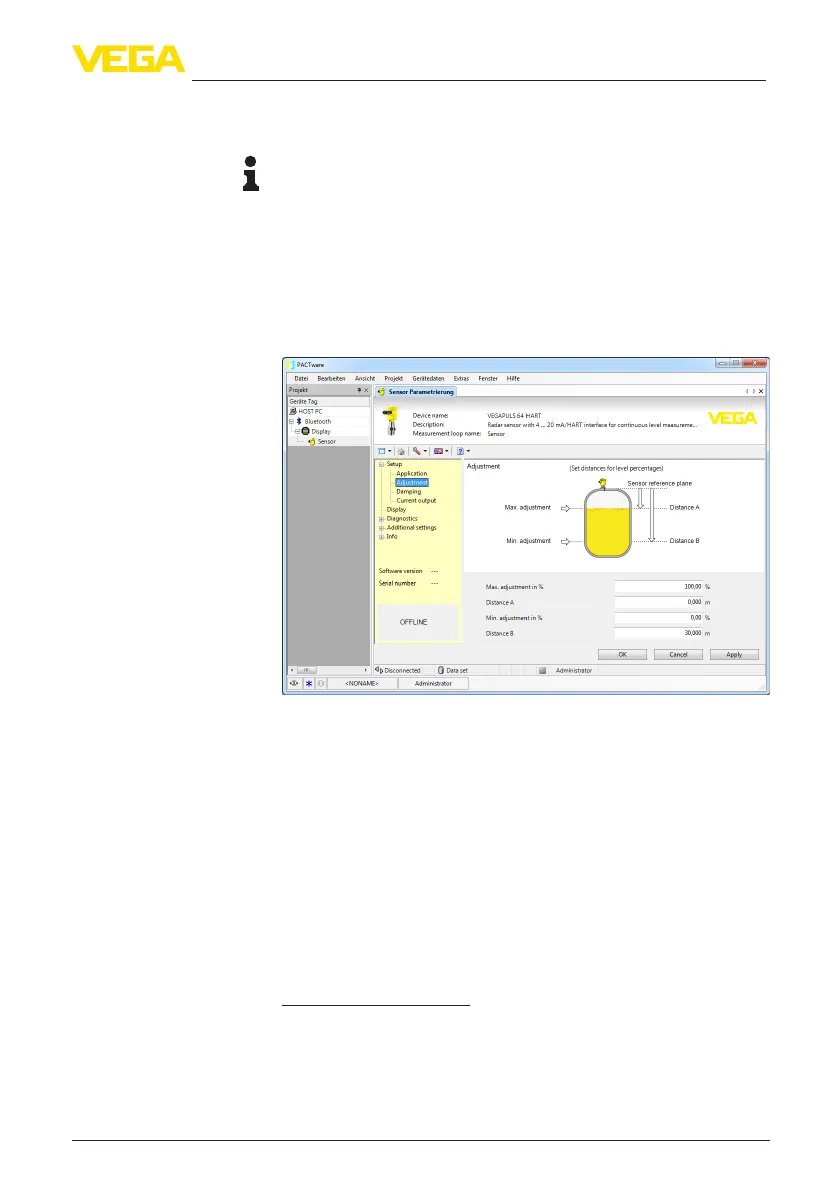
Fig. 63: Example of a DTM view
All device DTMs are available as a free-of-charge standard version
and as a full version that must be purchased. In the standard version,
all functions for complete setup are already included. An assistant for
simpleprojectcongurationsimpliestheadjustmentconsiderably.
Saving/printing the project as well as import/export functions are also
part of the standard version.
In the full version there is also an extended print function for complete
project documentation as well as a save function for measured value
and echo curves. In addition, there is a tank calculation program as
well as a multiviewer for display and analysis of the saved measured
value and echo curves.
The standard version is available as a download under
www.vega.com/downloads and " Software". The full version is avail-
able on CD from the agency serving you.
Standard/Full version





 To Next Page