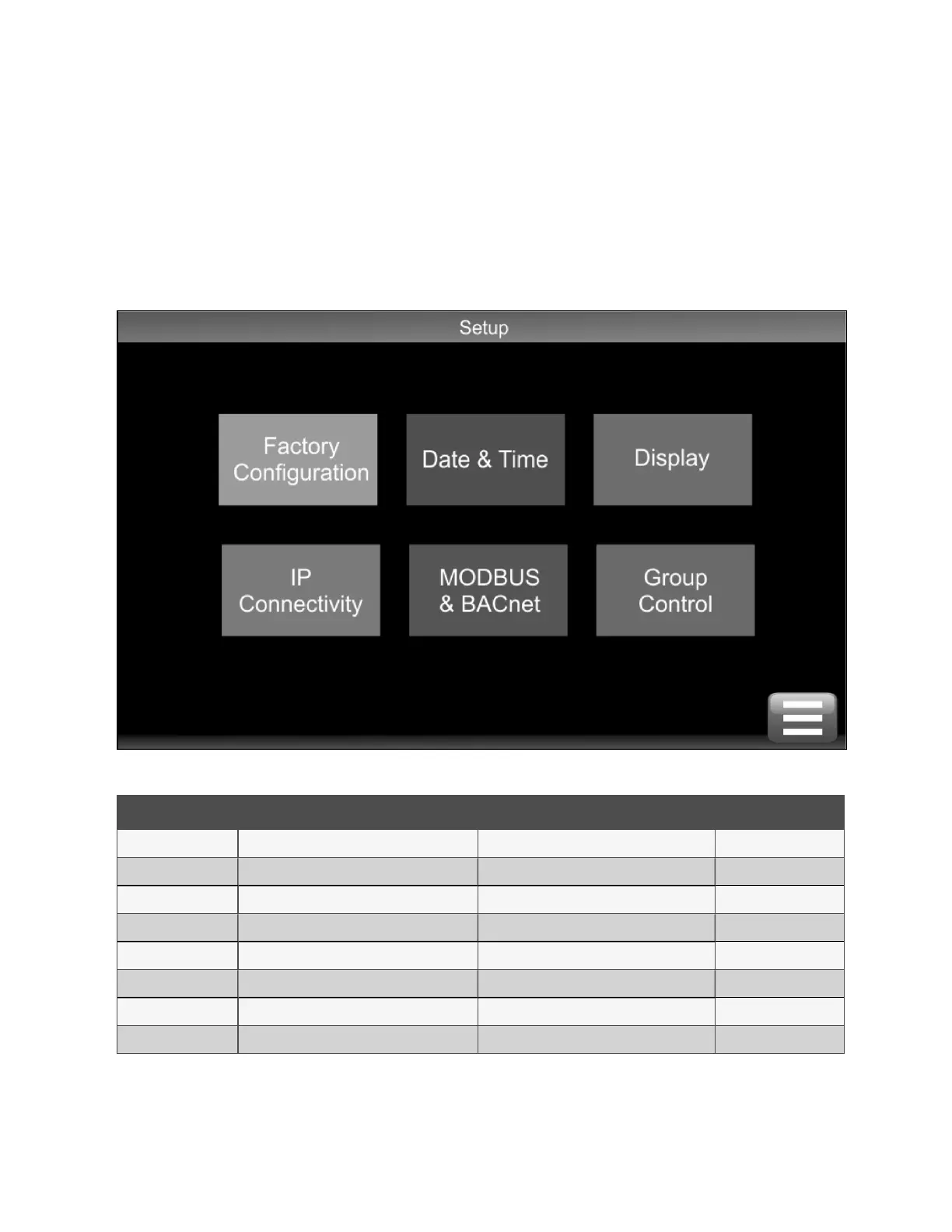
4.2.7 Setup Screen
The Setup screen is visible after logging in. Normally, you will not require to use the Setup screen because items modified here
are set at the factory or during commissioning. There may be times you may need to make adjustments following a site
upgrade.
NOTE: Information available via the Factory Configuration option can be viewed with the Service and Engineer access
codes. To make changes to items under Factory Configuration requires a special code.
Figure 4.7 Setup Screen
ID Title Description Range
P001 Redundant Pumps Select according to unit build No, Yes
P002 Primary Filter Select according to unit build No, Yes
P003 Primary Flow Meter Select according to unit build No, Yes
P004 Secondary Filter Select according to unit build No, Yes
P005 RH&T Sensor Type Select according to unit build No, Yes
P006 Secondary Fluid Quality Instrumentation Select according to unit build No, Yes
P007 Single Valve Select according to build No, Yes
Unit Serial Number Select according to unit build
Table 4.9 Setup Factory Configuration
4 Operation Proprietary and Confidential ©2025 Vertiv Group Corp. 25
Vertiv™ CoolChip CDU 600 Operation and Maintenance Guide








 To Next Page