8.12 Alarm Enable
Each alarm can be disabled or enabled. Use the Up and Down arrows to select a particular alarm, press
Enter to select either Enable or Disable. Press Enter again to store the change. When the alarm is disabled
it will NOT report to either the wall box beeper or to the common alarm relay.
NOTE: The high-water alarm will automatically shut the unit Off, even if the alarm is disabled. Similarly,
optional factory-installed smoke sensor is wired to shut off the evaporator unit, regardless of the
enable/disable status.
8.13 Alarm Time Delay
Each individual alarm can be programmed with a time delay, causing the unit to delay a specified amount
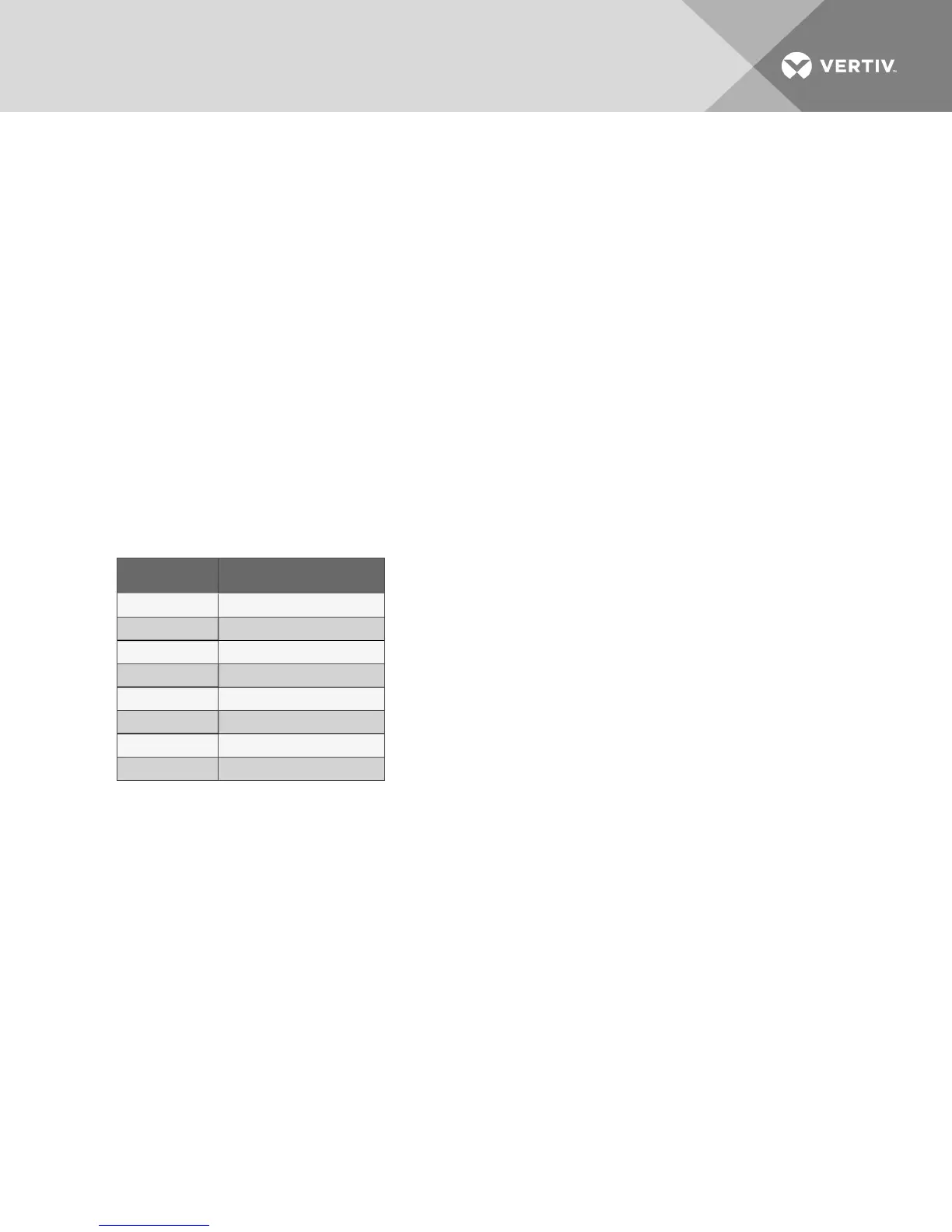
of time (0-255 seconds) before recognizing the alarm. See Table 8.4 below for the default times. The
alarm condition must be present for the full amount of the time before the alarm will sound. If the alarm
condition is diverted prematurely, the alarm will not be recognized and the time delay will automatically
reset.
NOTE: For software alarms such as “loss of power” and “short cycle,” the time delay should be left at
the factory default of 0.
Alarm Default Time Delay (seconds)
Custom Alarm #1 0
Custom Alarm #2 6
High Temperature 30
Low Temperature 30
High Humidity 30
Low Humidity 30
Short Cycle 0
Loss of Power 0
Table 8.4 Alarm default time delays
8.14 Common Alarm Enable
Each individual alarm can be selected to activate or deactivate the common alarm relay. If the energize
common alarm function is set to Yes, the relay is energized immediately as the alarm is annunciated and
de-energized when the alarm condition has been recognized. If the alarm is completely Disabled, the alarm
has no effect on the common alarm relay. Use the Up and Down arrows to scroll to a particular alarm, press
the Enter button to select it, then press the Enter button again to select Yes or No.
Vertiv | Liebert Mini-Mate2—5 ton User Manual| 61









 To Next Page