ITEM DESCRIPTION ITEM DESCRIPTION
3
Branch circuit-breaker status icon.
I = closed circuit breaker
O = open circuit breaker
9 Branch ID
4 Amperage (A) 10 Voltage (V)
5 Apparent Power (VA) 11 Branch identifier
6 Return icon
To view data for a branch module:
1. Use the scroll button to highlight a letter in the lower-left corner.
2. Press the scroll button to display the data for the selected branch module.
Receptacle level
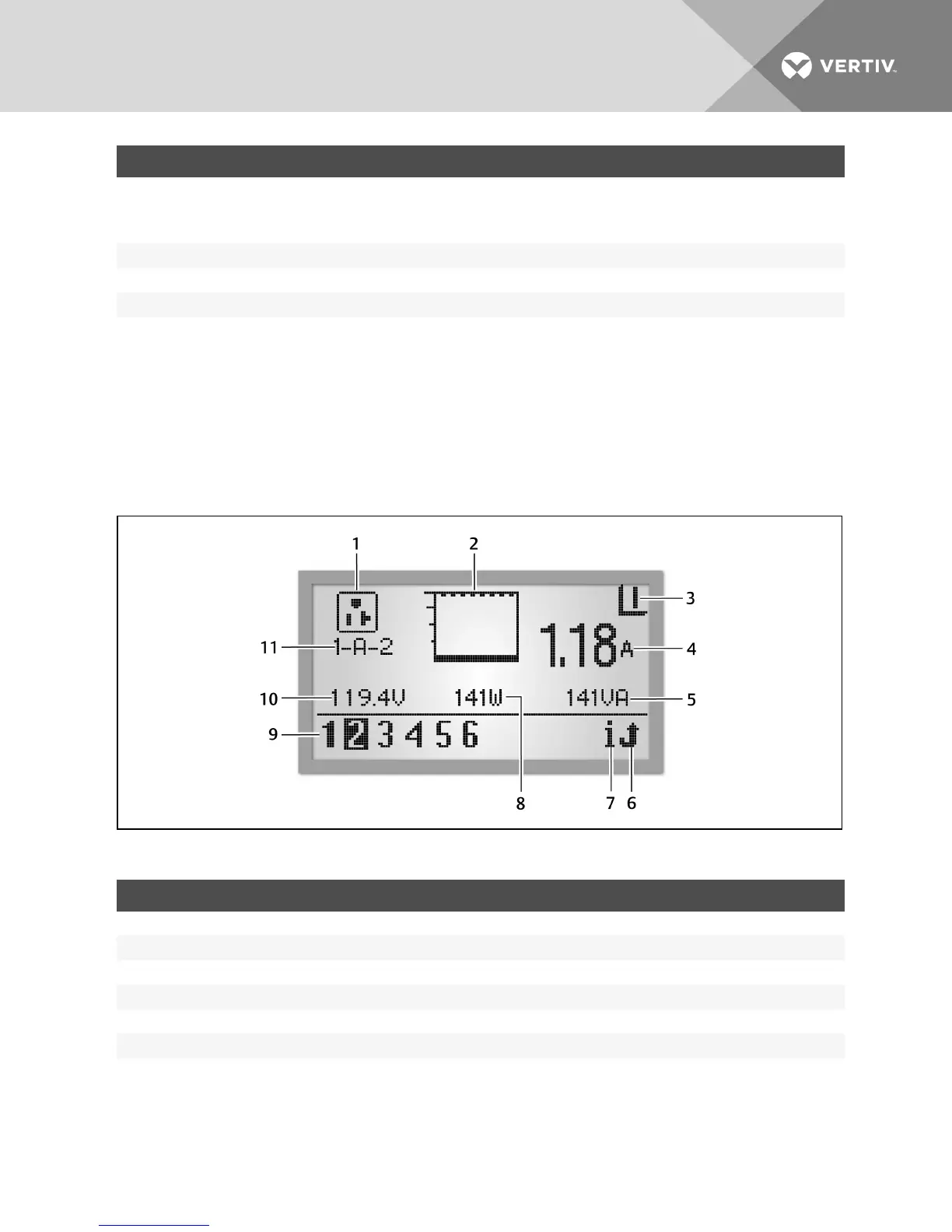
The availability of receptacle information depends on the capabilities of the rack PDU. The following figure is an example of
data for Receptacle 2, which is one of six receptacles on Branch A of PDU 1 that are communicating with the RPC BDM unit.
Figure 4.12 Receptacle Level View
ITEM DESCRIPTION ITEM DESCRIPTION
1 Component Identification 7 Information icon
2 Current bar graph 8 Real Power (Watts)
3 Receptacle Power Status 9 Receptacle ID
4 Amperage (A) 10 Voltage (V)
5 Apparent Power (VA) 11 Receptacle identifier
6 Return icon
Table 4.6 Receptacle Level View Descriptions
To view data for a receptacle:
1. Use the scroll button to highlight a receptacle number in the lower-left corner.
2. Press the scroll button to display the data for the selected branch module.
Vertiv | RPC2™ Communications Module Installer/User Guide | 43



 To Next Page