57
CHARGER
The charger recharges your Vertu phone battery
quickly and safely by means of a powered AC
outlet.
The charger supplied with your Vertu phone should
be appropriate for your region. However, you
should always check that electrical rating of the AC
outlet is appropriate for the charger before you
attempt to plug it in.
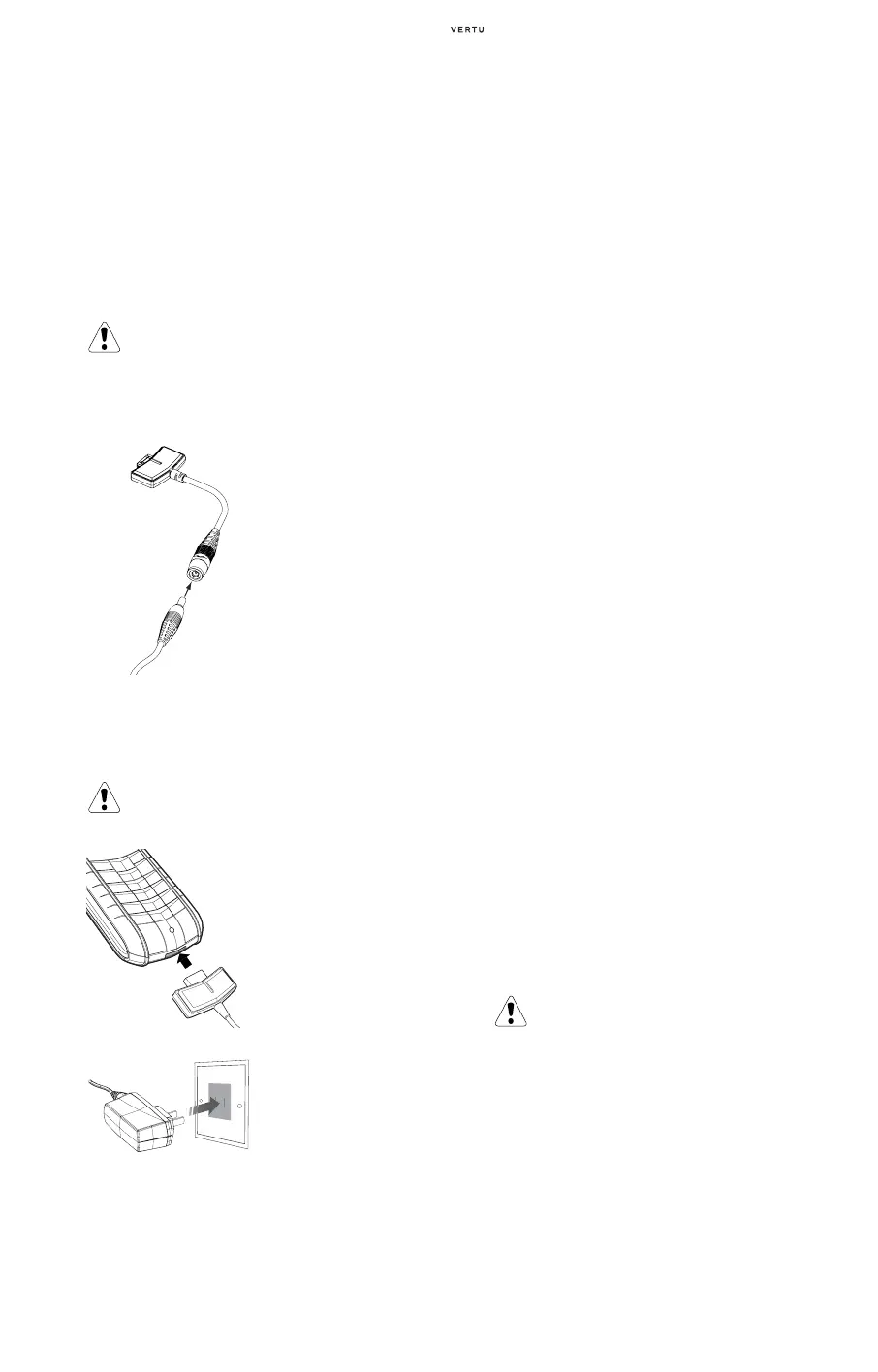
Attaching the Cable to the Phone Connector
CHARGING YOUR BATTERY
The battery for your Vertu phone is rechargeable
and requires charging at regular intervals.
If the battery is fully discharged it may take a few
moments before the charging indicator appears on
the display.
When the battery is fully charged, the battery
charge indicator stops animating and, if your Vertu
phone is switched on, a confirmation message is
briefly displayed.
If your Vertu phone is not charging, try the
following:
> Disconnect the charger from the AC outlet.
> Check that the electrical rating of the AC outlet is
compatible with your charger.
> Verify that the AC outlet has power and that it is
switched on. For example, in many hotel rooms,
AC outlets are used for lighting and may be
switched on and off from remote locations in the
room.
> Wait for at least 10 seconds and then re-connect
the charger to the AC outlet.
> Use another nearby AC outlet that you know is
providing power.
> If charging still fails, contact Vertu Concierge for
further advice.
The vibrating alert is disabled while the charger is
connected to your Vertu phone.
When you want to stop charging your battery, for
example when charging is complete:
> Disconnect the charger from the AC outlet.
> Disconnect the charger from your Vertu phone by
pulling the charger connector – do not pull the
cable or adaptor body.
The charger can be used in conjunction with the
data cable. For more information refer to
“Connecting the Data Cable” on page 8-60.
BATTERY
Removing the Battery
> Switch off your Vertu phone and disconnect the
charger and any accessories.
Caution. Never attempt to use a charger if it has
been damaged. Contact Vertu Concierge to obtain
a replacement.
> Attach the charger
cable by inserting it into
the adaptor body.
Caution. Only use the approved charger
and battery designed specifically for your Vertu
phone.
> Ensure that you have
attached the charger
cable to the correct
charger.
> Insert the charger
connector into the
bottom of your Vertu
phone as shown.
> Connect the charger
body to a powered
AC outlet.
> After a few seconds,
the battery indicator
animates and a
confirmation message
is displayed if your
Vertu phone is
switched on.
Caution. Do not dispose of batteries in a fire and
always dispose of a battery according to local
regulations. Do not dispose of as household
waste.
Always switch the phone off and disconnect the
charger before removing the battery.















 To Next Page