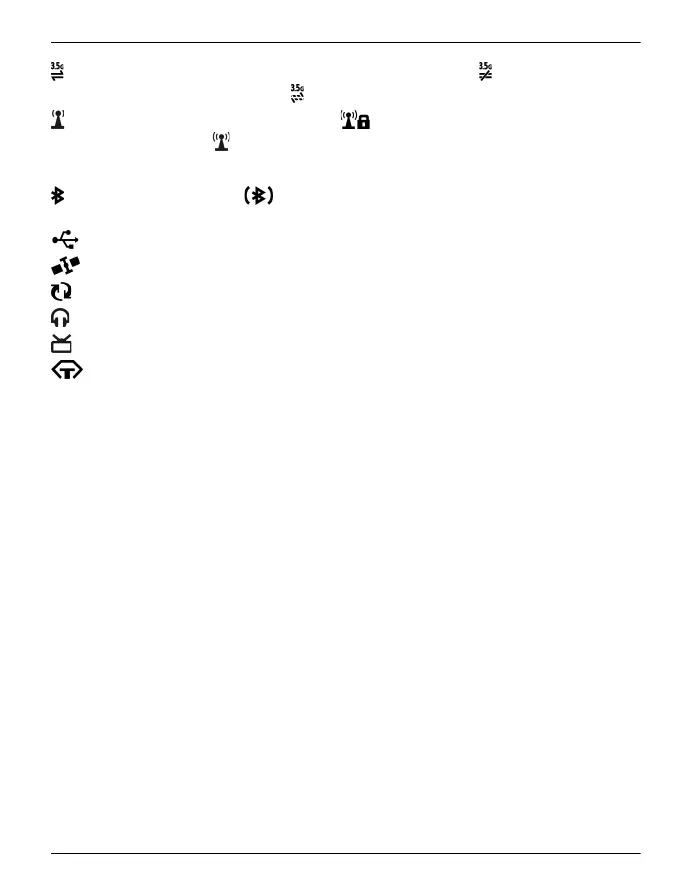
An HSPA data connection (network service) is open. indicates that the
connection is on hold and
that a connection is being established.
A WLAN connection is available. indicates that the connection is
encrypted and
that the connection is not encrypted.
Connectivity indicators
Bluetooth is active. indicates that your phone is sending data. If the
indicator is blinking, your phone is trying to connect to another device.
A USB cable is connected to your phone.
GPS is active.
The phone is synchronising.
A compatible headset is connected to your phone.
A compatible TV-out cable is connected to your phone.
A compatible text phone is connected to your phone.
Set the notification light to blink for missed calls or messages
When the phone notification light blinks, you have missed a call or a message has
arrived.
Select Menu > Settings and Phone > Notification lights > Notification light.
Flashlight
The camera flash can be used as a flashlight. To switch the flashlight on or off, slide
and hold the key lock switch for two seconds.
The flashlight can only be used when you are on the home screen. You can switch the
flashlight on also when you are on the home screen and the keys and screen or the
device is locked.
Do not shine the flashlight in anyone's eyes.
Use your phone offline
In places where you do not want to make or receive calls, you may still access your
calendar, contacts list, and offline games if you activate the offline profile. Switch the
phone off when mobile phone use is not allowed or when it may cause interference or
danger.
On the home screen, select the profile and Offline.
Home screen 43
© 2011 Vertu. All rights reserved.















 To Next Page