Calls
Call a phone number
1 On the home screen, select Call to open the dialler, and enter the phone number.
To enter the + character, used for international calls, select * twice.
2 To make the call, press the call key.
3 To end the call, press the end key.
Tip: To call a contact, on the home screen, select Call, and start entering the
contact's name.
Search for a contact
You can search for a contact you have saved in the contacts list.
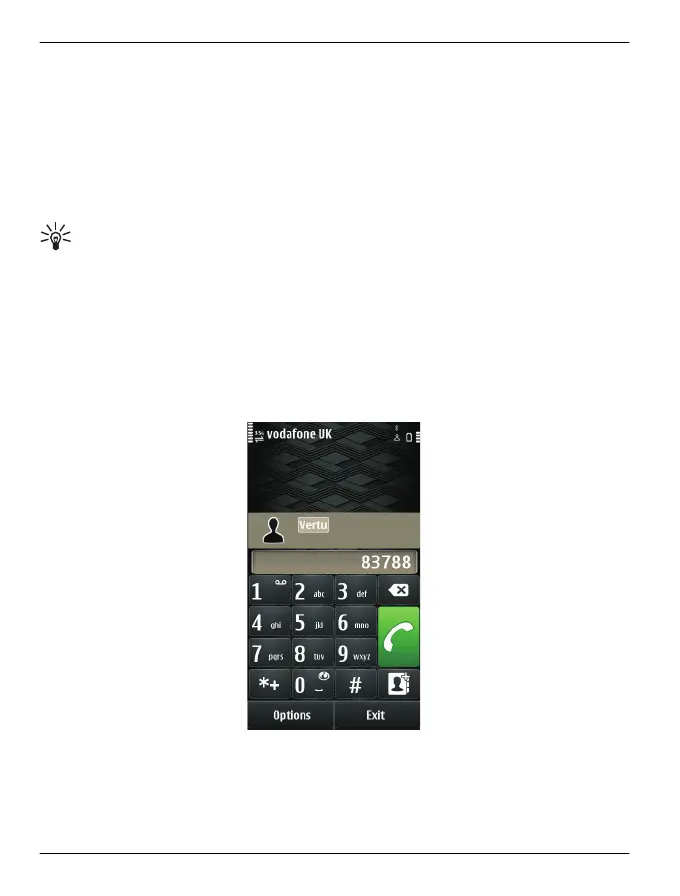
On the home screen, select Call, and start entering the contact's first or second name.
You can also search by company name.
When entering the characters, select each number key once for each letter. For
example, to search for Vertu, enter 8, 3, 7, 8, and 8.
Call a found contact
Select the contact.
Send a message to a found contact
Select and hold the contact, and in the contact card, select Message.
46 Calls
© 2011 Vertu. All rights reserved.















 To Next Page