If you search for or browse to a location, and view details about the location using a
service, such as Weather, the information for the location you are currently viewing is
displayed. To return to viewing your current location, or to view information for your
current location, select
.
Zoom in or out
Select + or -.
Tip: To zoom, you can also place two fingers on the map, and slide your fingers
apart to zoom in or together to zoom out. Not all phones support this feature.
If you browse to an area not covered by the street maps that are stored on your phone,
and you have an active data connection, new street maps are automatically
downloaded.
Prevent downloading new street maps automatically
In the main menu, select
> Internet > Connection > Offline.
New street maps are also downloaded if you upgrade to the latest Maps application
version. When you use Maps the first time after an upgrade, select Use Ovi Maps
online. You need an active data connection.
Map coverage varies by country and region.
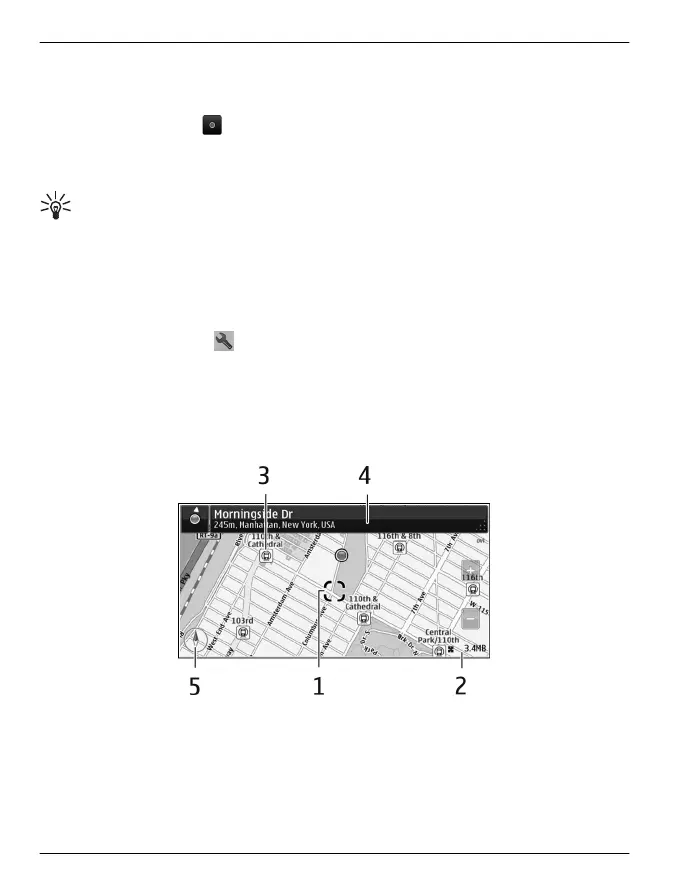
Map view
1 Selected location
2 Indicator area
3 Point of interest (for example, a railway station or a museum)
4Information area
5Compass
98 Maps
© 2011 Vertu. All rights reserved.















 To Next Page