70
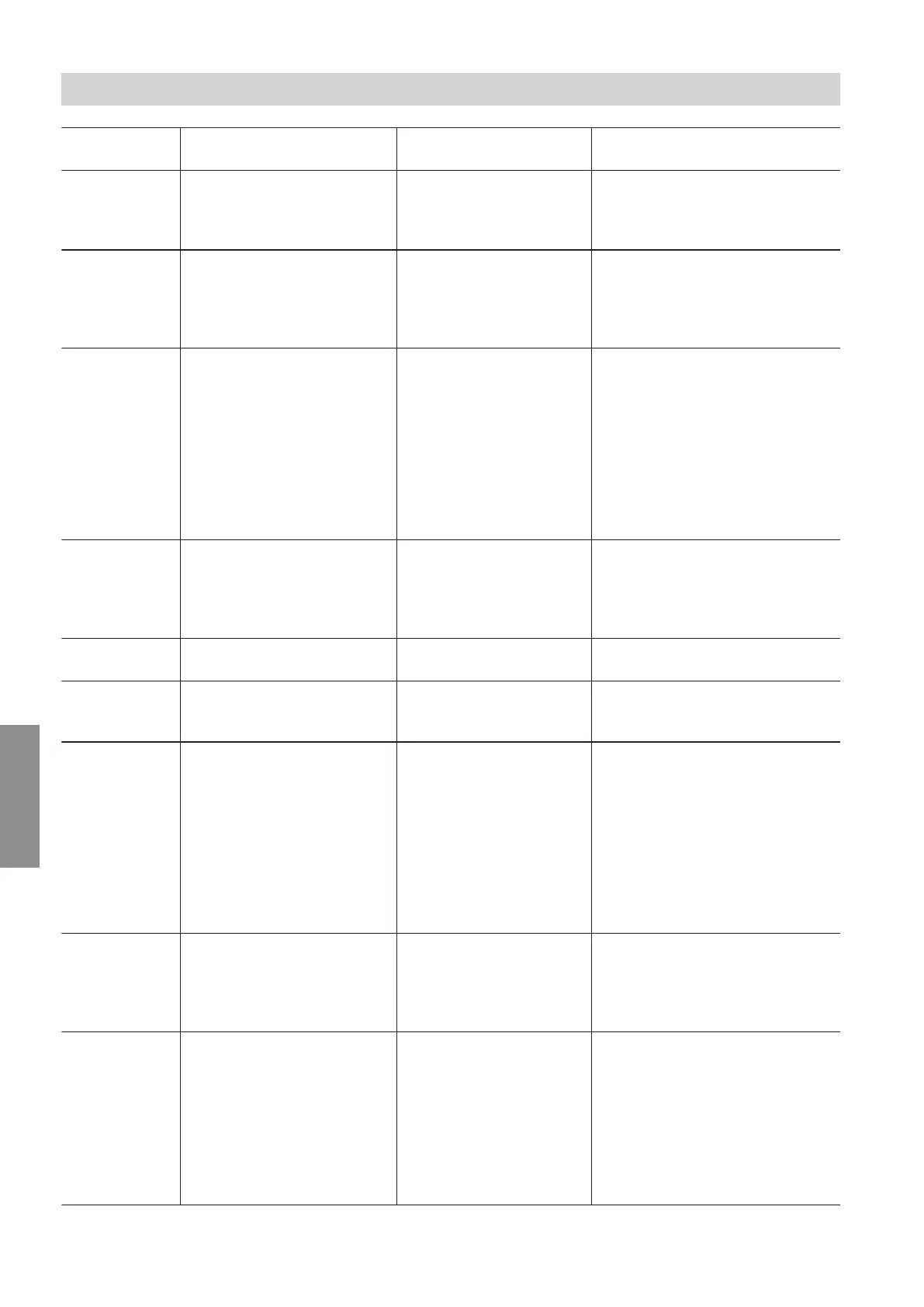
Displayed fault
code
System characteristics Cause Measures
71 Burner in a fault state Fan speed too low
■
Check fan for blockage.
■
Check setting for gas type and
flue system.
Reset the appliance.
73 Burner in a fault state Internal communication
error
Reset the appliance.
If the fault occurs repeatedly, re-
place the HBMU heat management
unit. See chapter "Replacing the
HBMU heat management unit".
74 Burner locked out.
Internal circulation pump off.
No central heating and no
DHW heating.
System pressure too low Top up with water.
Vent the system.
If the fault occurs repeatedly:
■
Check system pressure sensor
with external pressure gauge.
■
Check diaphragm expansion
vessel pre-charge pressure.
■
Check settings for set system
pressure and range.
77 Burner in a fault state HBMU heat management
unit data memory
Reset the appliance.
If the fault occurs repeatedly, re-
place the HBMU heat management
unit. See chapter "Replacing the
HBMU heat management unit".
89 No central heating and no
DHW heating
Internal circulation pump
blocked
Check circulation pump. Replace if
necessary.
91 Function of affected exten-
sion in emergency mode
DIO electronics module
communication error
Check connections to DIO elec-
tronics module and connection to
HBMU heat management unit.
92 Function of the relevant elec-
tronics module in emergency
mode
ADIO electronics module
communication error
■
Check setting in the commission-
ing assistant and correct if re-
quired.
■
Check connections and leads to
the ADIO electronics module.
■
Check PlusBus voltage level
(24 to 28 V).
■
Check subscriber number on ro-
tary switch S1 and correct if re-
quired.
95 Burner off OpenTherm remote con-
trol unit not connected
■
Check connection to the Open-
Therm remote control. unit.
■
If OpenTherm is not required, set
C.7 in the commissioning assis-
tant to a value other than 14.
100 Electronics modules connec-
ted to PlusBus not function-
ing
Voltage error PlusBus Check whether the PlusBus power
supply on the HBMU heat manage-
ment unit is OK: Remove all con-
nected PlusBus components and
reconnect one by one.
Check that no more than 1 Vitotrol
200-E is connected to the HBMU.
Check whether there is a short cir-
cuit at the PlusBus cable.
Troubleshooting
Fault messages (cont.)
6167586
Diagnosis




 To Next Page