9:2
AVAILABLE MEMORY
The built-in memory can store designs, fonts, stitches and other À les. To check how much memory is still available in the
built-in memory, go into File Manager, touch Quick Help and then touch either My Designs, My Fonts or My Files. A pop-
up message shows how much memory is available.
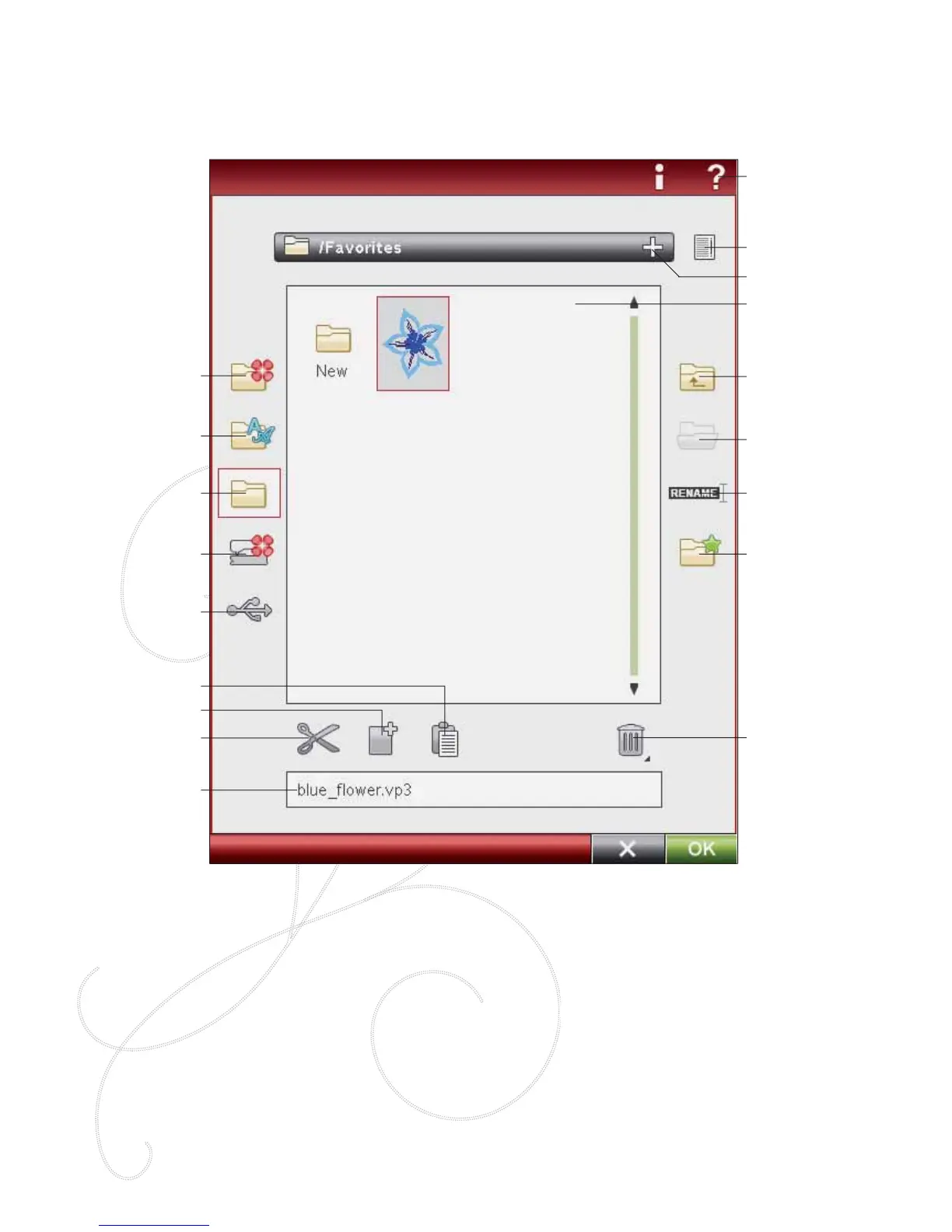
FILE MANAGER
The File Manager is used to open, organize, add, move, remove and copy your designs, fonts and stitch À les. Use either
built-in memory or an external device connected to your machine for storing designs and À les.
My Files
My Fonts
My Designs
Built-in Designs
External Devices
Cut
Copy
Paste
Delete
Move up one folder
Open folder
Rename À le or folder
level
Create new folder
Name of selected À le
Drop down menu
List view
Quick Help
Selection Area
FILE MANAGER - OVERVIEW OF ICONS
FILE FORMATS
Your machine can load the following À le formats:
• .SHV, .DHV, .VP3, .VIP, .HUS, .PEC, .PES, .PCS, .XXX, .SEW, .JEF,
.EXP, .10* and .DST (embroidery À les)
• .SH7 (stitch À les),
• .VF3 (embroidery font À les)
• and also .TXT and .HTM/HTML-À les.
Note: If the À le type or À le version is not supported by your machine, or the À le is
damaged, it is shown in the selection area as an unrecognized À le.








 To Next Page