69
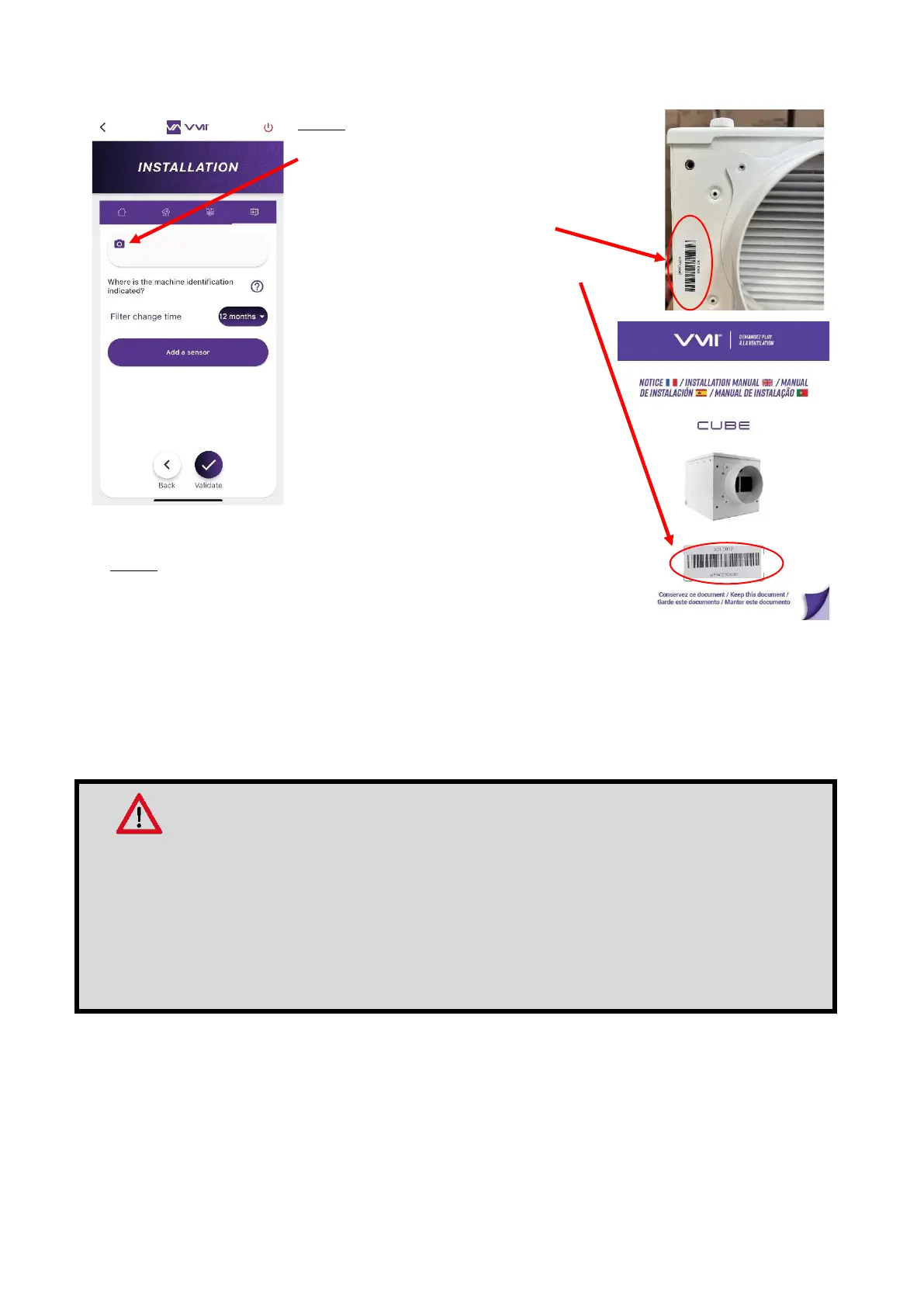
Step 7: Machine identifier
• Click on the “camera” icon to scan the
VMI
®
unit bar code. This bar code is located:
o on the side of the VMI
®
CUBE
o or in the hard copy manual included in the
VMI
®
CUBE box.
• If you are unable to scan the bar
code using your camera, you can also
enter the machine identifier manually
(figure under the bar code).
• Press the VALIDATE button.
Step 8: Warranty Document
• Accept the GENERAL TERMS AND CONDITIONS OF USE
and the PRIVACY POLICY.
• Sign as the installer and click on CONFIRM.
• Enter information on the end customer to create the warranty document.
Recommendations
The end customer's e-mail address must be entered if you wish them to receive the warranty
document automatically.
Once the information has been entered, the warranty document is generated automatically
and is sent to VMI-Ventilairsec, to your company and the end customer (if their email address
has been entered).
After completing these steps, the VMI
®
unit is ready for use.


 To Next Page