5.Panel Operation
Output Noise Wave
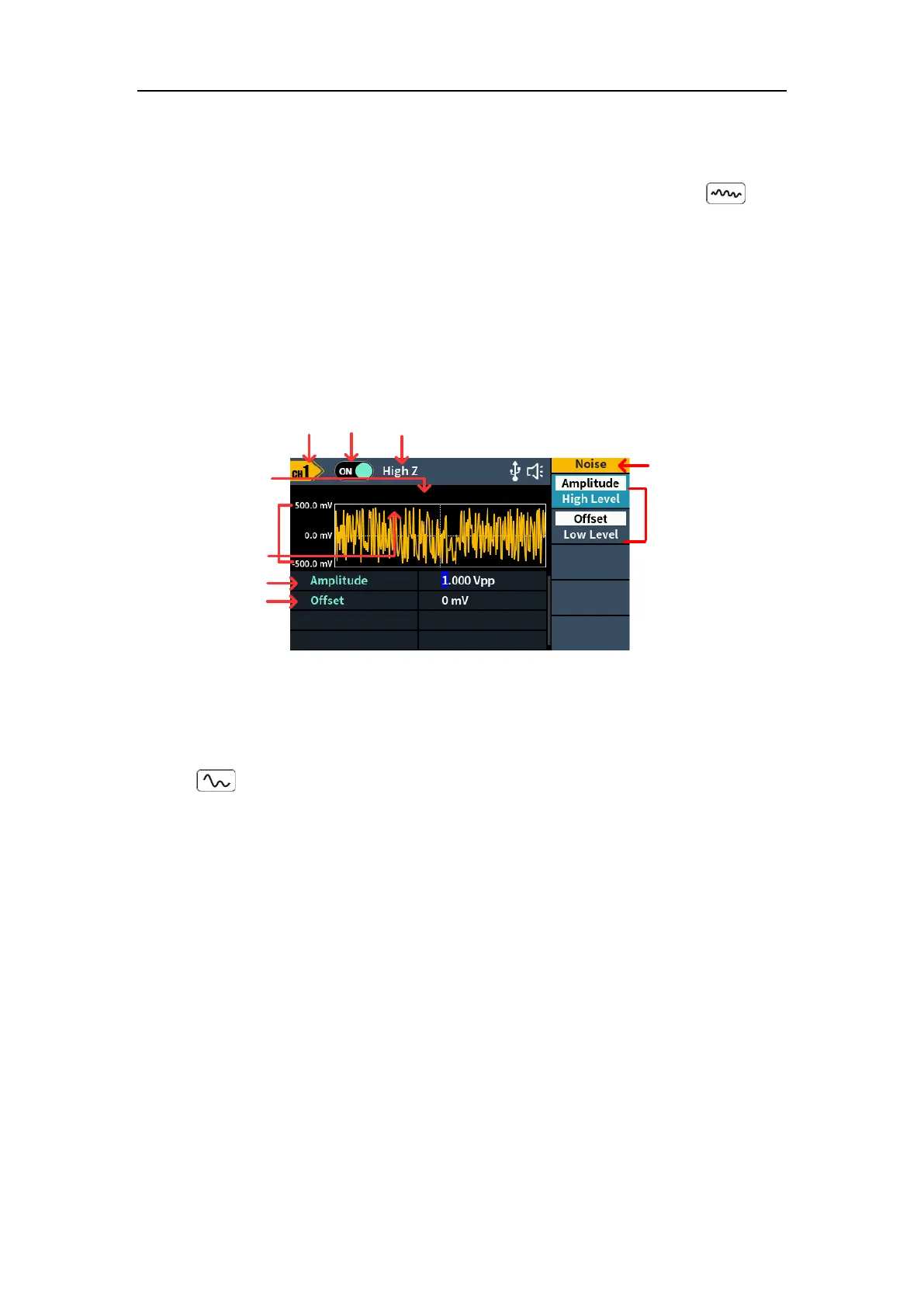
The noise wave which the generator output is white noise. Press , the
screen displays the user interface of the noise wave. The Noise waveform
parameters can be set by operating the Noise setting menu on the right.
The noise wave has no frequency and periodic parameters.
The noise wave menu includes: Amplitude/High Level, Offset/Low Level.
To set the Amplitude/High Level, Offset/Low Level, please refer to Output Sine
Wave on page 6.
Load
Output
switch
Parameter 1
Parameter 2
Noise
Period
High low - level
Channel
Current
signal
Setting menu of
Noise signal
Figure 5-9: Noise wave user interface
Output Arbitrary Wave
Press , the screen displays the user interface of the arbitrary wave. The
Arbitrary waveform parameters can be set by operating the Arbitrary setting
menu on the right.
The arbitrary wave menu includes: Frequency/Period, Amplitude/High Level,
Offset/Low Level, Phase, Built-in Waveform and Store.
To set the Frequency/Period, Amplitude/High Level, Offset/Low Level, Phase,
please refer to Output Sine Wave on page 6.
The Arbitrary signal consists of two types: the system built-in waveform and
the customized waveform loaded from PC software which is edited by users.



 To Next Page