VWR CO2 Incubator Basic | 31
Start-up |
Chapter 5
1. Position support rail [4] onto the lower embossing [6] and tilt toward the work space side wall so
that the rail is positioned over the two embossings [5] and [2].
2. Clamp lockspring [3] behind upper embossing [1].
3. To remove the support rails, pull lockspring tab down and out of the embossing to remove rail.
Installing the shelf supports:
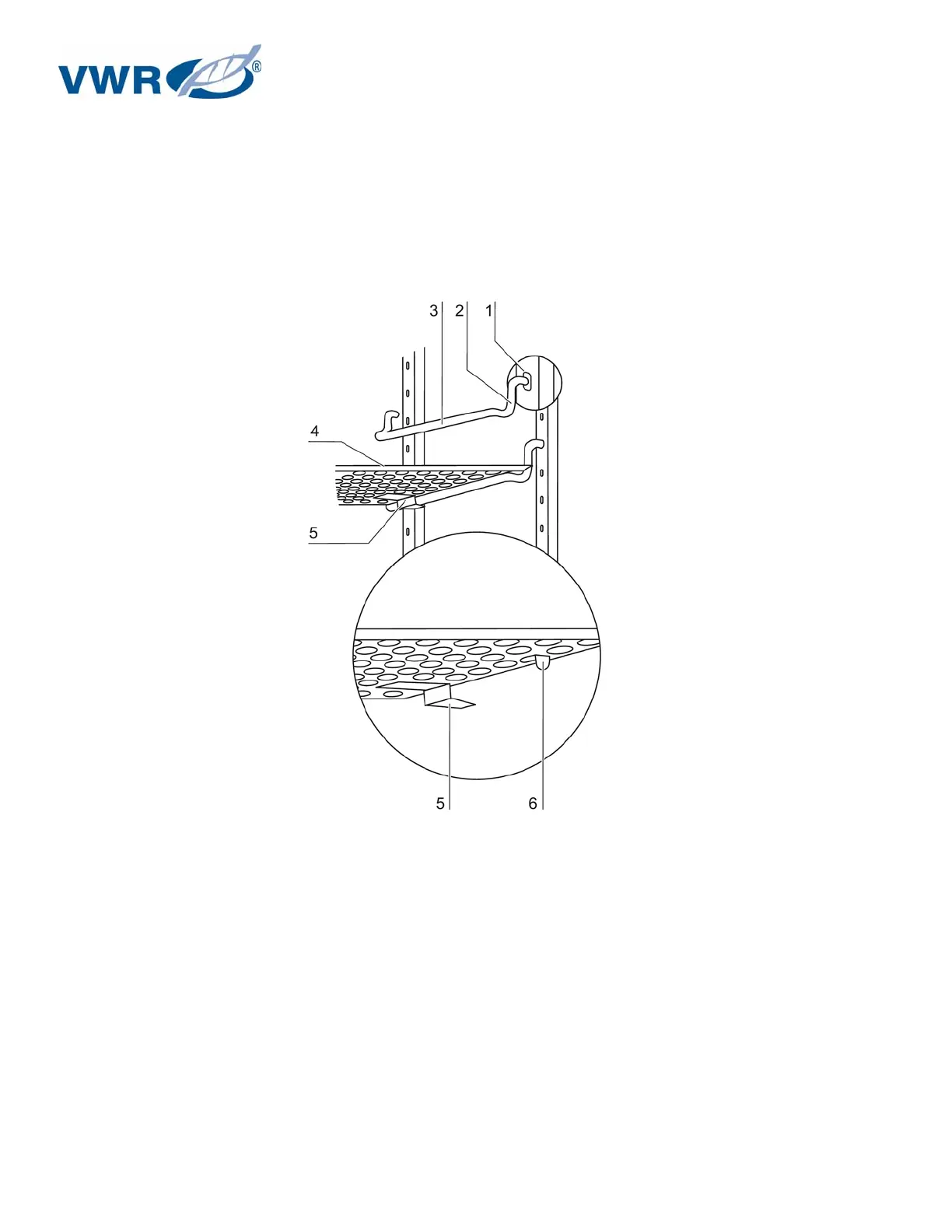
Figure 11 – Shelf support/sheet insert installation
1. Insert the shelf supports [3] into the perforations [1] of the support rail with the bar facing down.
2. Make sure that the two vertical elements [2] of the shelf support are flush with the support rail.
Installing the shelves:
1. Push the shelf [4] onto the shelf supports with the tilt protection [5] facing the rear panel of the
device. The tilt protection [5] is also used as a guide for the shelf.
2. Slightly raise shelf so that the withdrawal stop [6] can be routed over the shelf supports.
3. Make sure that the shelf supports are positioned in the two tilt protectors in a way that it can
move freely.


 To Next Page