14
System description
System description
5.3 Congurationfortrailers
Transmission types
To display the OptiTire data of the trailer in the driver’s cabin, both the trailer and towing vehicle must be
equipped with OptiTire in combination with the external sensor WM2 if communication is implemented
via radio link.
Alternatively, the trailer data can be displayed in the towing vehicle if it is equipped with an integrated
display. When the trailer is also equipped with WABCO Trailer EBS, the data can be transferred to the
towing vehicle’s central computer via CAN.
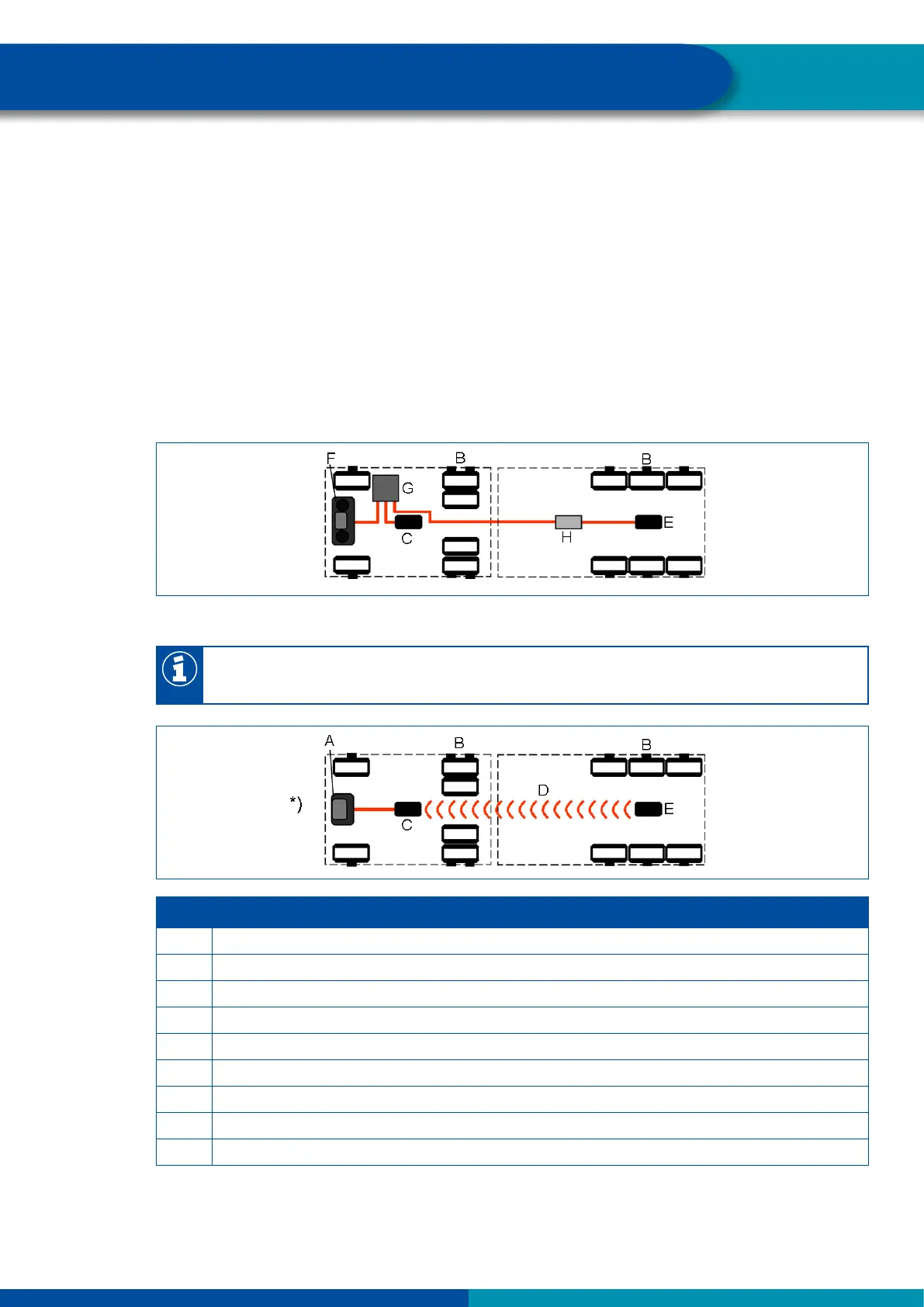
The following illustrations compare both transmission types, wireless connection and CAN bus, with
each other.
Data transmission via a CAN bus
Data transmission via radio link
The data can only be transmitted via a radio link if both the towing vehicle and the trailer are
equipped with external sensors.
LEGEND
A Display
B Sensors
C ECU
D Wireless connection
E Trailer ECU
F Integrated display
G Central computer
H TEBS modulator
*) In combination with external sensor in towing vehicle and trailer


 To Next Page