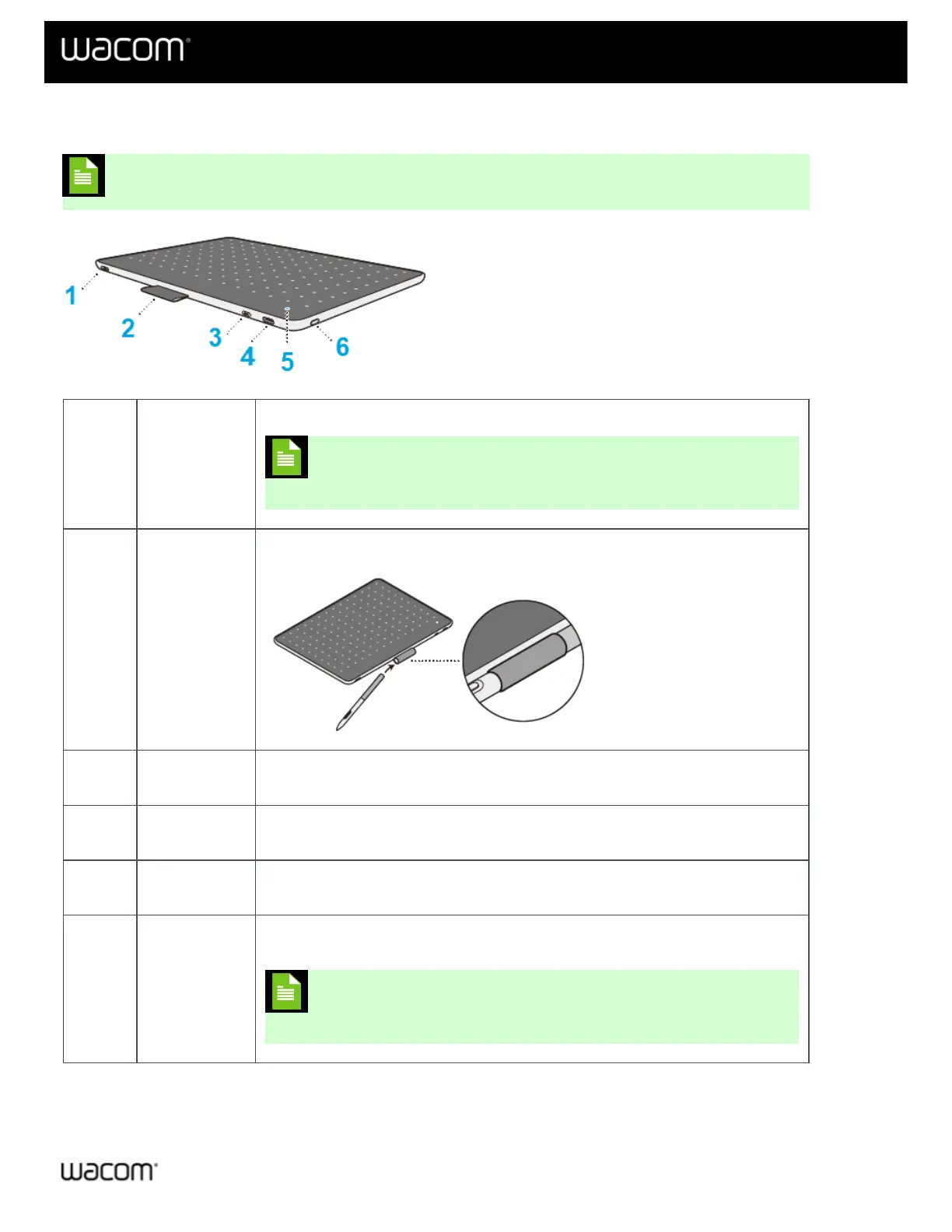
Features of your Wacom One
Note: "Wacom One" refers to both the Wacom One S and the Wacom One M.
1
Pen tether
slot
Attach the pen to your Wacom One using the pen tether slot.
Note: The Pen tether is an optional feature, available in the
Wacom eStore.
2 Pen holder
Use the tab on the top of the device to store the pen when it is not in use.
3 Mode button
This button is used for troubleshooting specific issues with Android devices. For
more details, visit Wacom Support to search for “Android FAQs”.
4 USB-C port
Connect your device to your computer using the USB-C cable included with your
device (or purchased separately on the Wacom eStore).
5 Status LED
The LED lights when the device is on and brightens when the pen is near the active
area. The LED also indicates Bluetooth status.
6
Power button
& Bluetooth
Press the button to turn the device on and off and to connect wirelessly to a
computer or Android device.
Note: When connected via USB, you do not need to use the
Power button to turn the device on.
| Do not share my information | Cookies | Terms of use | Privacy Policy | California Privacy















 To Next Page