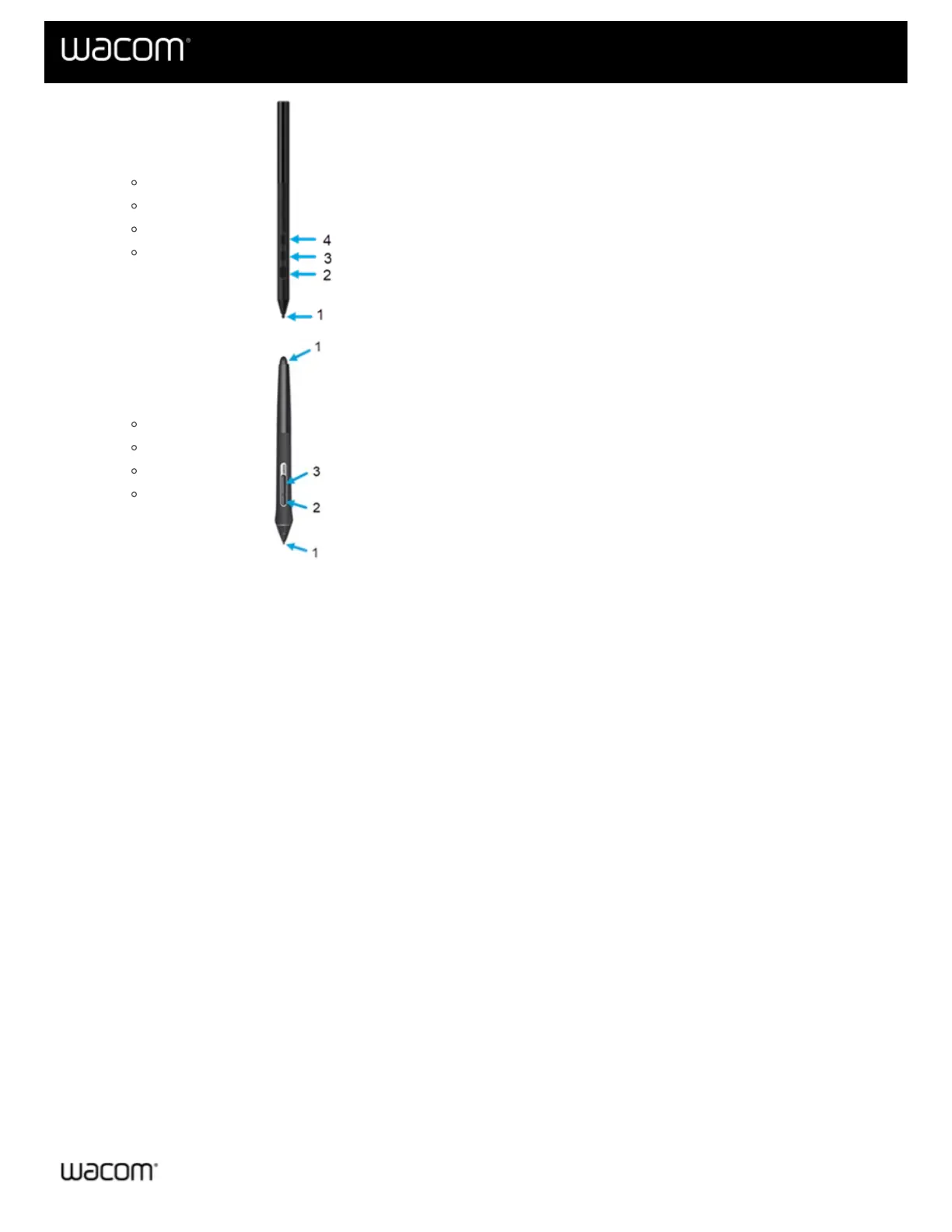
Pro Pen 3
Pen button = 4
Pen button = 3
Pen button = 2
Pen tip = 1
Pro Pen 2
Pen eraser = 1
Pen button = 3
Pen button = 2
Pen tip = 1
9. Move the pen from a vertical position toward the right and then toward the left. The X Tilt value should change
to approximately +60 when you move to the right. The X Tilt value should change to approximately -60 when
you move to the left.
10. Move the pen from a vertical position toward the bottom of the device and then toward the top of the device.
The Y Tilt value should change to approximately +60 when you move toward the bottom. The Y Tilt value
should change to approximately -60 when you move toward the top.
11. If you are testing an Art Pen, place the pen tip on the surface of the device and slowly rotate the pen on its
axis. The Rotation value should change as you rotate the pen.
12. If you are testing an Airbrush, move the fingerwheel forward and backward. The Wheel value should decrease
to approximately 0 when the fingerwheel is all the way forward. The Wheel value should increase to
approximately 1000 when the fingerwheel is all the way backward.
| Do not share my information | Cookies | Terms of use | Privacy Policy | California Privacy















 To Next Page