82 Lexa PLUS| Instructions for Use |RIS-311 ENG Rev03 |29/08/2022 |© W&H Sterilization Srl
Diagnostics
Troubleshooting
MANAGING ERRORS
If during a sterilization cycle an error occurs do the following:
1
Wait until the OPEN button appears.
2 At the end of the reset phase, you may open the door. A pop
appears requiring a confirmation.
3 Tap to open the door.
CAUTION! Do not switch off the sterilizer during the reset
phase: it takes some minutes to reset the system and
reach safe conditions in the sterilizer chamber.
Notice: Water could be present in the chamber when opening the
door: prevent spilling (e.g., place a towel below the chamber door).
VIEW AND SAVE THE ERROR LOG
1 Tap to save the list in the USB pen drive.
ERROR PAGE
During the sterilization cycle, the sterilizer is continuously monitored
by a control system. If an anomaly is detected, the cycle is aborted
automatically, and the sterilizer starts a reset phase.
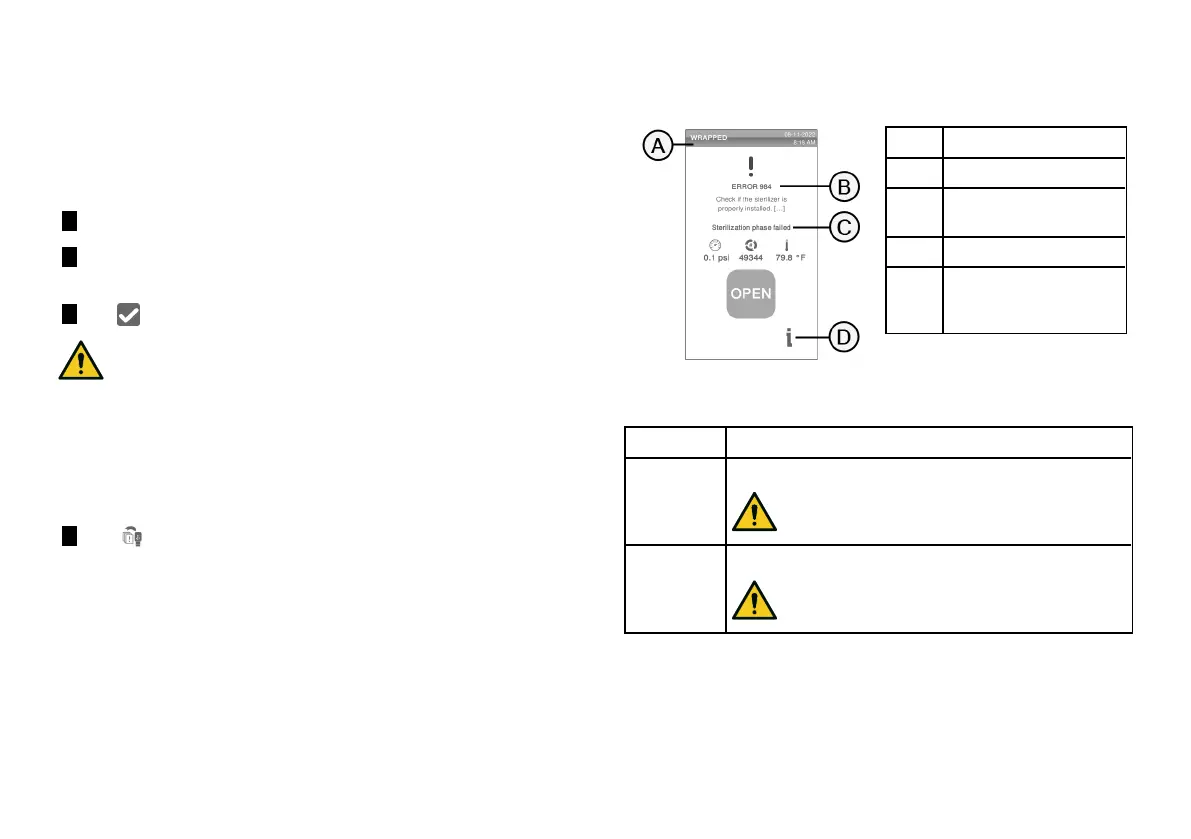
The following page appears:
Part Description
A
Current sterilization cycle
B
Error number, See
"Errors"
on page77
.
C
Warning messages.
D
Open button that appears
after the reset phase had
finished.
WARNING MESSAGES
Message Description
Load not
sterile
The load is not sterile.
WARNING! Do not use items on patients!
Drying
interrupted
The load might be wet.
WARNING! Wet items are for immediate use only!



 To Next Page