17
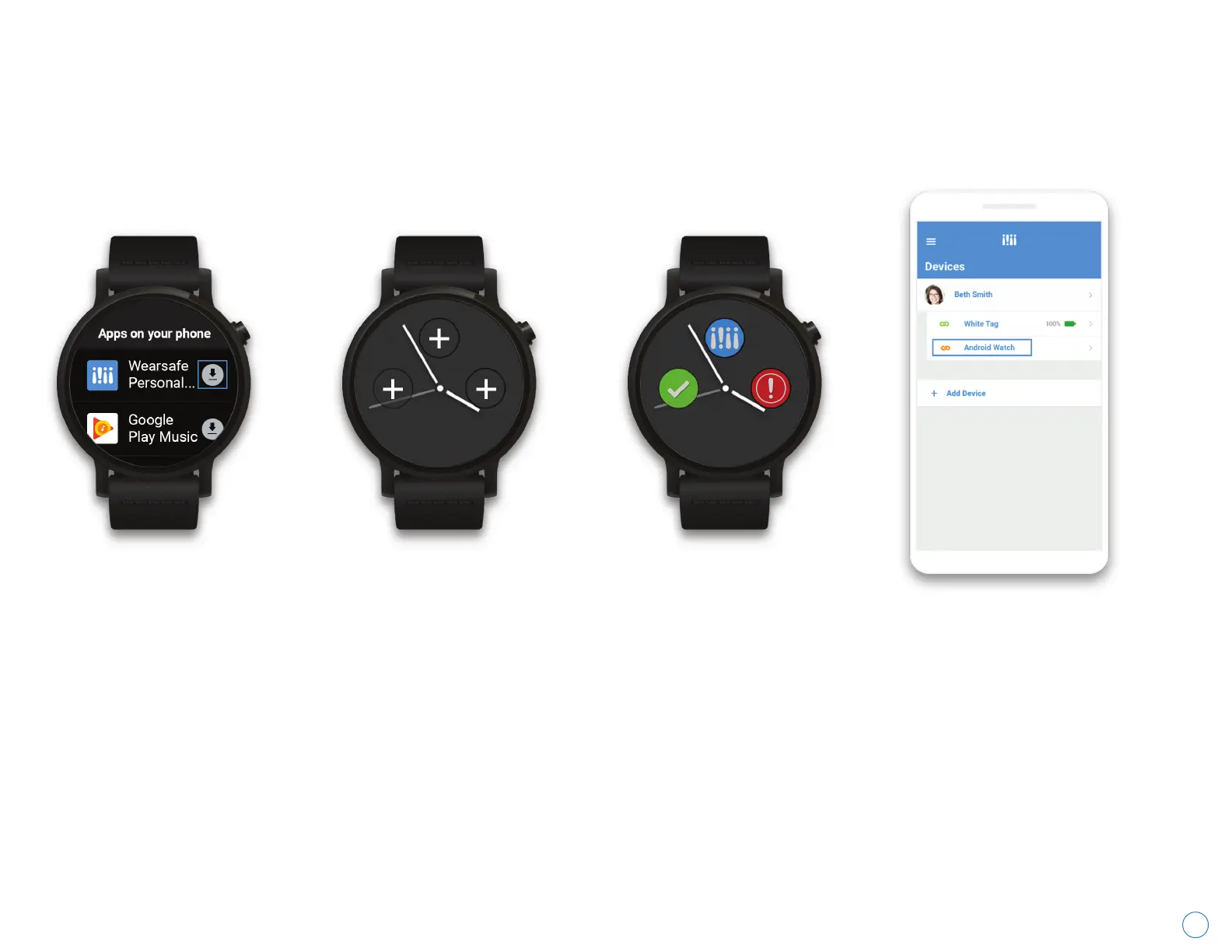
Pairing Your Android Watch
First, make sure the
Wearsafe App is installed
on your phone. Then,
open the Google Play
Store on your watch and
navigate to the tab listing
apps on your phone and
download the Wearsafe
watch app to your watch.
Next, press and hold on your
watch face to enter edit
mode. Scroll down to
Layouts where you will see
multiple options for the
number and arrangement of
complications. Tap the
complication layout you wish
to use and go back to edit
mode. On the watch face,
you'll notice empty spots
with “+” buttons. Tap them to
add a complication to that
spot.
You will have multiple
options when choosing
Wearsafe complications.
You may choose to add
the Wearsafe watch app
itself as a complication,
which opens the
Wearsafe watch app.
You can also choose the
Check-in or Red Alert
shortcut complications
to send Check-ins and
Red Alerts without
opening the app at all.
Once you’ve chosen your
preferred complications,
open the Wearsafe app
on your phone and visit
the “Devices” page from
the main menu to verify
that your watch is
properly paired. You will
see it listed with your
other devices.
With Android Wear 2.0, you can send alerts from your watch face using the Wearsafe complications. Follow these
instructions to download the Wearsafe App to your watch and set it up to send alerts.
Wearsafe User Manual



 To Next Page