EasyManua.ls Logo

Wearsafe Tag - Pairing Your Apple Watch

Default Icon
37 pages
Print Icon
To Next Page IconTo Next Page
To Previous Page IconTo Previous Page
Loading...
18
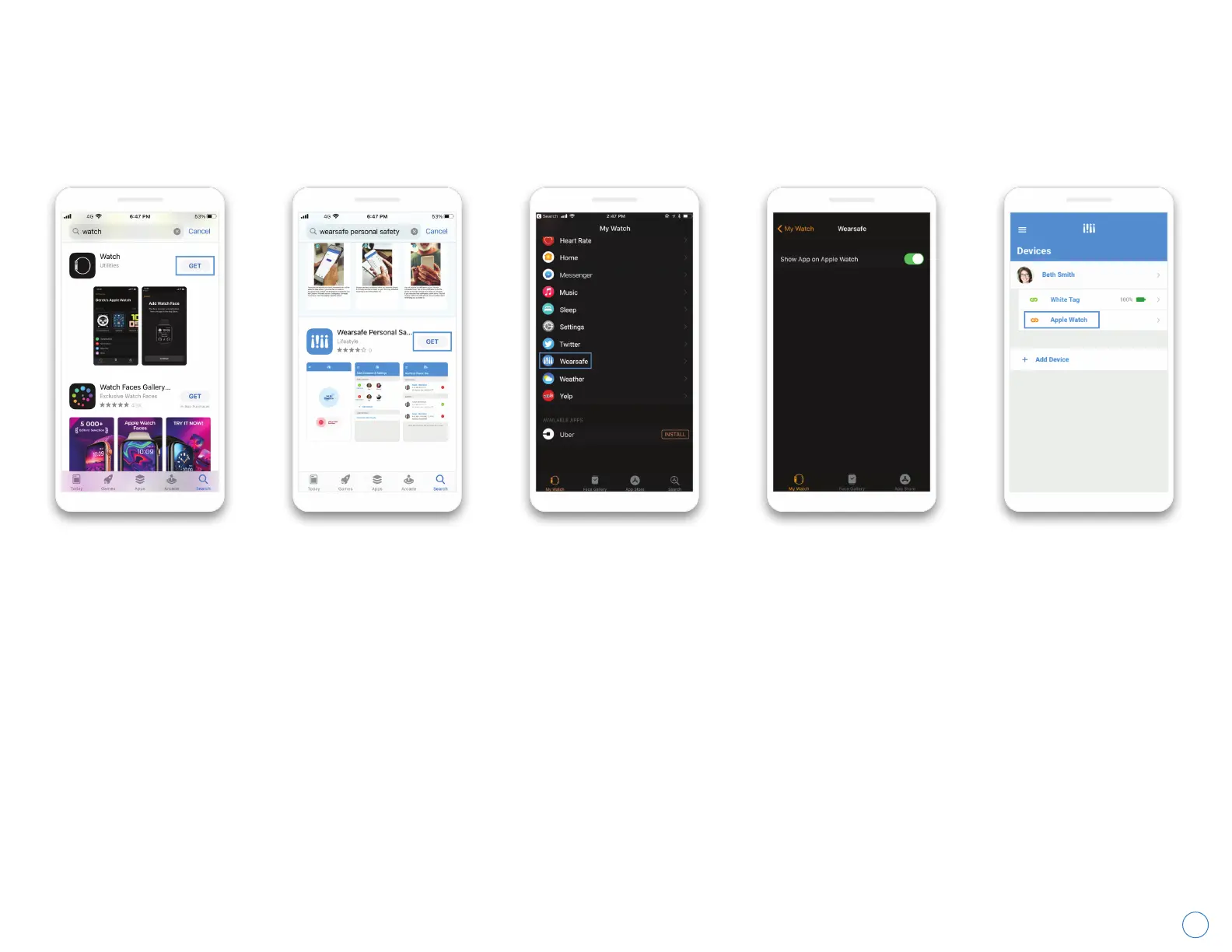
Pairing Your Apple Watch
To use your Apple
Watch with Wearsafe,
you must enable the
Wearsafe watchOS
App using the Watch
app on your iPhone.
If you do not have
the Watch app
installed yet on your
iPhone, open the
App Store and
search for “Watch”.
Then, install the app.
Next, make sure the
Wearsafe App is
installed on your
iPhone. Visit the App
Store and search for
“Wearsafe Personal
Safety”, then install
the App.
Once both apps
are installed, open
the Watch app on
your iPhone and
navigate to the “My
Watch” tab at the
bottom and scroll
down to the
Wearsafe app.
Open the settings
for Wearsafe and
enable the switch
which says, “Show
App on Apple
Watch”.
Your watch should
now be paired with
Wearsafe! To
confirm, visit the
“Devices” page from
the main menu of
the Wearsafe app.
Your watch should
be listed with your
other devices.
Wearsafe User Manual
With Apple Watch, you can send alerts from your watch face using the Wearsafe complications. Follow these
instructions to download the Wearsafe App to your watch and set it up to send alerts.