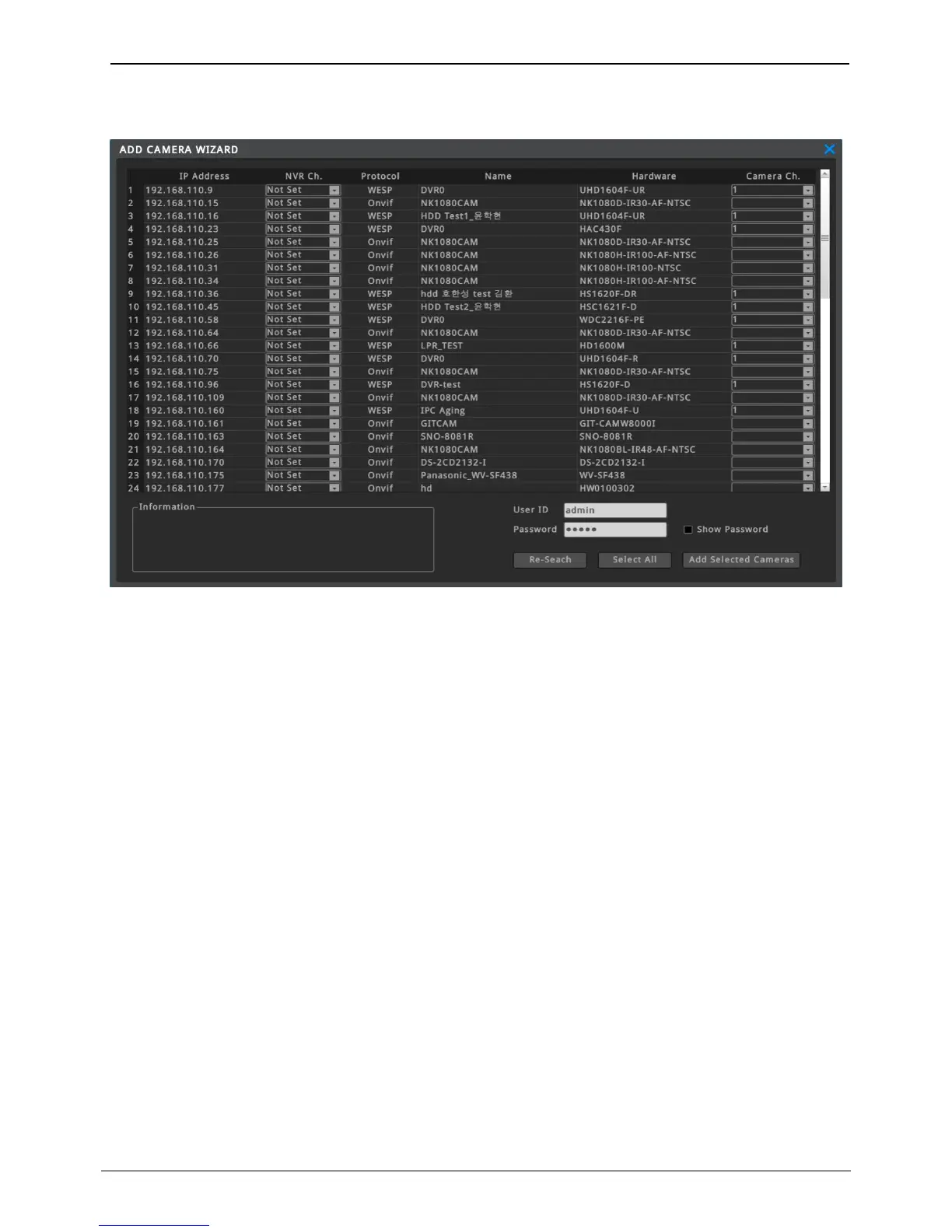
ADD CAMERA WIZARD
All IP camera and DVR which are in the same subnet can be registered at once by using ADD CAMERA WIZARD.
IP Address
Show IP address of IP camera or DVR. Note that only IP cameras and DVRs which re in the same subnet can be
shown in the list.
NVR Ch.
Set the number of channel of NVR to register.
Protocol
Show IP camera or DVR’s protocol.
Name
User defined deviec name of IP camera or DVR is shown.
User can manually change the name after registration is completed.
Hardware
Model name of IP camera or DVR is shown.
Camera Ch.
User should select the number of DVR’s camera channel if the unit is DVR.
For IP camera, this menu will be inactivated.
Information
Show the information of selected unit. The information is provided by the IP camera or DVR.
User ID / Password
User ID and Password of the IP camera or DVR should be typed in this menu. Please use Admin ID.
User ID and password might be different by models. When multiple cameras are selected and ID and password
of each of them is different, you can modify each camera's ID and password at [Device] – [Config].



 To Next Page