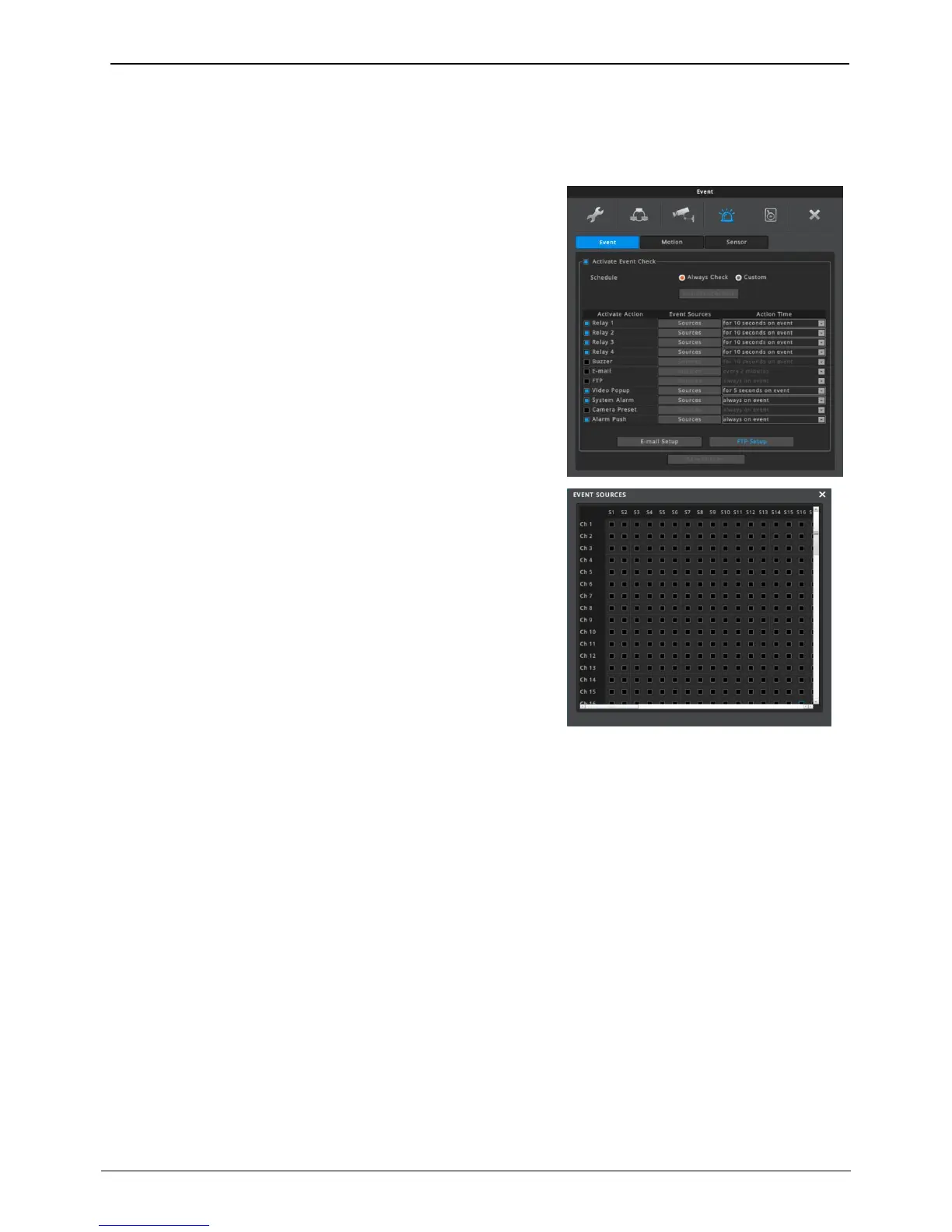
Relay
When events that have been selected in “Event Sources” occur,
event notification by relay goes on for the time period set in “Action
time”.
Buzzer
Event notification by buzzer goes on for the time period set in
“Action time”.
E-mail Setup
When events occur, NVR sends text information and image of
event to email address which is set by user.
FTP
When events occur, NVR sends image of event to deginated FTP
server
Video Popup
When selected event source’s event is occurred, video which is
mapped channel and sensor will be popup.
Multi channels and multi sensors can be mapped, and multi
channel’s video will popup in multi division mode.
System alarm
Image will pop up to notify triggered events upon event from event
source happens.
Camera preset
When events occur, PTZ preset runs according to previsous settings
Alarm push
If event in event sourch happens, event notification will be delivered to mobile application in push alarm.
<Note>
1. To use fire detection feature, please connect WEBGATE’s flame detection camera (N1080BL-AF-F2).
2. Select sensor of fire detection camera channel as Flame Detector.
3. Alarm push feature will be working over v3.4.x version of Android/IOS mobile application.
Action Time
• Dwelling time of relay or buzzer: Relay or buzzer remain for the selected time preriod
• E-mail: Sends email according to the interval
• FTP, System alarm, camera preset, Alarm push: Always operate on event
<Notice>
1. If Action time is off, action for events will not work.
2. Event action is working when action is enabled (checked).



 To Next Page