INSTALLATION AND MAINTENANCE MANUAL
E1 FAMILY
LICENSED & SPREAD SPECTRUM RADIOS
JUNE 2001
SECTION 2: PRODUCT DESCRIPTION PAGE 3-57
3.12.3 Spreading Code Selection (Lynx.sc Only)
The spreading code is the pseudo-random chip sequence that is mixed with the data to produce the
spread spectrum signal. The spreading code is generated by only the Lynx.sc radio internally.
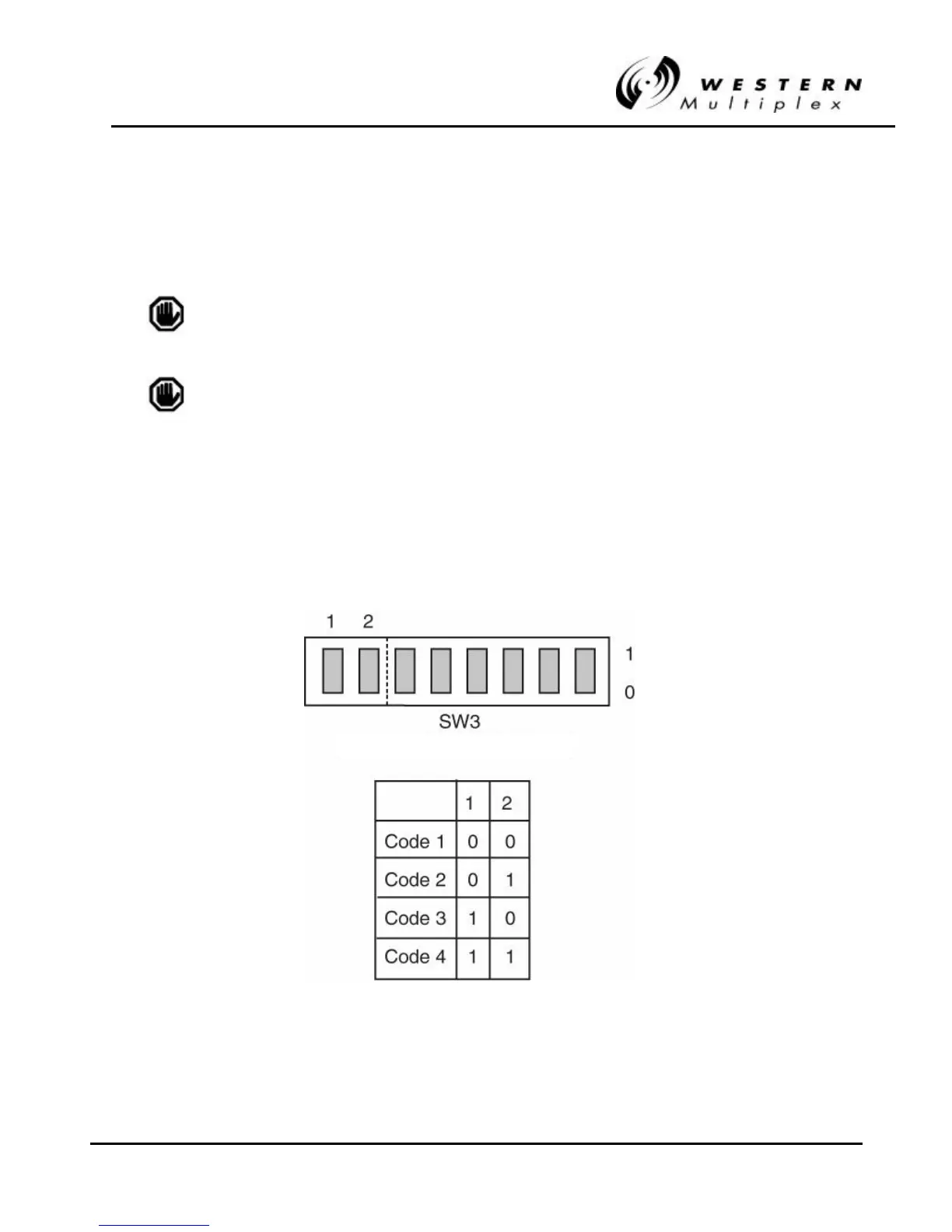
Different codes can be selected using the DIP switches on the Lynx.sc radio’s rear panel.
The spreading code must be the same for both ends of a radio
link.
The spreading code can not be selected on the 4xE1 and 8xE1
Lynx 1.5 GHz and Lynx.HD models.
Spreading codes are all set in the factory to code 1. Should the code need to be changed, then
both ends of the link must be changed.
Changing the spreading code is an out-of-service adjustment. There are two DIP switch segments
on SW3 located on the rear panel which select the spreading codes. See Figure 3-13 for DIP switch
segment settings.
Figure 3Figure 3-- 13: Spreading Code Selection (13: Spreading Code Selection (Lynx.scLynx.sc only)only)



 To Next Page