EasyManua.ls Logo

Williams Electronics WHIRLWIND - Side 2

Williams Electronics WHIRLWIND
106 pages
Print Icon
To Next Page IconTo Next Page
To Previous Page IconTo Previous Page
Loading...
€,_\n\P._\\m.q<_\M
m_oo:o:_om
om3mm
—Wmm~@5OmnmO
ame
$J—O$~O—.—m:.n
2%»
mmnm
m8um
>
man
m
o.
m_:o_o
_.m3um
.
.
Aom.
mm
sooommmé.
:32.
3988
osooxm
V
ommmm<m
..w5m_o
rmaum.
ca
2864
in
wooqo
o.mu_m<$
2
m3m_o
rmanm
«om,
moo
oo3n_o8.
Ba
3
n._m<o_.
o
9mu_mE
m3n_o
rmanm
49....
m
+
2.2
o
.92
uoooanm
ommmm<m
:38
o.
:9;
_m3u
2:
_u_m<o«
8
ommmm<m
so
:m3o
2
so
:3.
oo2a__oo
53..
3
so
to
woos
o_oo_o.<o.
moo
so
_o.o23.3o
.
33.2
Tm
a_mu_m<m
man
oo
3
.3
:8
_u_m<o«
u
Q_mv_m<
_:c3%oq
BAT.
om“.
_:Vn_m<o«
w
o_mu_m£
man
.8
com
_o:
5
Sn
.
4
m=.5_o
rmaum
.43.
>
+
nmmmm
08%
558:
E9...
8
«mm
oaoo.
8183..
8
ozoox
m:<
um:.oc_m«
_m3v
7
Smo:
:92
_m3n
3
3
2.5
..w_3©_o
_..m3Um..
V
mozom
am.m.:oQ
3
8m.»
rmao
_<_m5x
4ma_o
20
A
4
nmmmm
>o<>zom
8805
92.8:
$
ozoo.
c1o2<
mo_o:o_a
._.¢m.
>
%
ummmm.
man
88:.
>So-c§g>zc>r-oo<<z
+
.83
92.8:
3
=8
_<_>zc>r-
4
ooéz
uomaoz
8
mama.
%
ommmm<m
.oo._
qoa.
2:
_u_m<c_.
in
moo_.o
9o_o_m<$
sooaoo
ouoaaoo
2
m
|
6m
3
Em<o_.
w
o.mo_m£
umozosma
mo_o:o_a\:mm:m4.
92:6
:6
8%
o<o_o.
08328
.8
ouoqmzoa.
8
>22
9
8.2
uoooaqu
ommmm<m
mc83m:o
o<o_o
o.
m:
mo_o:o_am
man
zmmzmam
o:
u_m<:m_q
man
umoxcox
8.8::
:m3o
.3
E364
Tm
Emv_m<m
man
om
Sb»
3
_u_m<o4
u
Em_u_m<
>
mo_o:o8
._.om,
m
+
ummmm
>o<>zom
8805
4
92.8:
osoo.
853..
8
ma<m:oo
8
So
:92
ox.
o.
:8
..oo._
._.om1
8
co
ozooxoa.
Ocmoéo
.8
onmomzoz.
..
wm
mmnm
2%
m
o.
wo_o:oa
«mm».
5.3.
oogao
ozooxm
o.
mo_o3o8\2mm:o.
o:osa
moo
oo3u.o8.
A
+
20
+
nmmmm.
mag
c:_m8:.
9
ummmm
>o<>zom
8805
918:
>S.o-c..o:s>zc>r.oo<<z
V
A33
92.8:
8
«own:
:8
.
4
osoo.
ozos.
%
_
>c4o-c..
oooao=+
owmmm<m
..m§8:
_.o<m_m..
2:
2364
in
woooo
Em-
u_m<mV
So
.3
_u_mv6_.
u
o.mv_w:
<<w3
8
ojoox
m:<
um_&oc_m_‘
mo_o:o8
.3
2.8
.60:
._.mm~..
..y
W
+
>22.
u
82
mwooaqm
ommmm<m
:m3o
man
3:389
88
xxv
o.
mmn:
9.58:
Sm.
mm
v8mo::<
mo8m8a.
:
m3
8.
nmmmm
>o<>zom
8.85
misc:
oaoo.
8283.
4
gang.
4
owmmm<m
..m¢<.8:
macaw.
2:
_u_m<m_.
in
moo_.m
U8-
%
u_m<mV
.3
3
n_m<o..
w
o.mu_m<_
onmmim
m3.
92.8:
.888
8
:8
92.8:
>
Zmix
.388
8
ozoox
E3832
.8
ouoom.
:0:
8
82888
3
:8
on:
8..
:3
3
So
mm3o
uoonama.
ommmm<m
=8
m<<_8:.m
3.38
mag
3:352.
5
:8
23.2
wooa
&mu_m<m.
<o«=<_:n
uqovoa
misc:
ouoamzoa.
mo_oo.
man
ouo..m8
mizosom.
:2:
83.38
ozooxm
S
92.8:
0.358
moo
oo3v_o8.
20
H
8
4
nmmmm
>o<>zom
8885
92.8:
2.68.
4
+
983..
8
nqoomoa
8
mumnra
mmao
8m8.
=
~33
o3o2smo.
ox:
.4mm<U_m
zomzo
u3m$3.
Ema.
8
ozoox
m3.
um:_oc_m_.
mixes»
v
nmmmm
>o<>zom
3805
92.8:
ozno.
¢
c:o=<.
8
ma<m:oo
8
:8
E
3
8.3.3..
2:8:
8__m
4
mcoc.
ozmzoom
83
mmo-
ommmm<m
03.8
.838
man
3:383
3
_u_m<m«
rm
moooo
8?.
moéamma
v8.mm
>O<>zom
92.83
mmmi
o.mu_m<m
man
8
oo
3
2364
m
o.mu_m<.
mzoésm
:6
8
m9..m:oo.
8
>8;
_83m
.>c
3
v
f:
mag
ox:
:03
:8
Aomzo ozomzn
U038:
2
:8
omam
:83
8
>a_:m~3o:.
_83m
38
o.
v
.48.
uoomwma
+
ommmm<m
83.88
om.»
3
>8:
:93
co
ao8::3o
omao
onmqmzoam
man
om3.:nmv.
oI>zom
88.88
>a_.cmS..o2
_83m
co
2...
zwsoo
:8
@830
23.
man
omziaomv.
D29
>:&E>&.oo§3aV
8
nm3w
3m:cm_
8..
amzm.
..
Pooooa
8
>8
.8.
uawm
>o<>zom
momi.
_o2o=<.
8
ammo:
>238.
Eoao.
Ema?
8
G350
03..
23..
mo
8
>cQ:m
man
>a_cm.3o:8
on
oo
8
mmao
O83
Toomrm
omao
03-0:
osao:
8
oz.
3%
8
oz.
_
4
_
A
4
Tmmao
3
3
>282
Zoao.
$ma<
8
u_m<.
_
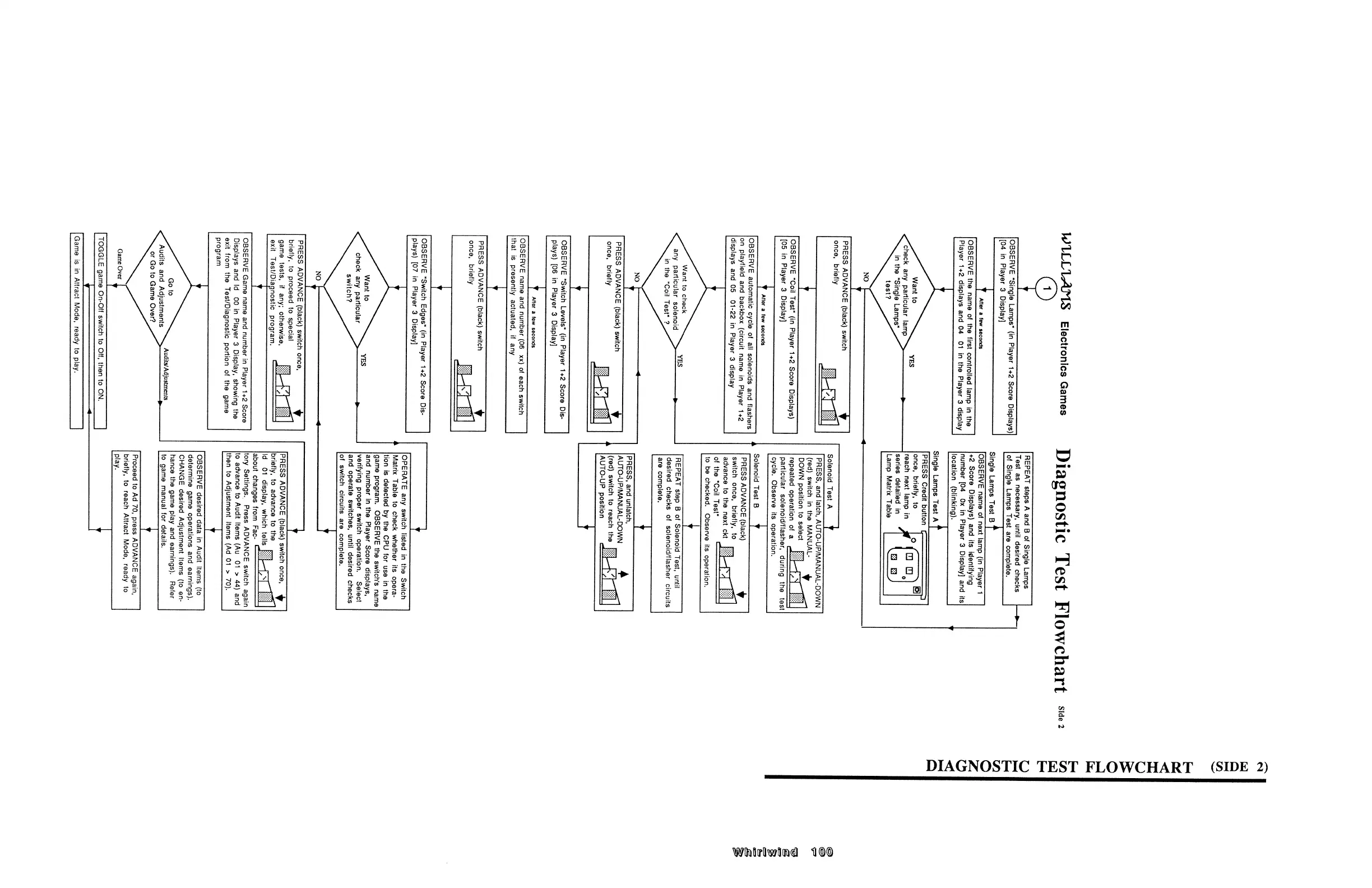
DIAGNOSTIC
TEST
FLOWCHART
(SIDE
2)
Wifn lrflw tm l
1|
©©
W"LLL'Lr3.T’l.8
Electronics
Games
Diagnostic
Test
Flowchart
Side2
(SIDE
2)
OBSERVE
"Single
Lamps‘
(in
Player
1+2
Score
Displays)
[04
in
Player
3
Display]
+
After
a
few
seconds
OBSERVE
the
name
of
the
first
controlled
lamp
in
the
Player
1+2
displays
and
04
01
in
the
Player
3
display
REPEAT
steps
A
and
B
of
Single
Lamps
Test
as
necessary.
until
desired
checks
V
of
Single
Lamps
Test
are
complete.
Single
Lamps
Test
8
+
OBSERVE
name
of
next
lamp
(in
Player
1
+2
Score
Displays)
and
its
identifying
number
[04
Ox
in
Player
3
Display]
and
its
location
(blinking).
Single
Lamps
Test
A
PRESS
Credit
button
want
to
YES
once.
briefly.
to
check
any
particular
lamp
A
mach
"ext
‘amp
i”
test?
Lamp
Matrix
Table
NO
4
V
PRESS
ADVANCE
(black)
switch
§
once,
briefly
i
OBSERVE
"Coil
Test”
(in
Player
1+2
Score
Displays)
[05
in
Player
3
Display]
+
After
3
YEW
SBCODUS
OBSERVE
automatic
cycle
of
all
solenoids
and
flashers
on
playfield
and
backbox
(circuit
name
in
Player
1+2
displays
and
05
01-22
in
Player
3
display
Want
to
check
NO+
PRESS
ADVANCE
(black)
switch
once,
briefly
V
must
i
OBSERVE
“Switch
Levels“
(in
Player
1+2
Score
Dis-
plays)
[06
in
Player
3
Display]
?
After
a
few
seconds
OBSERVE
name
and
number
(05
xx)
of
each
switch
that
is
presently
actuated.
if
any
i
PRESS
ADVANCE
(black)
switch
§
once.
briefly
V
OBSERVE
"Switch
Edges“
(in
Player
1+2
Score
Dis-
plays)
[07
in
Player
3
Display]
Want
to
Solenoid
Test
A
}
PRESS.
and
latch.
AUTO-UP/MANUAL-DOWN
(red)
switch
in
the
MANUAL-
DOWN
position
to
select
__
repeated
operation
of
a
_!_
particular
solenoid/flasher.
during
the
test
cycle.
Observe
its
operation.
Solenoid
Test
8
+
PRESS
ADVANCE
(black)
V
switch
once.
briefly.
to
advance
to
the
next
ckt
of
the
“Coil
Test"
""""""""""""
to
be
checked.
Observe
its
operation.
i
any
particular
soienoid
YES
>
REPEAT
step
8
of
Solenoid
Test.
until
.
in
the
.00"
Test.
1,
desired
checks
of
solenoid/flasher
circuits
are
complete.
PRESS.
and
unlatch,
AUTO-UP/MANUAL-DOWN
(red)
switch
to
reach
the
AUTO-UP
position
!—g
i
i
OPERATE
any
switch
listed
in
the
Switch
Matrix
Table
to
check
whether
its
opera-
tion
is
detected
by
the
CPU
for
use
in
the
game
program.
OBSERVE
the
switch's
name
and
number
in
the
Player
Score
displays.
check
any
panicmar
YES
5
verifying
proper
switch
operation.
Select
switch?
and
operate
switches,
until
desired
checks
of
switch
circuits
are
complete.
NO
<
+
PRESS
ADVANCE
(black)
switch
once,
*
briefly.
to
proceed
to
special
game
tests,
it
any;
otherwise,
exit
Test/Dia
nostic
program.
V
OBSERVE
Game
name
and
number
in
Player
1+2
Score
Displays
and
id
00
in
Player
3
Display,
showing
the
exit
from
the
Test/Diagnostic
portion
of
the
game
program
Go
to
,
Ad'ts/Ad‘
tm
is
Audits
and
Adjustments
u
1
Jug
cn
>
or
Go
to
Game Over?
Game
Over
[TOGGLE
game
On-Oil
switch
to
Off,
then
to
ON.
I
<
Y
[Game
is
in
Attract
Mode,
ready
to
play.
PRESS
ADVANCE
(black)
switch
once.
V
briefly.
to
advance
to
the
id
01
display,
which
tells
about
changes
from
Fac-
""""""""""""
tory
Settings.‘
Press
ADVANCE
switch
again
to
advance
to
Audit
Items
(Au
01
>
44)
and
then
to
Adjustment
Items
(Ad
01
>
70).
OBSERVE
desired
data
in
Audit
items
(to
determine
game
operations
and
earnings).
CHANGE
desired
Adjustment
Items
(to
en-
hance
the
game
play
and
earnings).
Refer
to
game
manual
for
details.
i
Proceed
to
Ad
70,
press
ADVANCE
again,
briefly,
to
reach
Attract
Mode,
ready
to
play.
DIAGNOSTIC
TEST
FLOWCHART
Wliullli‘[|\wlllmCél
Tl
©©

Table of Contents