504474448
3
EN
Aug. Winkhaus GmbH & Co. KG ∙ Berkeser Straße 6 ∙ 98617 Meiningen
T +49 369 3950 - 0 ∙ www.winkhaus.de ∙ Subject to technical changes
blueMatic EAV Installation, Operating and
Maintenance Instructions
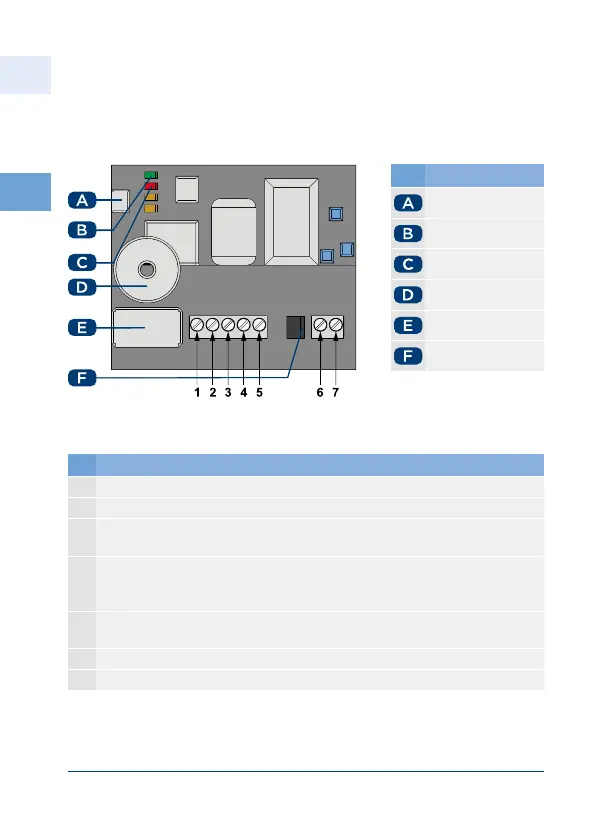
• Connect the terminals 2 through 5 of the wireless receiver as described in the
table below.
No. Name
P button
green LED
red LED
Buzzer
Relay
Jumper V V
Figure 3.5.1-1: Terminal assignment of the wireless receiver
No. Terminals wireless receiver
1 Break contact (NC) is not required
2 Contact (C) connect with a green wire from the cable transition
3 Make contact (NO) connect to terminal of the wireless receiver
( V DC)
4 V DC or V DC Power supply eg from the Winkhaus power
supply (connect with white wire from the cable transition terminal
from the wireless receiver)
5 V DC Power supply eg from the Winkhaus power supply (connect
with brown wire from the cable transition)
6 Auxiliary antennaANT (not required)
7 Auxiliary antennaGND (not required)



 To Next Page