504474458
3
EN
Aug. Winkhaus GmbH & Co. KG ∙ Berkeser Straße 6 ∙ 98617 Meiningen
T +49 369 3950 - 0 ∙ www.winkhaus.de ∙ Subject to technical changes
blueMatic EAV Installation, Operating and
Maintenance Instructions
white V DC
brown V
green
yellow
grey
pink
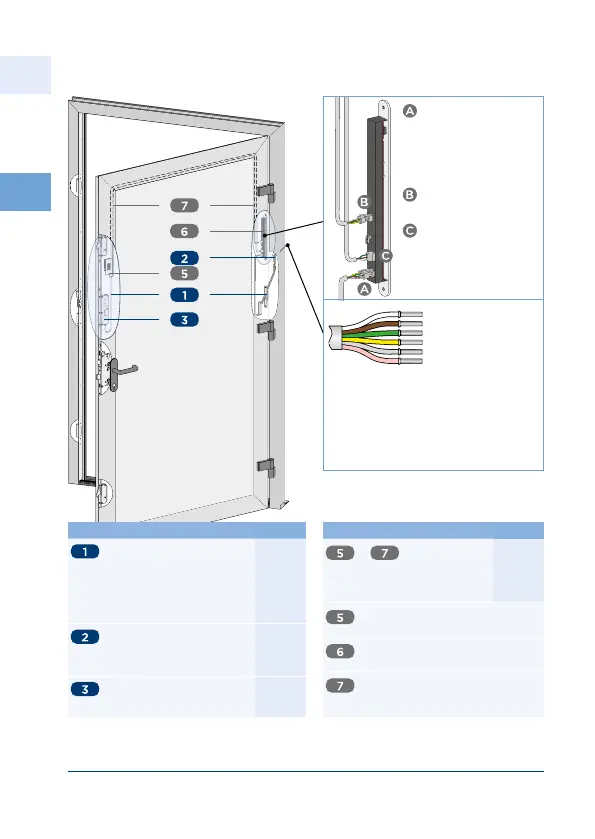
Figure 3.6.2-5: Installation blueMatic EAV with Fingerprint ekey home
integra with control unit (sash side)
greenyellow output relay at
integra
greypink input for external potential-
free contact (eg unlocking
via intercomopen button)
Notice! max m extendable
(min mm)
X Connection
from sash part cable
transition T-KÜ-T SET
FT INTEGR-EAV to the
control unit ekey home
integra with -pole
plug
X Connection from
control unit to the
fingerprint plug-in
Screw-type terminal
Connection to motor
housing EAV (relay )
white supply
brown supply -
green switching pulse
}
relay (at integra )
}
external opening
signal
Description Part-no.
Set of cable transition T-SET
KÜ-T FT INTEG-EAV M
including connecting cable
m -wires for motor
housing plus cover plate
(depends on the faceplate
material type) plug-in
Frame part cable transition
T-KÜ-T RT Kabel M for
external power supply
mounting on DIN rail
Motor housing EAV for re-
trofitting mechanical locking
system AV standard
Description Part-no.
to ekey WH-EAV
Set Integra with control unit
round face plate mm
square face plate mm
ekey
Fingerprint ekey home FS IN T
BT Dekorelement FS IN ED
Control unit ekey home SE Integra
(RE)
ekey KAB A m x RJCP
Connection between fingerprint
and control unit Integra



 To Next Page