INITIAL POWER-UP SCREEN
When the unit is energized for the first time, or after a power
loss:
• On a 60 Hz power supply, the Select Time Format screen
appears.
• On a 50 Hz power supply, the Select Language screen
appears, then the Select Time Format screen.
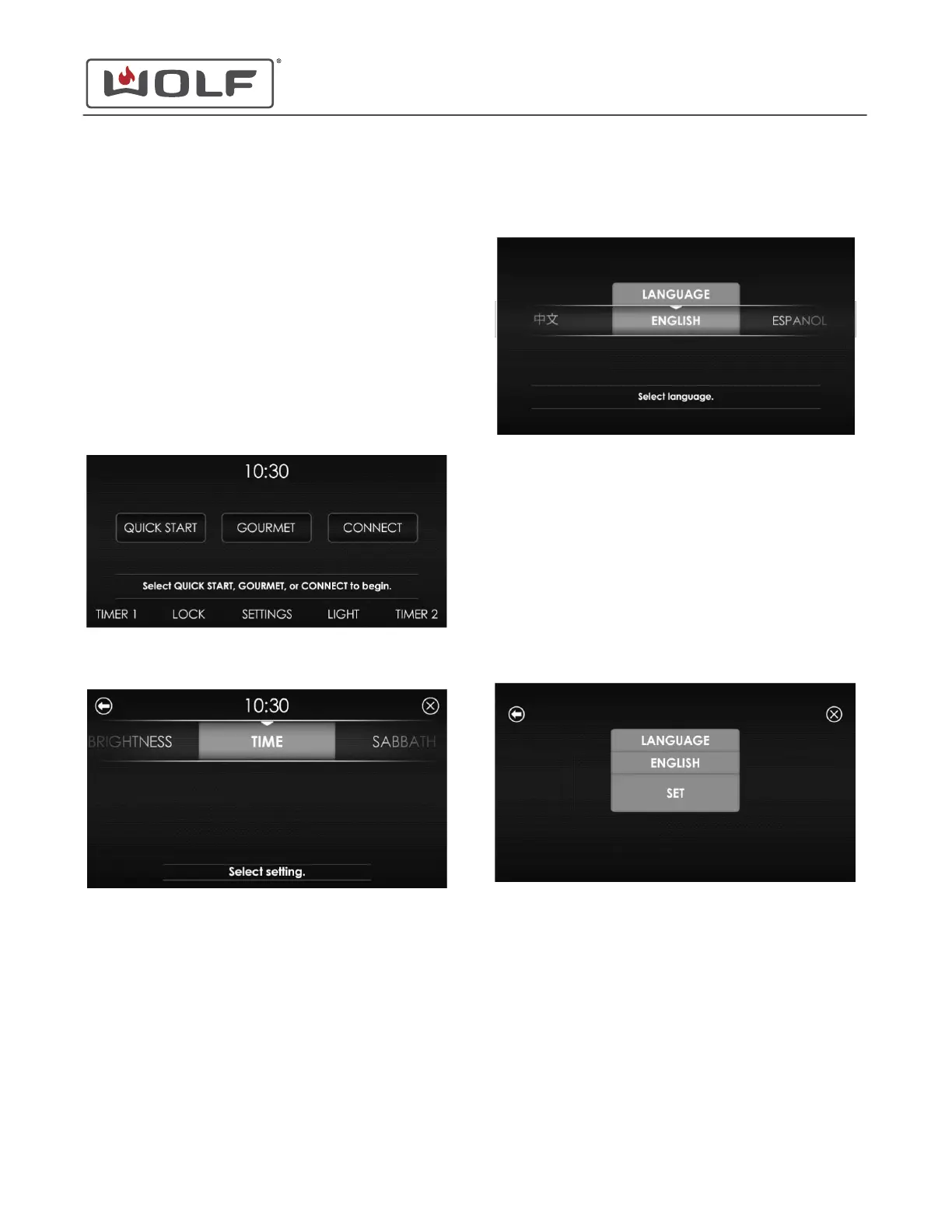
SET THE LANGUAGE
1 Touch the time on the display. The Home screen appears.
2 Touch Settings. The Settings screen appears.
3
Scroll to Language on the UIM. Touch Language. The
Language Selection screen appears.
The available languages are:
• English
• Spanish
• French
• German
• Italian
• Dutch
• Chinese
4 Scroll left or right to highlight the desired language. Touch
the highlighted selection. The Set Language screen
appears.
5 Touch Set. The Home screen appears.
30" and 36" Induction Range
Settings
SETTINGS
service.subzero.com
829191 REVA
2



 To Next Page