3-22 Installation of Printhead and Ink Cartridge Rev AB
Wolke m600 touch Operator Manual
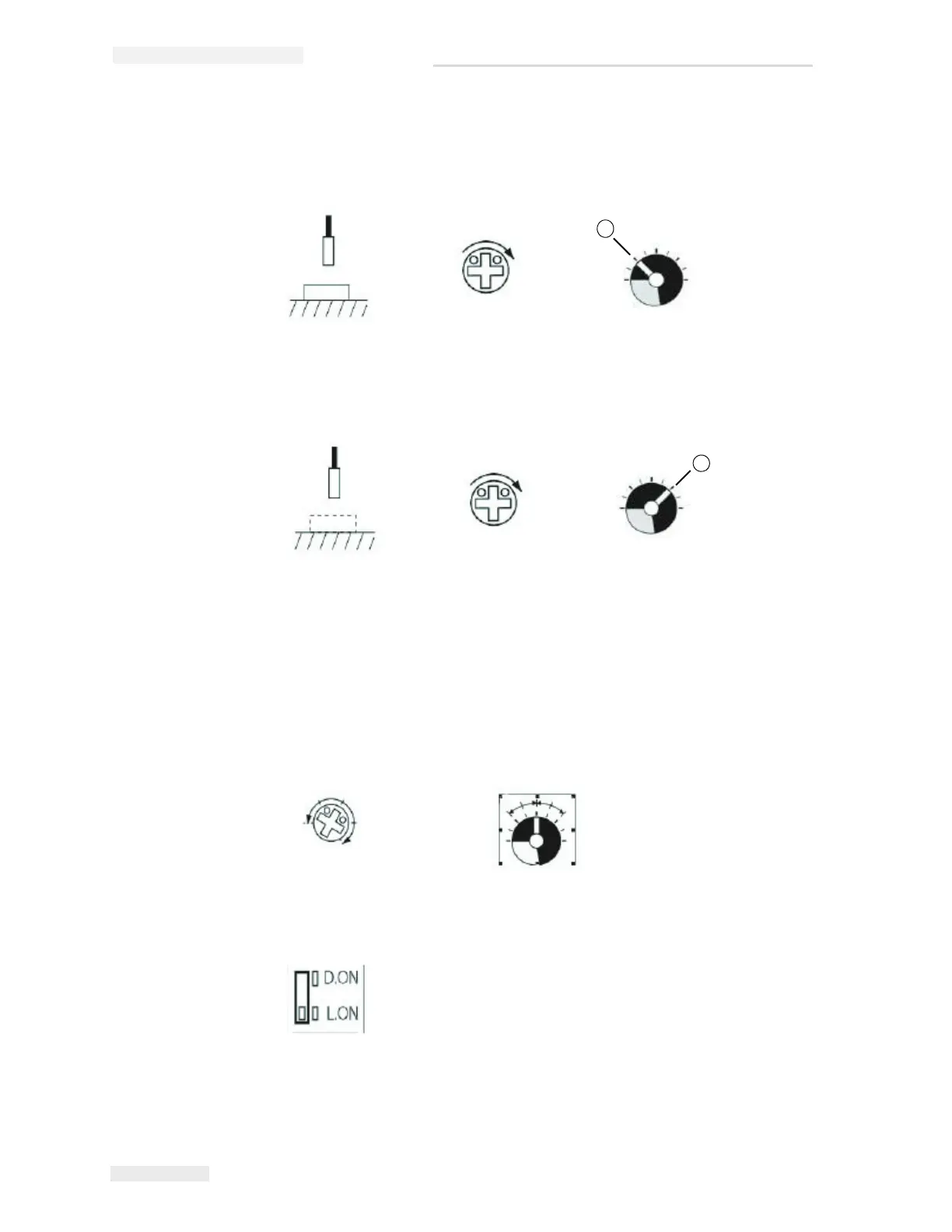
4 Using a measuring object, set the sensitivity in the identification area.
To do so, turn the trimmer in clockwise direction until the function
indicator (red LED) glows. This is point A.
5 Remove the measuring object. If the function indicator (red LED) does
not glows without an object, continue turning the trimmer in
clockwise direction until it glows. This is point B.
Note: If the function indicator (red LED) glows without an object, the
indicator must be switched off (turn trimmer counterclockwise).
Then turn the trimmer in clockwise direction again until the function
indicator glows. This is point B.
6 Set the sensitivity to an average (point C) between point A and point
B. Once the sensitivity difference between point A and point B is half a
rotation, stable identification will be possible.
7 Set the D.ON/L.ON switch in dependency on whether the sensor
should be switched ON or OFF for an object.
Note: After changing over the FINE/TURBO selector switch, sensitivity
must be readjusted.



 To Next Page