Settings 4 - 33
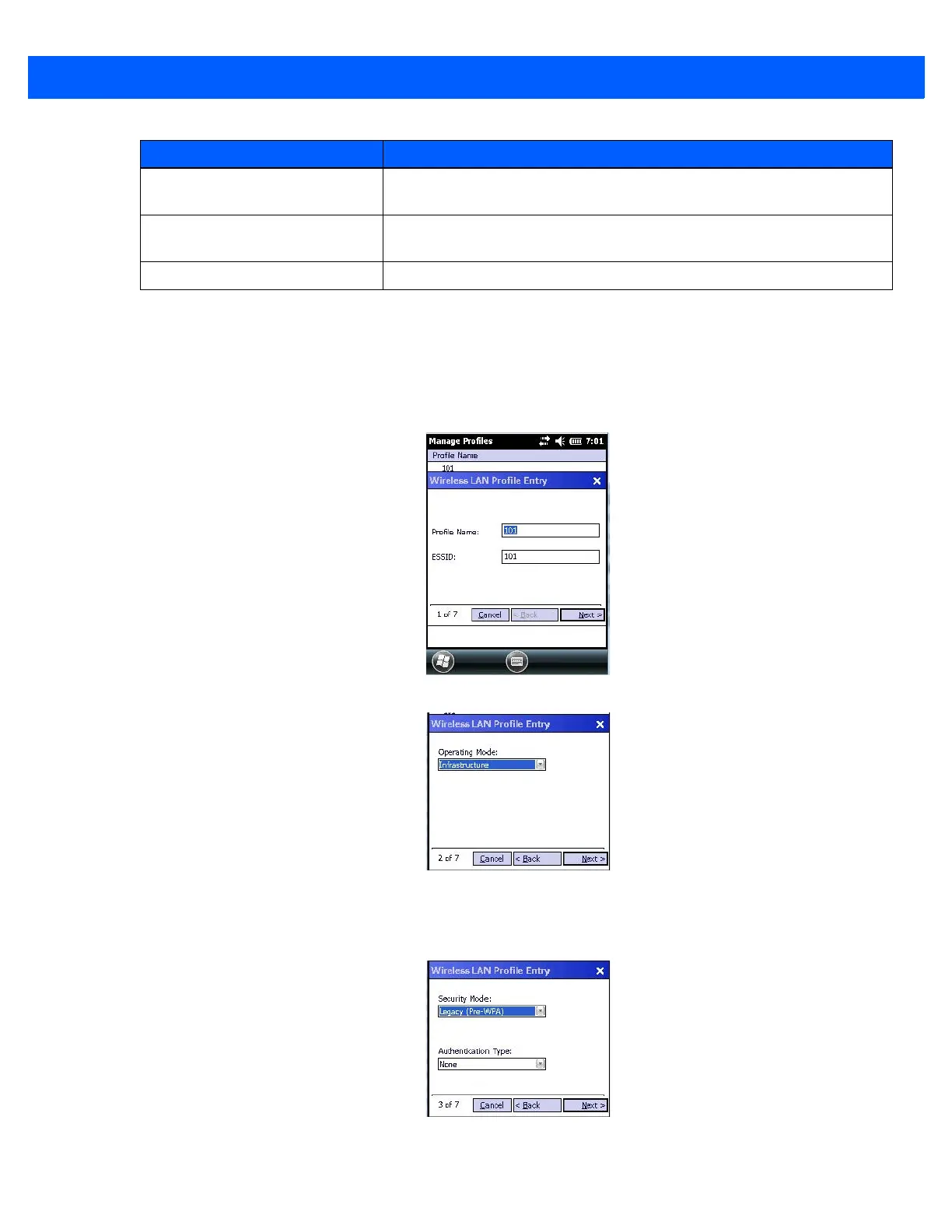
•Tap on Manage Profiles.
• Tap and hold the stylus on the Manage Profiles window, and choose Add from the pop-up menu to
display the Wireless LAN Profile Entry window.
• In the Profile Name dialog box, type a name for the profile
• In the ESSID Profile ID dialog box, type the ESSID.
•Tap Next to display the Operating Mode dialog box.
• In the Operating Mode drop-down menu, choose Infrastructure. (Keep in mind that because the Regula-
tory option for this unit is set to Enable 802.11d by default, the operating mode is limited to Infrastructure.
•Tap Next to display the Security Mode dialog box.
• In the Security Mode drop-down menu, choose Legacy (Pre-WPA).
Wireless Diagnostics Provides tools with which to diagnose problems encountered with the
wireless connection.
Log on/off Displays the Network Login dialog box used to log on to a particular
profile or to log off the currently active profile.
Fusion Help Displays extensive on-device Help.
Application Description



 To Next Page