Audemat Control Silver v.2.1.x User Manual – 06/2015
Page 20
Head Office : Parc d’activites Kennedy - 20, avenue Neil Armstrong – 33700 Bordeaux-Merignac (France)
Tel +33 (0)5 57 928 928 – Fax +33 (0)5 57 928 929 – contact@worldcastsystems.com – www.worldcastsystems.com
4. SYSTEM CONFIGURATION
4.1. Connecting to the unit
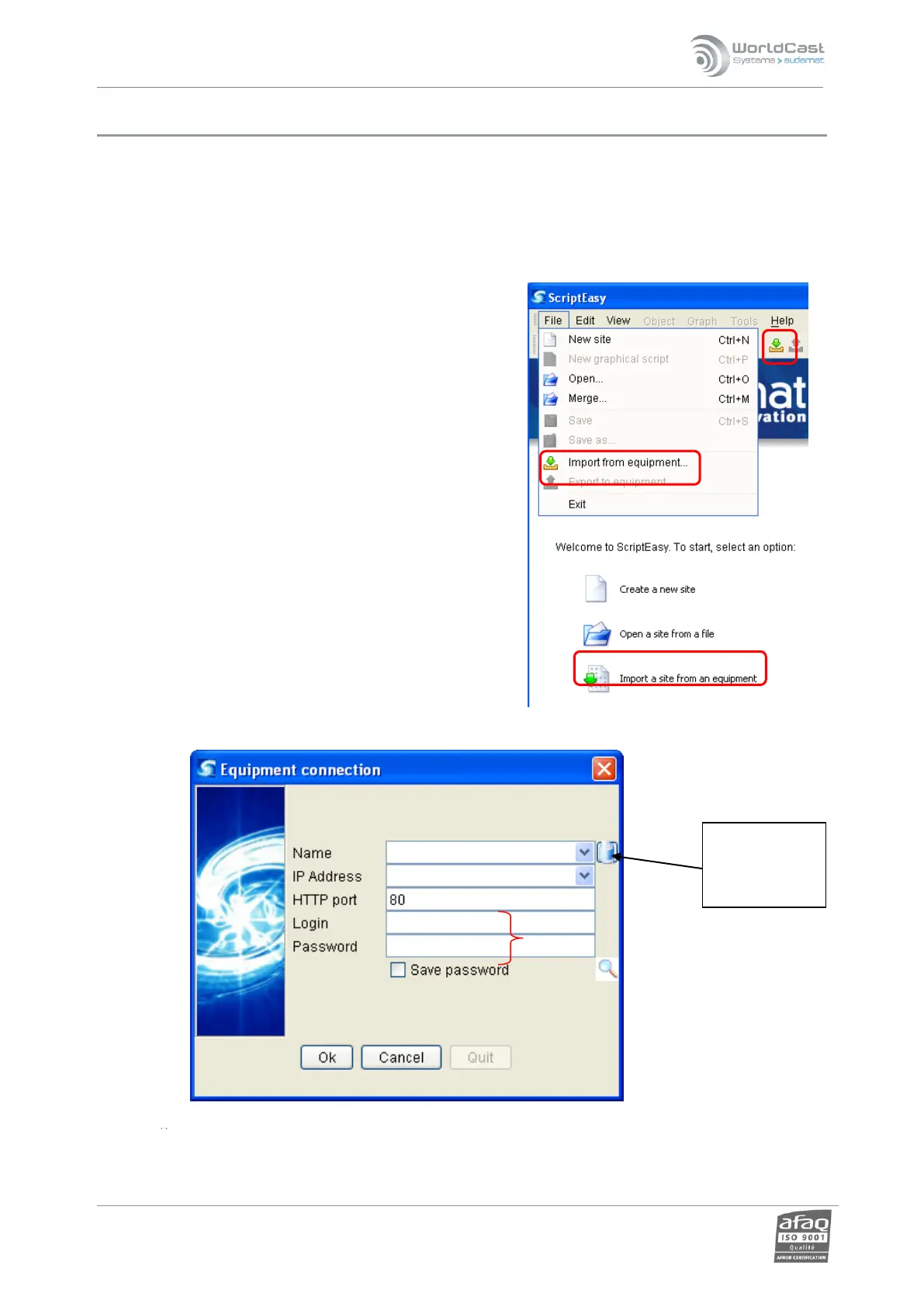
To access the system configuration, launch ScriptEasy from the desktop shortcut or from
‘Start’’Programs’’WorldCast Systems’’ScriptEasy’’ScriptEasy’.
From the main menu, the ‘File’ menu or the button, select
"Import from equipment”.
The login window is displayed:
Enter the equipment’s IP address (1) and the HTTP port (3) (port 80 by default), as well as the login and
password (4).
Clear
previously
saved data



 To Next Page