Audemat Control Silver v.2.1.x User Manual – 06/2015
Page 44
Head Office : Parc d’activites Kennedy - 20, avenue Neil Armstrong – 33700 Bordeaux-Merignac (France)
Tel +33 (0)5 57 928 928 – Fax +33 (0)5 57 928 929 – contact@worldcastsystems.com – www.worldcastsystems.com
7. INSTALLING SOFTWARE OPTIONS
7.1. Activating the MasterView option
Contact the sales department in order to obtain the software key to activate the “MasterView” option, and then
follow the procedure:
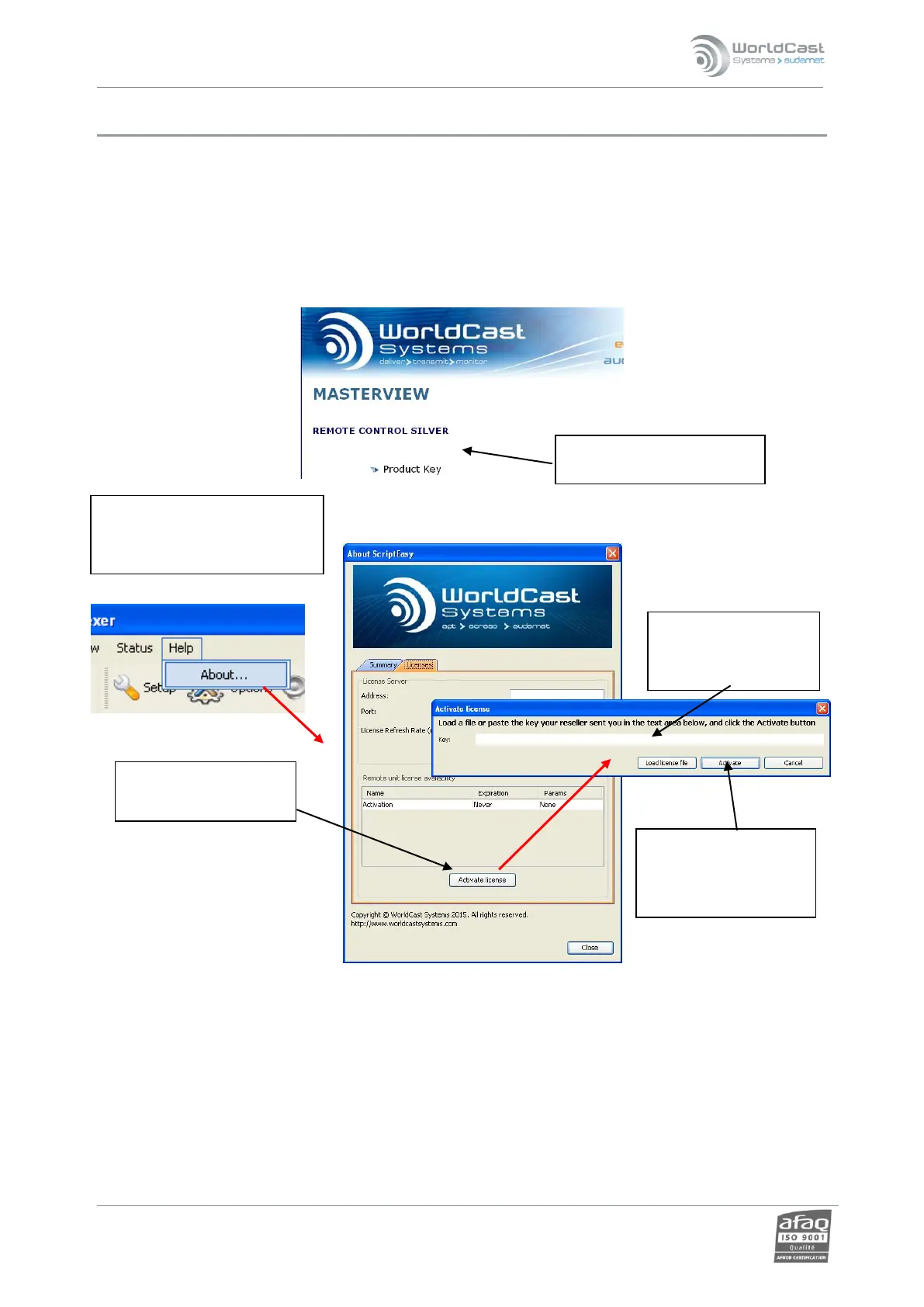
1. Insert the CD sent by WorldCast Systems upon purchase of the option, the following screen will pop up.
7. Close and restart the application
8. Once an option has been activated, a new line appears in the list of available licenses.
2. Click on the link and
copy the product key.
6. Click on “Activate” to
update the
equipment with the
option.
4. Click the “Activate
license” button..
5. Paste or copy the
product key in the
text box.
3. Go to the "Help“ menu of
ScriptEasy, click on ‘About’
and select the ‘Licenses’ tab.



 To Next Page