Audemat Control Silver v.2.1.x User Manual – 06/2015
Page 23
Head Office : Parc d’activites Kennedy - 20, avenue Neil Armstrong – 33700 Bordeaux-Merignac (France)
Tel +33 (0)5 57 928 928 – Fax +33 (0)5 57 928 929 – contact@worldcastsystems.com – www.worldcastsystems.com
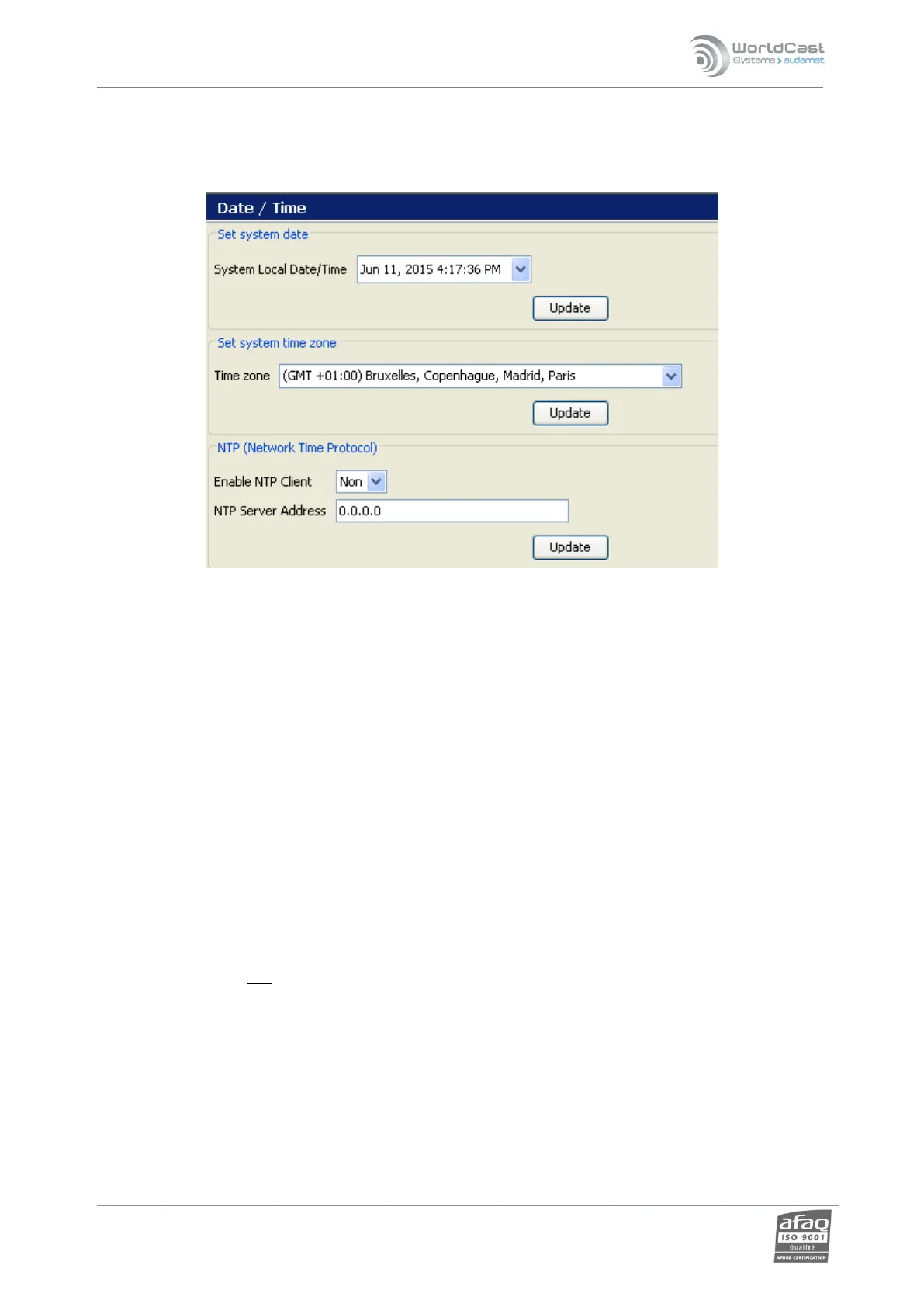
4.3. Date/Time
Set system date:
The user may update both date (year/month/day) and time (hour/minute/second).
Set system time zone:
The user selects the geographical zone from the list. Important to have this set correctly when using
an NTP server.
Network Time Protocol: NTP update
The user can enter a time server address to update the equipment’s internal clock automatically.
Make sure this address can be reached by the unit; specifically, the gateway must be properly set.
Specify whether it should be synchronized continuously or periodically. For periodic synchronization,
indicate what time the daily synchronization should occur (between 0 and 23).
Set the time zone UfirstU! Changes in the time zone affect the time that is displayed in the system time window,
so setting the zone first will eliminate the need to set the system time twice!



 To Next Page