EVOM™ Manual
World Precision Instruments 29
3. Press the
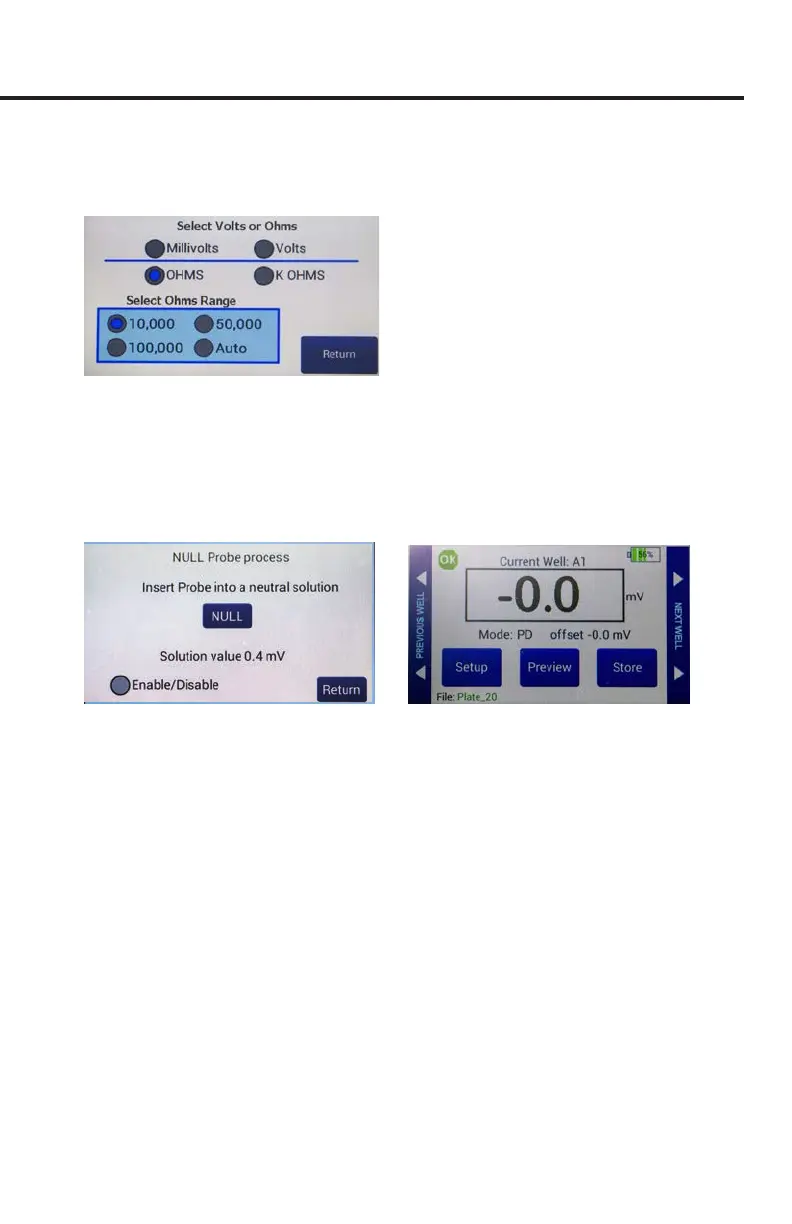
Mode Units
button and choose either Millivolts or Volts for making
voltage measurements (Fig. 51). Press the
Return
button to go back to plate
settings screen (Fig. 50).
Fig. 51—(Right) Select the mode. For voltage measurements, choose Millivolts or Volts.
4. To calibrate (zero) the electrodes' galvanic charge in saline, place the electrodes in
a saline solution, and press the
Probe Null
button. A popup message displays (Fig.
52). Push the
NULL
button. Wait for the second message stating ”Solution value
0.0” before pressing the
Return
button. This action removes any voltage osets
on the electrodes. Then, activate the
Enable/Disable
radio button to oset the
electrode potential.
Fig. 52—(Left) Null probe process.
Fig. 53—(Right) The potential dierence oset shows on the main screen under the reading.
5. Press
Return
to navigate back to the main screen (Fig. 53).
Taking Measurements
Whether you are taking resistance or voltage measurements, the data acquisition
procedure is identical.
1. To begin measuring with well A1, do one of the following:
• Press the foot switch or touch the
Store
button on the main screen. A
measurement of the rst well is taken, and the data storage advances to the
next well in your sequence. Tap the
Store
button again to measure the next
well in your dened sequence.
NOTE: When required, you may use the
Previous Well
area on the left side of
the screen to return to the last well and re-measure or the
Next Well
area on
the right side of the screen to skip a well. Then, press the
Store
button or the
foot switch to take the measurement of that cell.
• Press the
Preview
button to see a graphical display of the plate. The green cell
indicates the cell to be sampled, and the yellow cell indicates the next well in



 To Next Page